QScope

Programme

Are we going to run past the date

That is the commercial question about programme, and it is the only one a quantity surveyor has to answer. Everything else belongs to the planner.

  • Extension of time recorded on each variation
  • Percentages certified stay your professional assessment, not a guess from a bar
  • Practical completion date shared with the retention calculation

30 days free, no card.
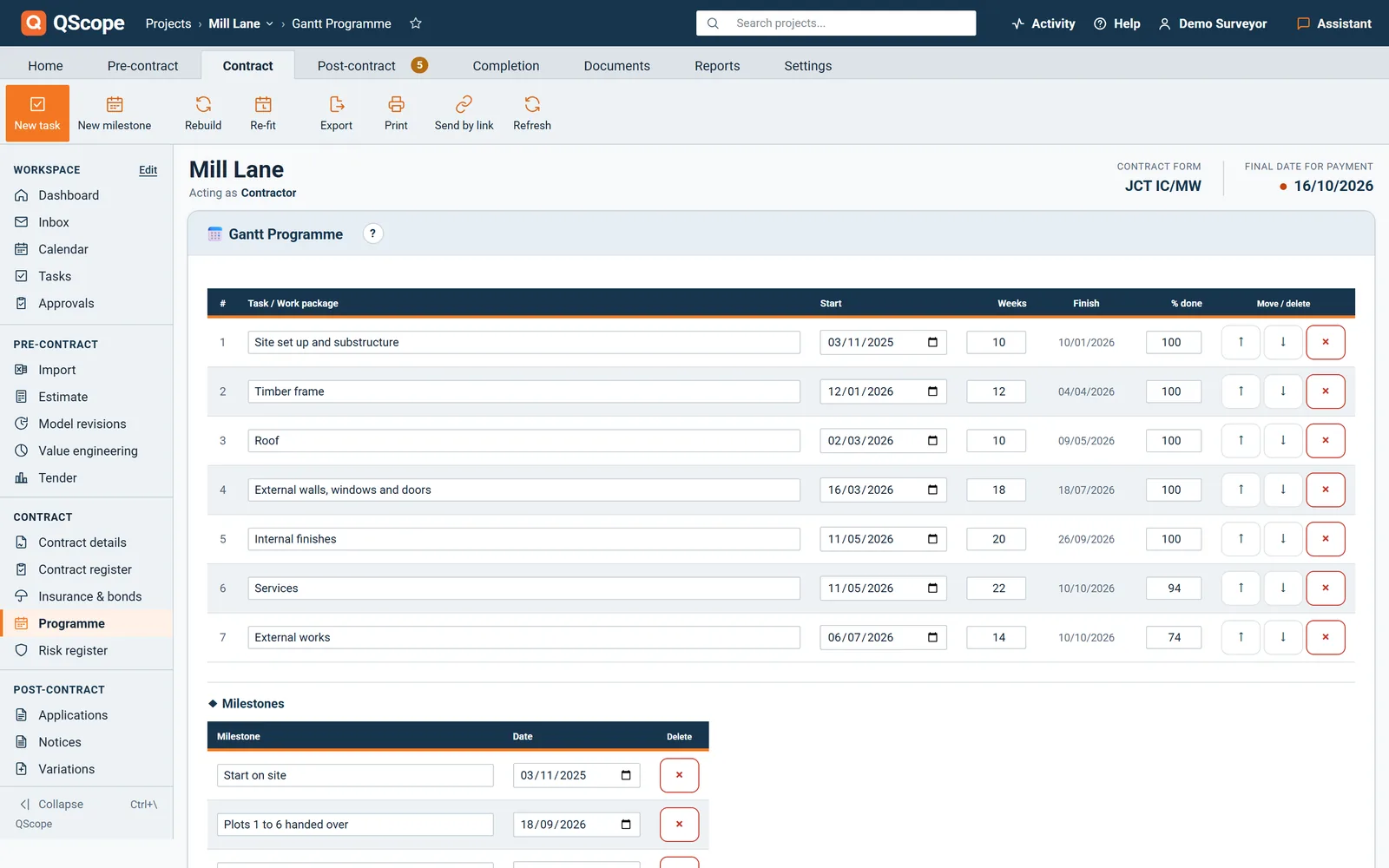
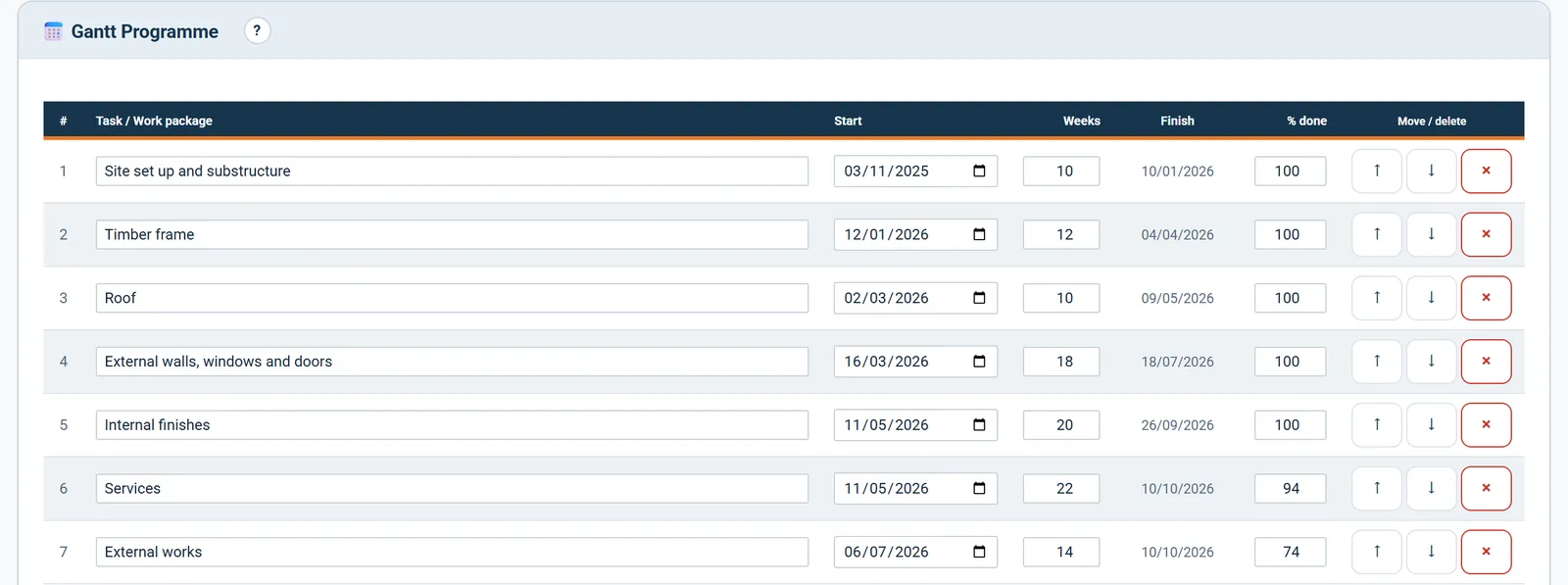
Gantt programme: tasks with start, weeks, finish and percentage complete

Keeping the programme with the valuations means the progress meeting and the cost report draw on one set of facts rather than two files that disagree.
Why it sits next to the money

Time and cost are the same conversation held twice.

A variation that carries two days of extension of time is not the same animal as one that does not, and the place to notice that is while the works are running. Keeping the programme with the valuations means the progress meeting and the cost report draw on one set of facts rather than two files that disagree.
Programme

The works against the contract period

A Gantt with four hundred activities is a planning tool.

  • Contract period taken from the project settings, not drawn by hand
  • Today marked, so the position is obvious without counting
  • Overrun past practical completion stated in weeks, not implied by a bar
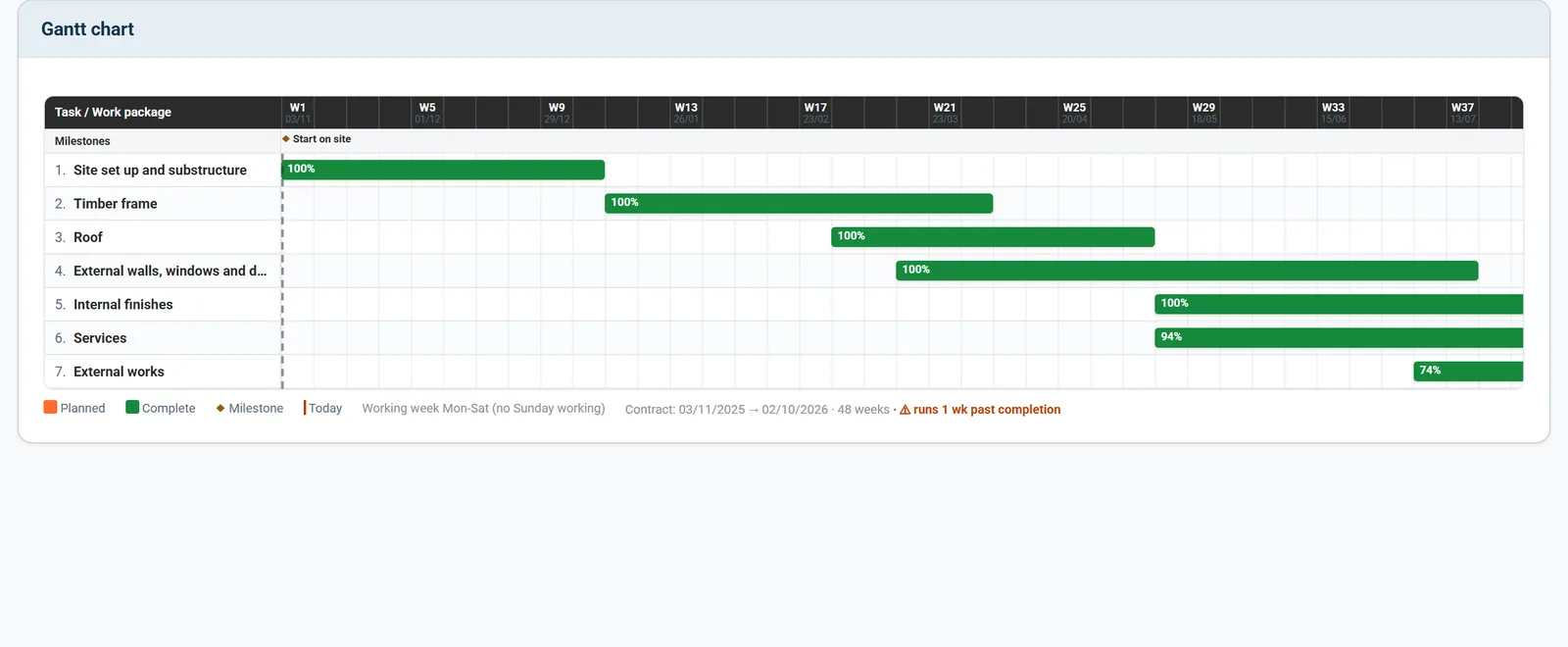
Gantt chart of the works against the contract period, with today marked

QScope draws the second kind. Contract period from your settings, today marked, and the sequence laid over it.

Extensions of time

When the overrun becomes a claim

A programme that runs past the contract date is a warning.

  • Thirteen relevant events, each flagged for whether it can carry money
  • Notice date, particulars date and award date held separately
  • Only awarded weeks move the revised completion date
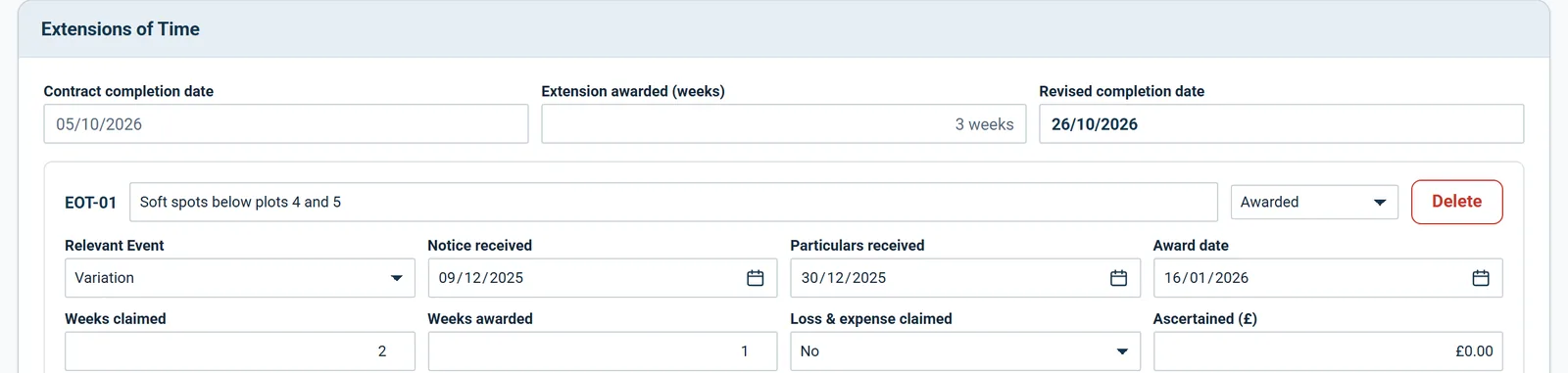
Extensions of time: revised completion date from weeks awarded

Only awarded weeks move the completion date: EOT-01 and EOT-03 give three weeks between them, and the rejected weather claim gives none.

See it running before you sign up

Completion

The date the programme is measured against

The contract completion date is the line every bar is judged against.

  • Practical completion, partial possession, non-completion and making good
  • The certificate date governs the retention, with a warning if Settings disagrees
  • Damages run from the revised completion date, not the original
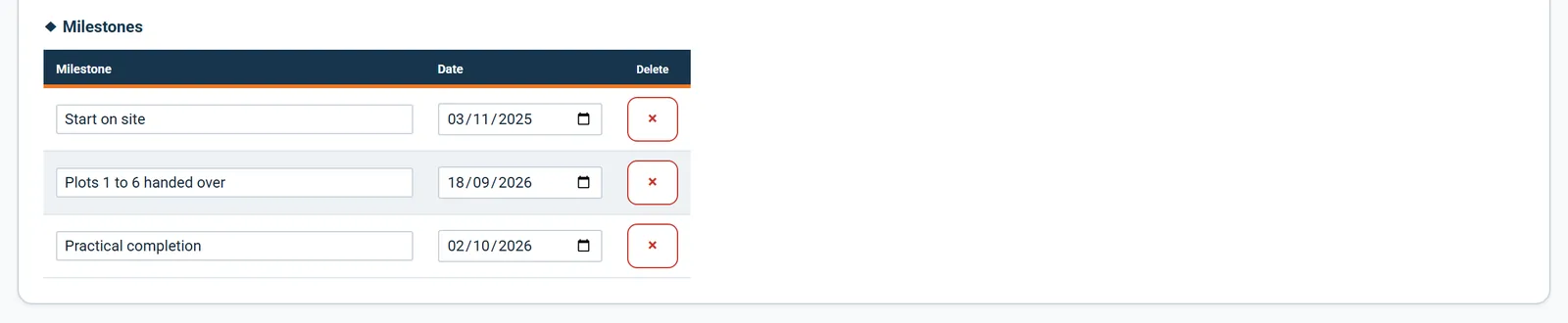
Milestones: start on site, handover and practical completion

The milestones carry the dates the programme is measured against: start on site, the first handover and practical completion.

Files and plans

The programme belongs with the file

A Gantt printed for a progress meeting is only as good as the records behind it.

  • Drawings filed in their own folder, with pins and markup
  • Site photographs listed with who uploaded them and when
  • Delay notices and correspondence filed against the job
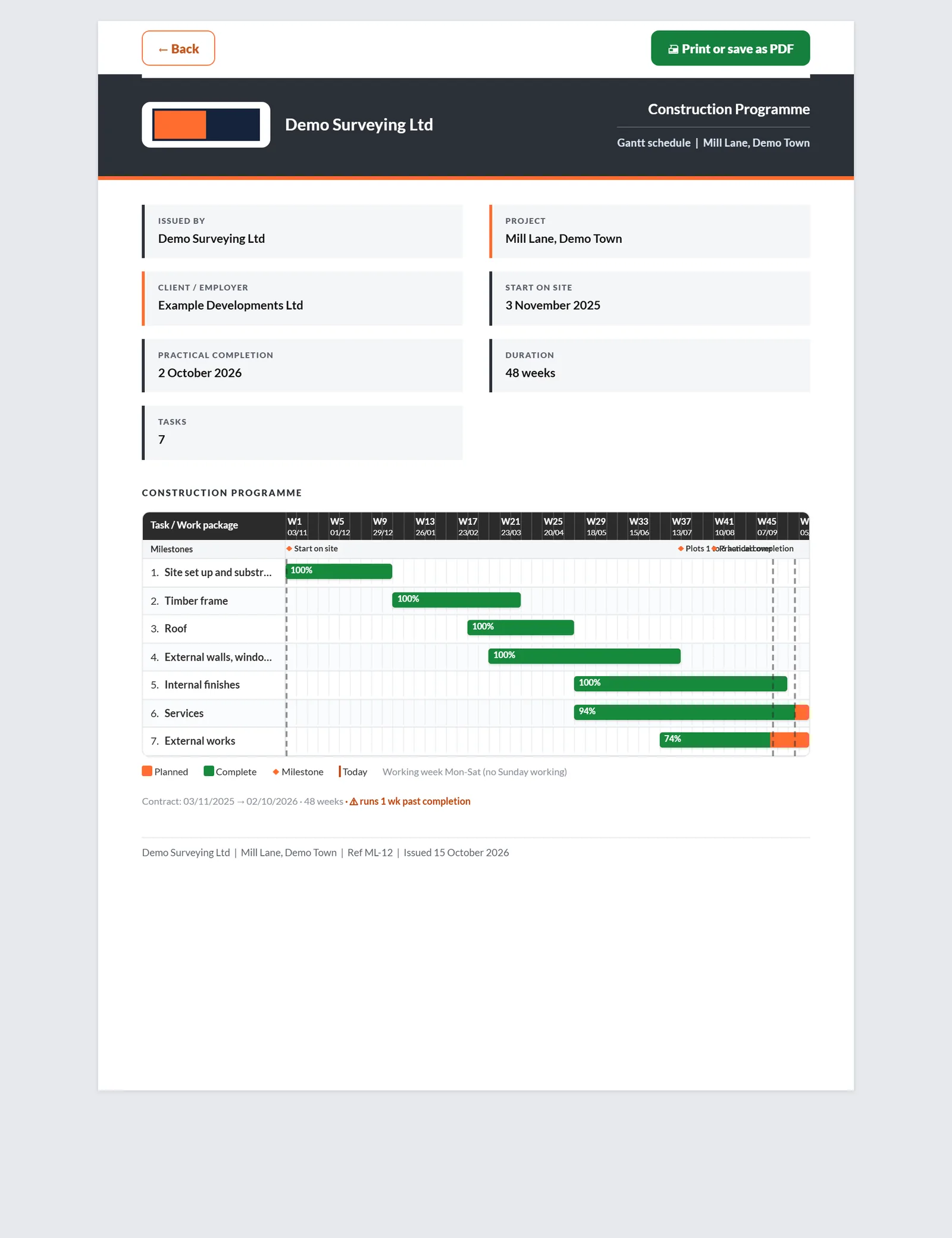
Printed Gantt programme with tasks against the contract period

QScope keeps the drawings, photographs and correspondence against the same project, so the commercial view of the programme sits on top of the record that supports it.

Programme

Built from the cost plan, fitted to the contract

Rebuild and auto-fit from cost plan turns the cost plan sections into programme tasks across the contract period, from the start date to practical completion.

  • Start on site and practical completion added as milestones on every rebuild
  • Re-fit to contract when the dates move, and add your own tasks and milestones
  • Generate PDF prints the Construction Programme
Programme tasks built from the cost plan sections, with percentage complete from the valuations

Nothing is typed twice: the tasks come from the cost plan and the progress comes from what you have certified.

Every other function on the Programme screen

5 functions the sections above do not cover, each as it works in the program.

Functions 1 to 3

01Rebuild needs sections in the cost plan, and QScope tells you to add a section row if there are none.
02Rebuilding asks first, because it replaces the tasks, dates and milestones you already have.
03The programme assumes a Monday to Saturday working week, so no task starts or finishes on a Sunday.

Functions 4 to 5

04The project dashboard draws a line from start on site to practical completion with today marked on it.
05Until the start, completion and retention release dates are set, the dashboard asks you to set them, because every payment clock runs from them.

Who it is for

One programme, four clocks running on it

You are applying

You claim the time before damages run

You notice delay, name the relevant event and claim the time before the damages clock does the arguing for you.

Applying for payment
the same measurement

You are certifying

You award the weeks and stop the clock

You assess the extension from the other chair, and the completion certificate you issue halves retention and stops the damages clock.

Certifying payment

You are doing both

Your delay is your own money waiting

You run the programme and the money together, and a completion date that slips moves the whole payment tail with it.

Doing both yourself

You are reporting

A late job is a loan running long

You track completion against the facility term, because a job that finishes late is a loan that runs longer than the model.

Recommending a drawdown

The client, the architect and the tenderer are not on this list. They are the people you let in on a link: they see the one document you sent them, answer it, and that answer is written into the record. No account, no licence, no charge, on every plan.

FAQs

The questions this page raises most often, answered without a sales pitch at the end.

No, and deliberately not. The percentage you certify is your professional assessment of the work done. QScope will not infer it from a bar chart, because a programme shows intent and a valuation records fact.

No. It is a commercial view of whether the job runs past the contract date. If you use a dedicated planning tool, keep using it. This exists so the answer to that one question sits next to the money.

From the project settings: the start, the practical completion date and the period in weeks. Change them there and the Gantt redraws.

Yes, if you want them to. Guests with view access can see it. What stays hidden from them is the CVR and your margin.

From the blog

The part nobody teaches you, written down

Three pieces from the same corner of a contract as this page, answered at length and without a sales pitch at the end.

All 174 pieces

Keep reading

The three parts this page leans on

Are we going to run past the date

That is the commercial question about programme, and it is the only one a quantity surveyor has to answer. Everything else belongs to the planner.

30 days free, no card.

Rather ask first? Write to help@qscope.co.uk and you will get a reply within one working day, Monday to Friday.