QScope

Down the chain

What you certify down, not just what you claim up

A main contractor values up to the client and down to subcontractors in the same month. Two systems means two chances to get it wrong, and one figure nobody can reconcile.

  • The whole subcontractor side is hidden from client guest links
  • Hidden from client-facing reports and the final account statement
  • Turn the section off entirely on jobs that have no subcontractors

30 days free, no card.

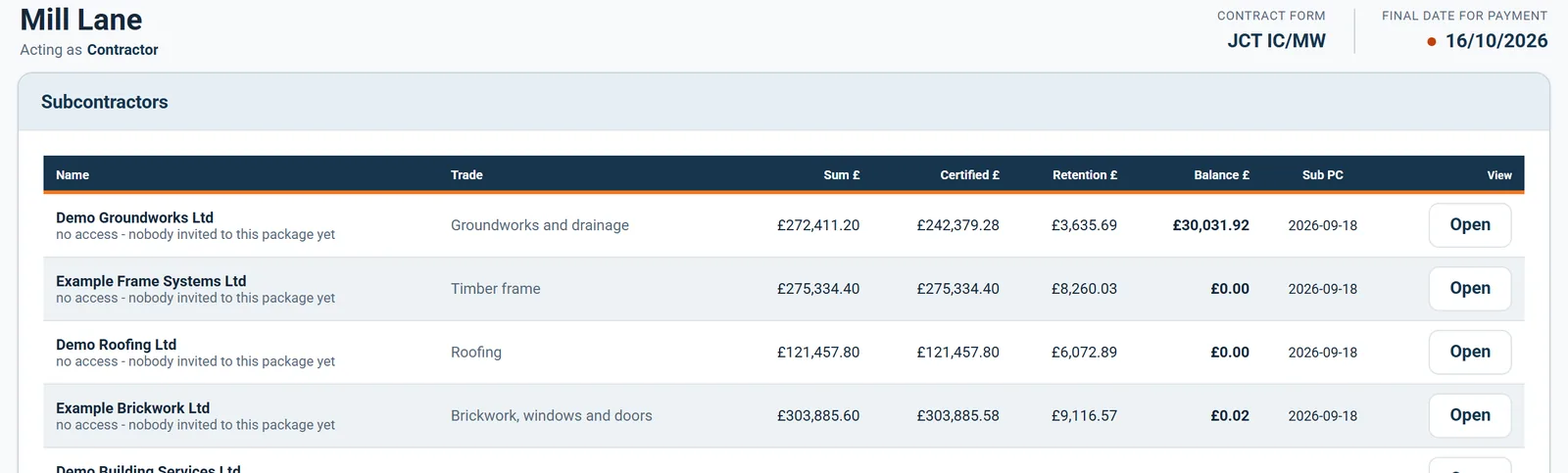
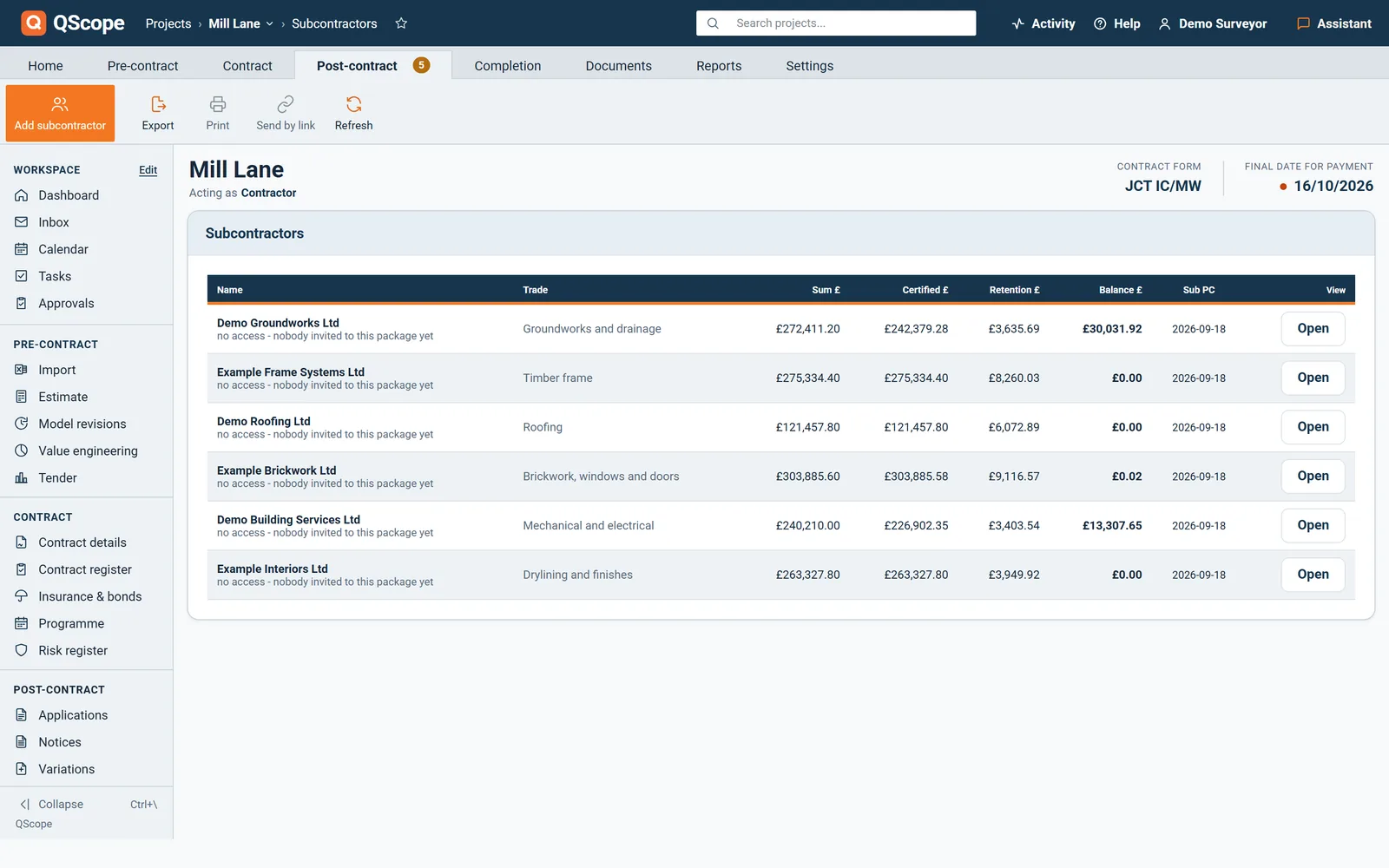
Subcontractors list: sum, certified, retention, balance and access for each package

What you pay a subcontractor and what you hold from them is your commercial position, not the client’s. It is also the fastest way to invite a conversation about your margin.

The client never sees any of it

What you pay a subcontractor and what you hold from them is your commercial position, not the client’s.

It is also the fastest way to invite a conversation about your margin.

Subcontractor Valuations

The same engine, pointed the other way

Subcontract valuations use exactly the same calculation as client certificates.

  • Each subcontract priced separately with its own package value
  • Its own retention rate, which rarely matches the main contract
  • Its own statutory dates, because the subcontract may sit on a different form
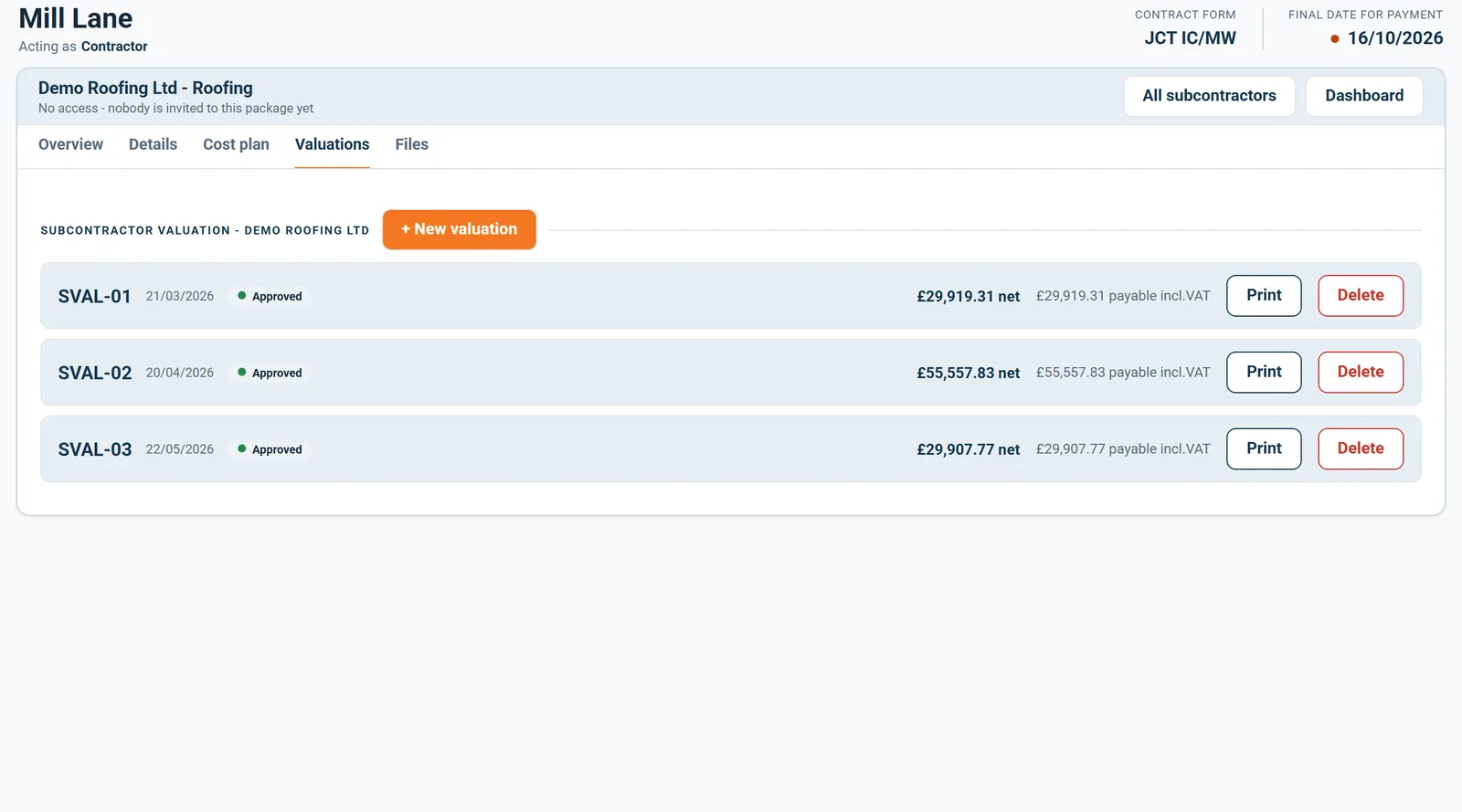
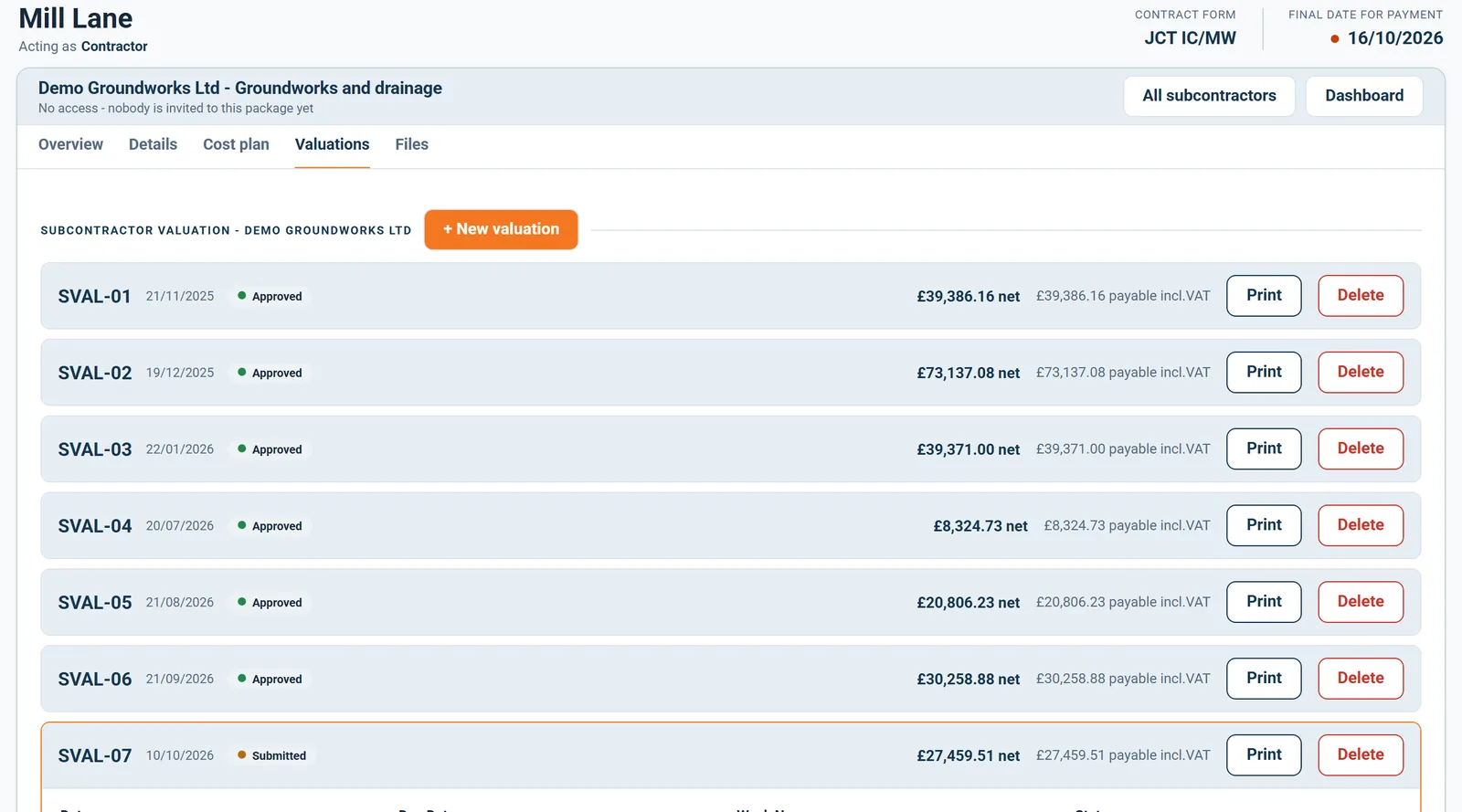
A subcontractor valuation: lines valued by percentage, retention, net payable

What differs is what belongs to each package: its own value, its own retention rate, and often its own contract form with different day counts.

Subcontractors

The tax position is a question, not an assumption

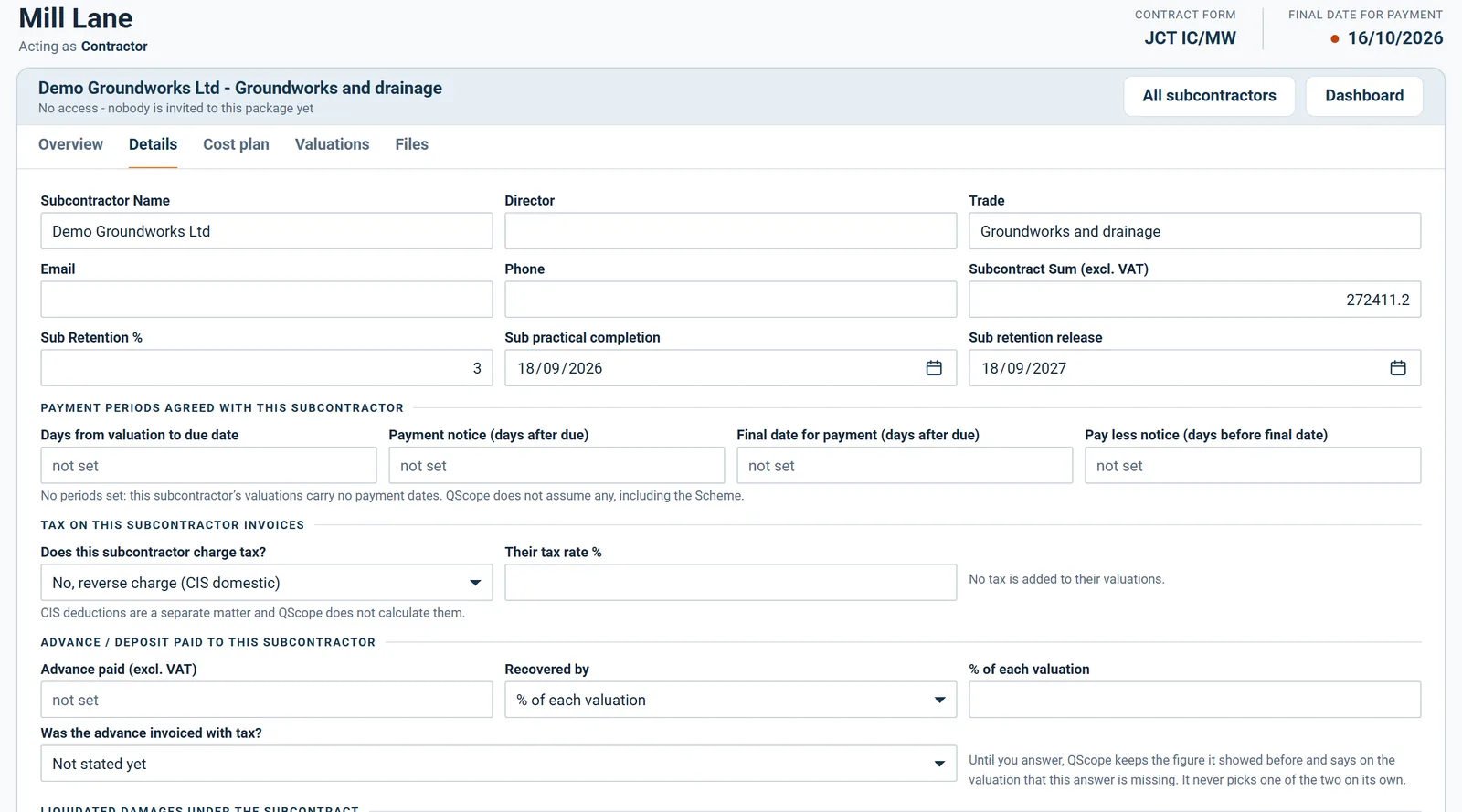
Each subcontractor answers one question in Details: does this subcontractor charge tax?

  • Not stated yet
  • Yes, adds tax at their own rate
  • No, reverse charge under the CIS domestic rules
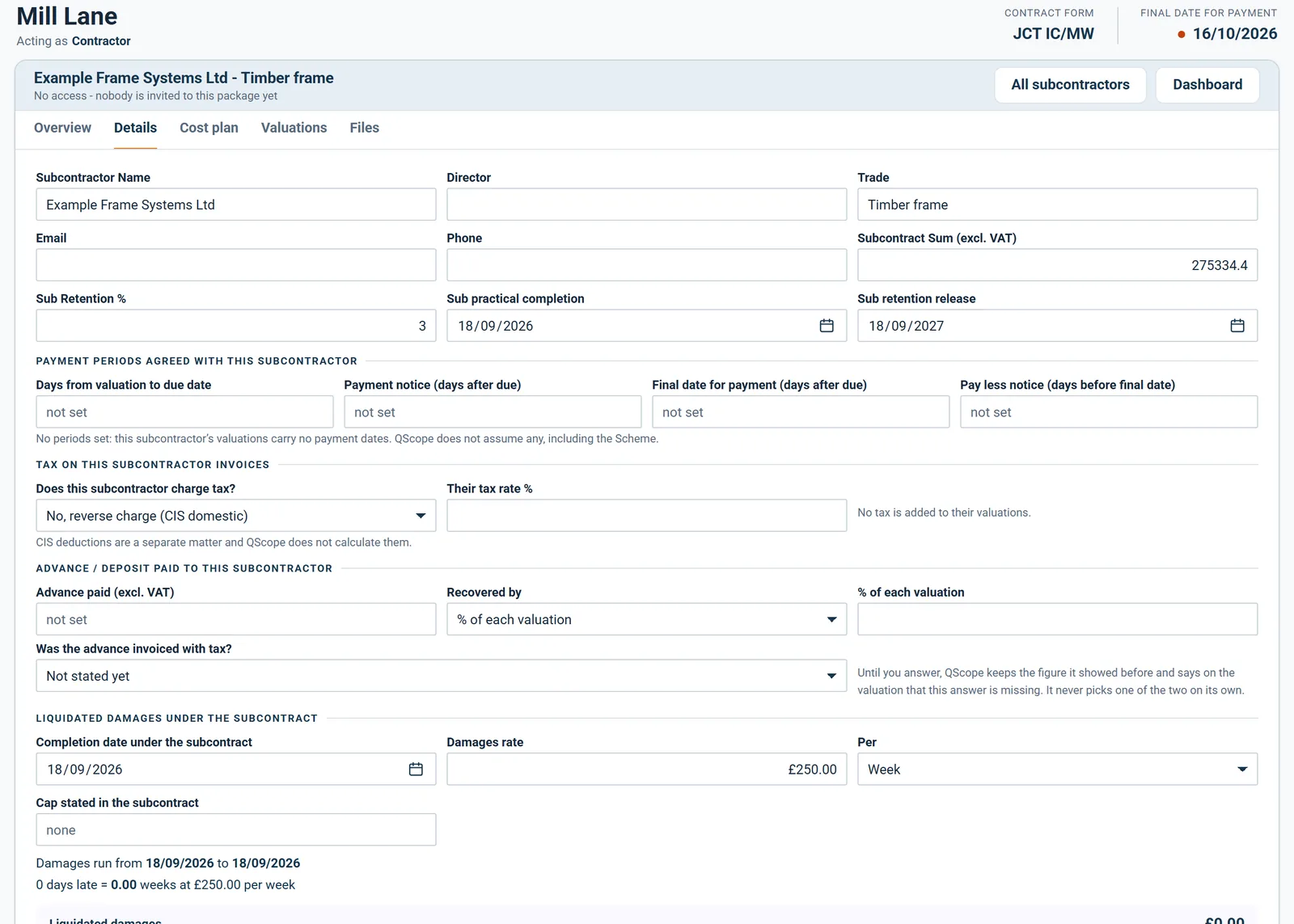
Subcontractor details: contacts, sum, retention, payment periods and tax

CIS deductions are a separate matter and QScope does not calculate them; the card says so. Each subcontractor also has its own cost plan, valuations and files, and only they see their files, on their own link.

See it running before you sign up

Subcontractor valuations

Every package on one list

The Subcontractors tab lists every package with its trade, sum, amount certified, retention held, balance and practical completion date.

  • Each row shows the subcontract sum, what has been certified and the retention held.
  • Balance is the sum with approved variations, less what is certified on the latest issued valuation.
  • Open takes you straight to that subcontractor's Overview.
Every subcontract package on one list

Every package on one list, with its trade, its sum and what has been certified to date.

Subcontractor valuations

Advances paid down the chain

Record an advance or deposit paid to a subcontractor and choose how it is recovered.

  • Recover it as a percentage of each valuation, a fixed amount, over a set number of valuations or at final account.
  • The card shows how much is still to recover.
  • An overpayment warning appears when certified money plus the unrecovered advance exceeds the subcontract.
Subcontractor details: advance paid and how it is recovered

An advance paid down the chain is recorded with its amount and the way it is recovered from the subcontractor's valuations.

Subcontractor valuations

Damages under the subcontract

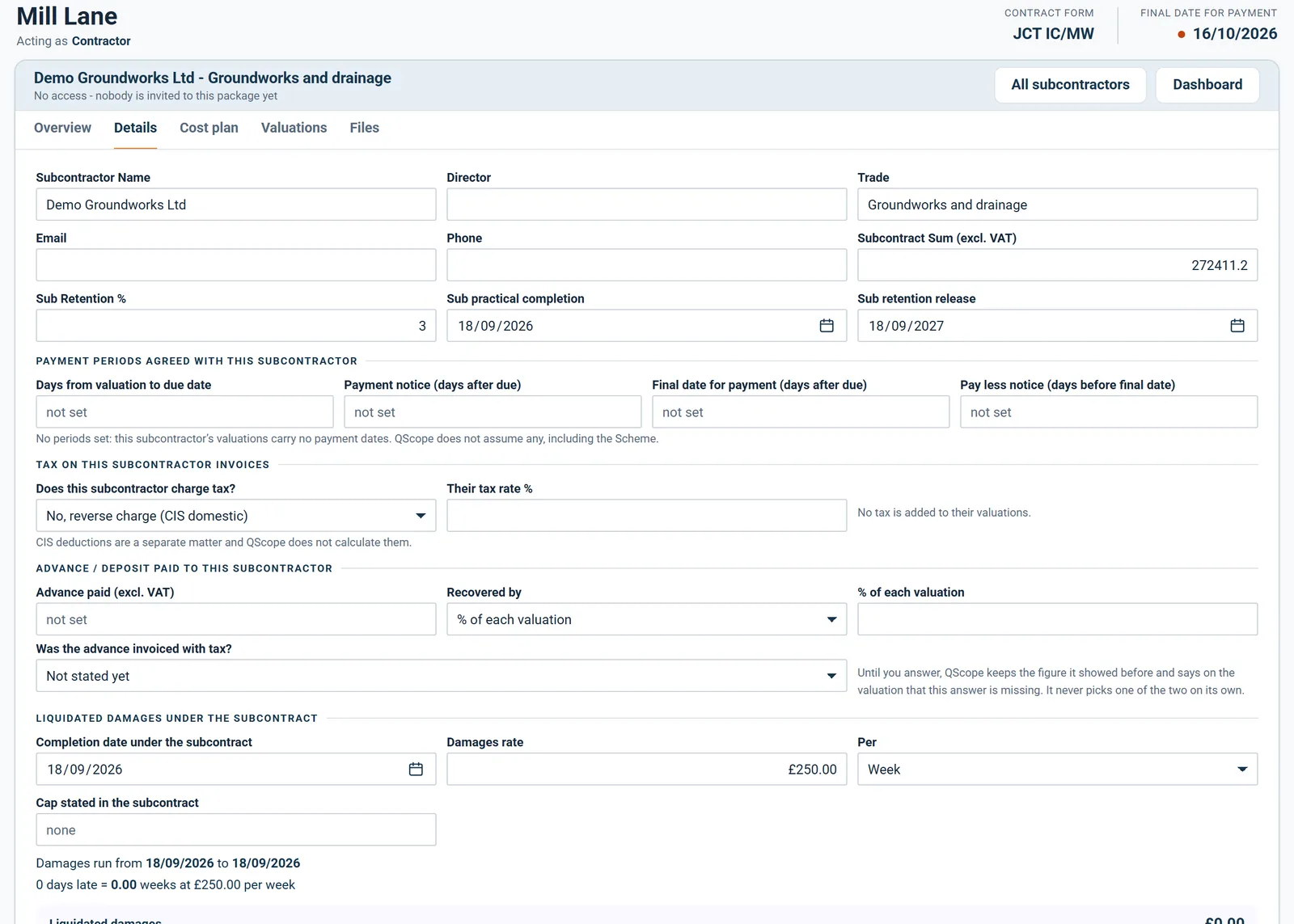
Set liquidated damages under each subcontract with its own completion date, rate per week or day and cap.

  • Damages run from the subcontract completion date plus any extensions awarded.
  • The figure is shown with the days late and the rate used.
  • It is never deducted from a valuation automatically, because deducting needs notice.
Subcontractor details: liquidated damages and extensions of time under the subcontract

Each subcontract carries its own completion date and damages rate, separate from the main contract.

Subcontractor valuations

One screen for each subcontractor

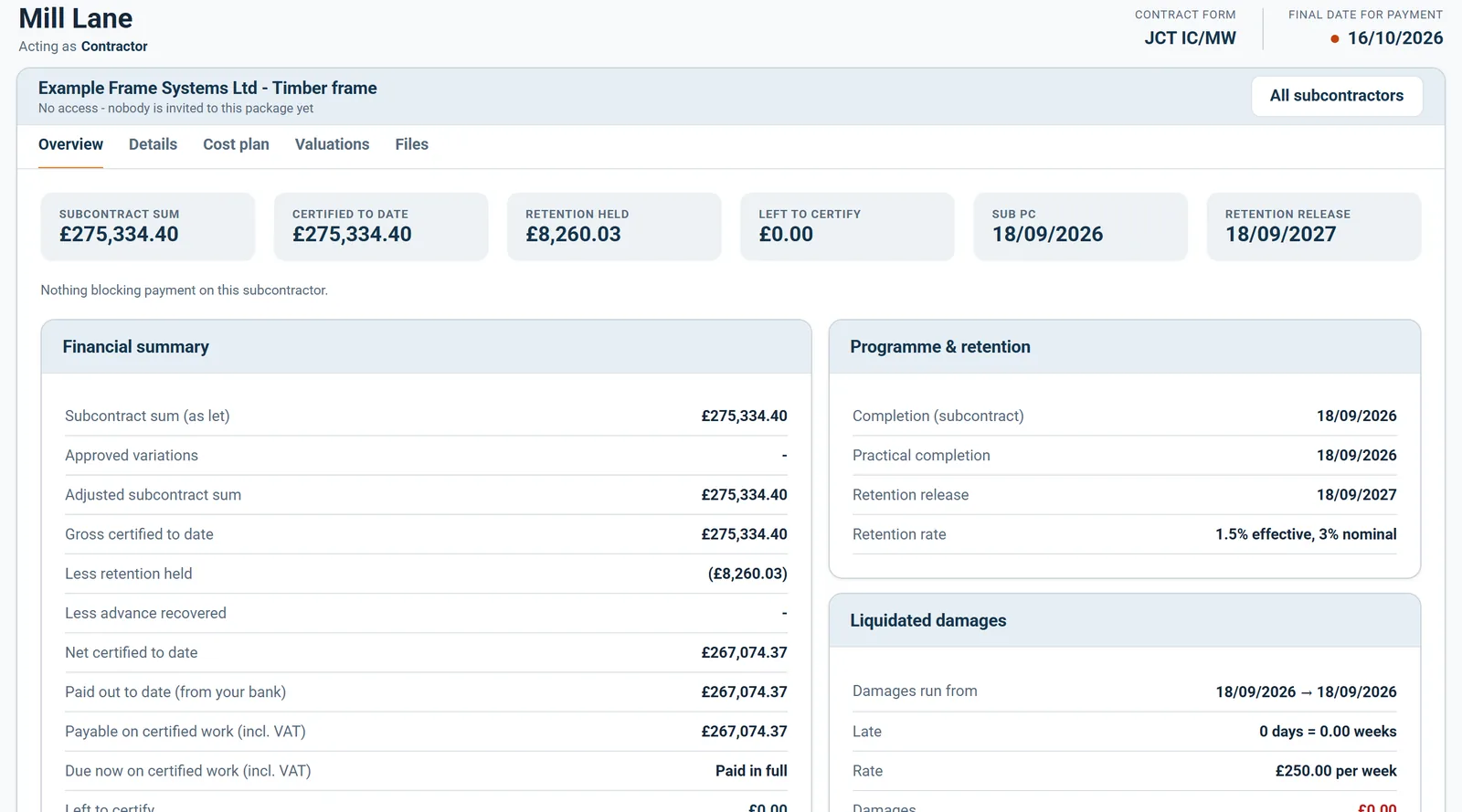
Each subcontractor has an Overview with their sum, amount certified, retention, what is left to certify and their key dates.

  • Tiles show the subcontract sum, certified to date, retention held and left to certify.
  • Practical completion and retention release come from the subcontract, or from the main contract when left blank.
  • Cards break down variations, valuations, any advance and liquidated damages.
Subcontractor overview: certified, paid, retention and warnings

Each subcontractor has one overview: the subcontract sum including variations, certified to date and retention held.

Subcontractor valuations

What you paid, not just what you certified

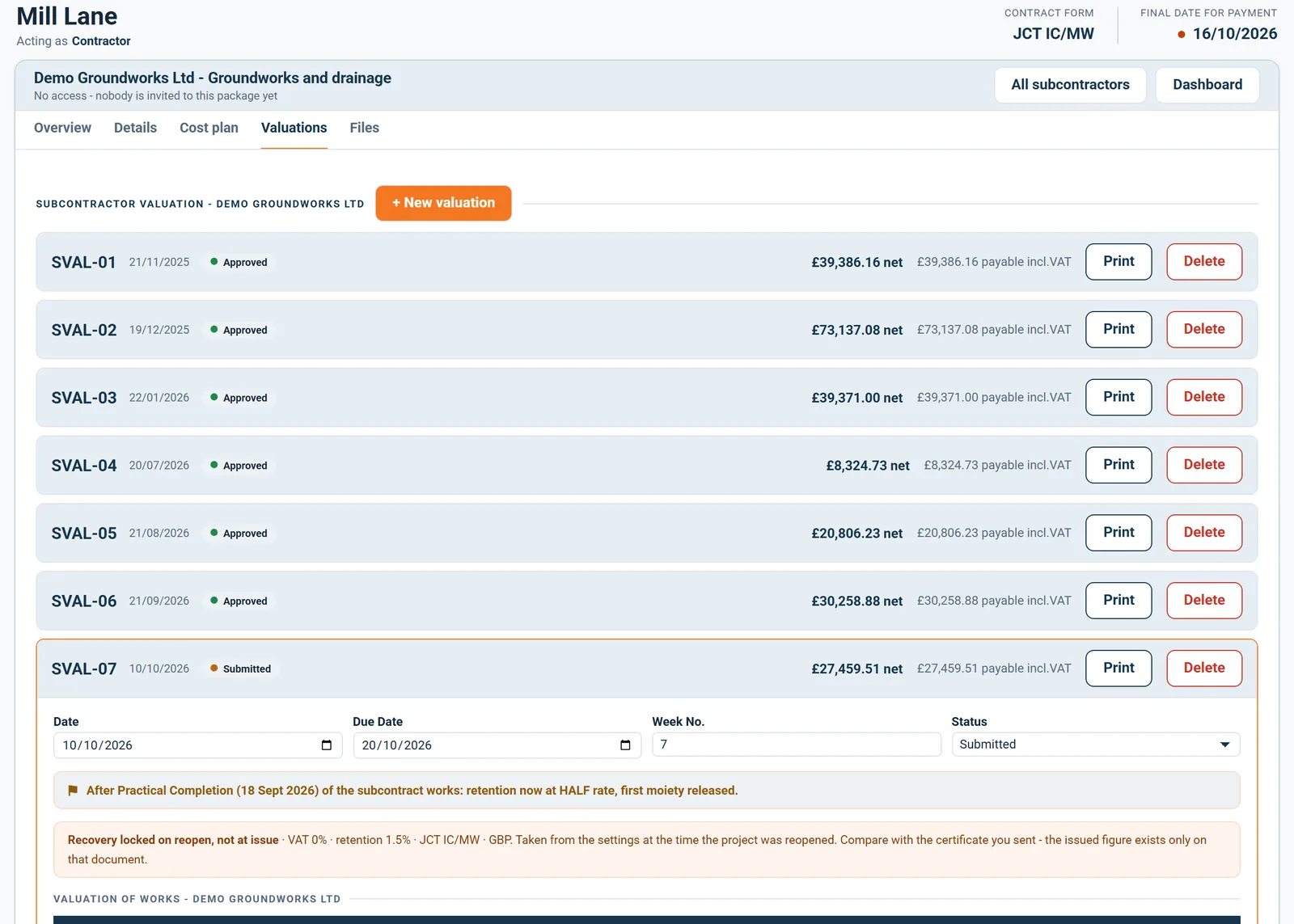
Record what you actually paid each subcontractor and when, against each valuation.

  • Enter the amount that left your account and the date paid.
  • Use certified amount fills in the net figure after advance recovery, and says whether tax is included.
  • Paid out to date and the dashboard cash position read from these boxes.
Subcontractor valuation with the amount paid and the date

Record the amount actually paid and the date, or use the certified amount, so what you paid is on file beside what you certified.

Subcontractor valuations

Issued means locked

An issued subcontractor valuation is locked, with its tax rate, retention, recovery and payment dates frozen.

  • Lines and amounts on an issued valuation cannot be changed or deleted.
  • The rates and dates used on the day of issue stay with the document.
  • An error corrects itself in the next valuation, which deducts what was previously certified.
An approved subcontractor certificate, locked against change

Once approved, a subcontractor certificate is locked: its lines and figures no longer change.

Subcontractor valuations

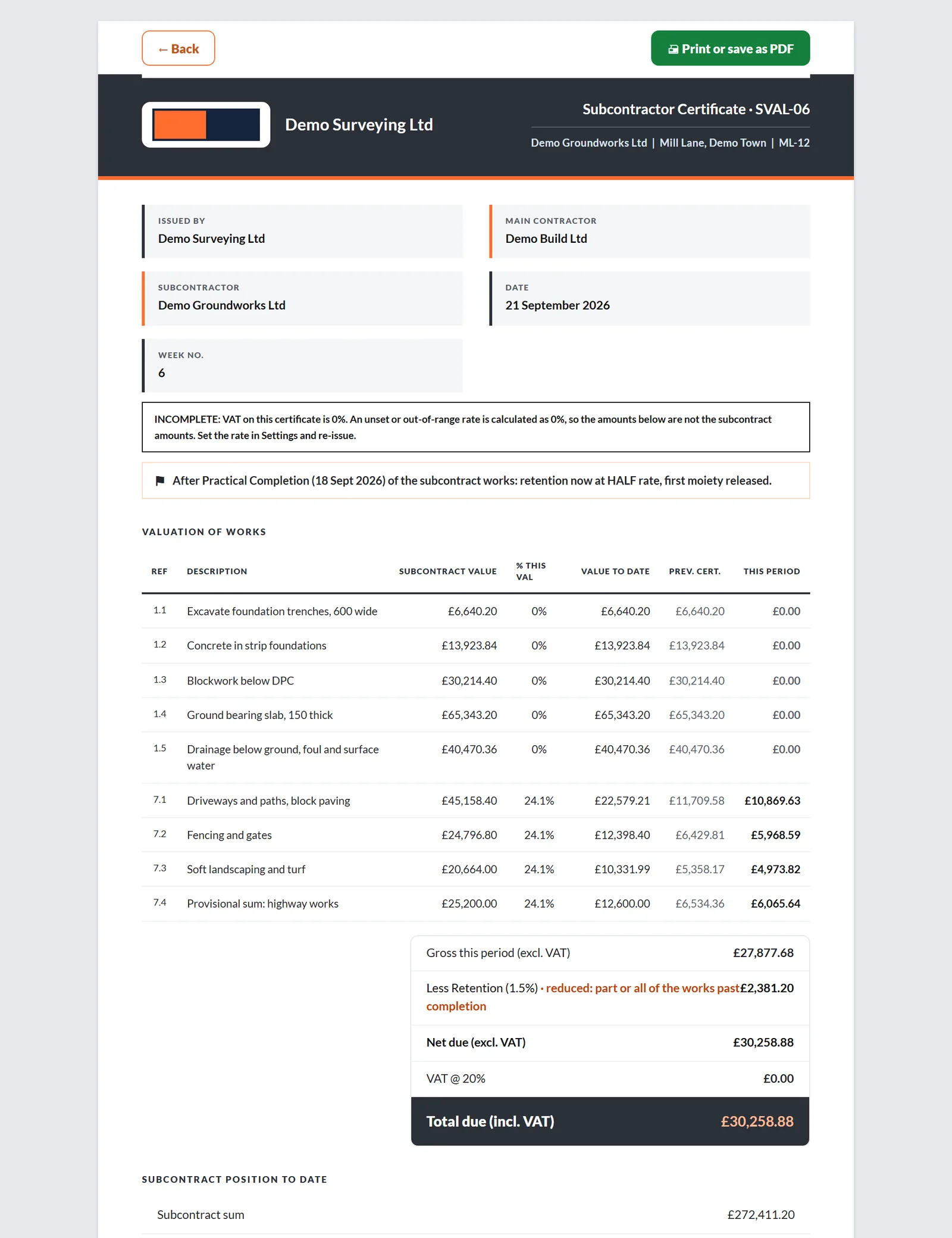
The certificate your subcontractor receives

Each subcontractor valuation prints as a Subcontractor Payment Certificate with the subcontract position to date.

  • It shows the valuation of works line by line, the retention and the amount due.
  • A subcontract position block states the sum, the value certified to date and what remains.
  • Print it or save it as PDF from the same window.
Printed subcontractor payment certificate

The subcontractor receives a payment certificate issued by you as main contractor, numbered in its own sequence.

Every other function on the Subcontractor valuations screen

56 functions the sections above do not cover, each as it works in the program.

Functions 1 to 28

01Add a subcontractor from the Subcontractors tab with a name, a trade and the sections of your cost plan they work on.
02Each package on the list says who has access to it, or that nobody is invited yet.
03Details holds the subcontractor's director, email and phone, and the director's name goes on the signature block of the certificate.
04Say whether the advance was invoiced with tax, and the valuation charges tax on the right figure.
05Keep a register of delay events for each subcontractor, and only weeks marked Awarded move their completion date.
06Tick which sections of the main cost plan each subcontractor works on.
07A subcontractor can only be removed when nothing points to the package, and QScope lists what still does.
08A subcontractor's estimate comes in through Import from spreadsheet on the Estimate tab, choosing the subcontractor side on the review screen.
09Each line in a subcontractor's cost plan has the same row menu as your own: add a row, insert a section, build up a rate, omit or delete.
10Every further package gets its own cost plan table with rows and section dividers.
11Each subcontractor valuation is numbered SVAL with its date, status, net amount and amount payable.
12A subcontractor valuation is Draft, Submitted or Approved, and Submitted or Approved counts as issued.
13Value any line by percentage or by a fixed sum for the period.
14Add the subcontractor's approved variations to a valuation, and they are valued like any other line.
15Remove lines that are not claimed this period with one button.
16Skip advance recovery on a single valuation with one tick.
17Each subcontractor valuation has its own notes box.
18Issuing a valuation that puts you ahead of the subcontractor shows a warning but does not stop you.
19Putting an issued valuation back to Draft needs a reason, which is recorded in the project journal with your name.
20A draft valuation can be deleted, an issued one cannot.
21Settings has a grid showing which subcontractor works on which section of the cost plan.
22A package cannot be added without a name, and a new package opens on its Details tab.
23Balance counts only issued valuations, so a draft never reduces it.
24If you invite someone on the subcontractor side without picking their package, the list tells you they get no figures until you do.
25The heading of each package shows whether anyone has access to it.
26Once all four periods are set, each valuation shows its payment notice, pay less and final payment dates, fixed when it is issued.
27Until you answer the tax question, QScope adds no tax to that subcontractor's valuations and says so on the valuation.
28An overpayment warning appears when certified money plus the unrecovered advance is more than the works are worth.

Functions 29 to 56

29QScope shows how many days late the subcontractor is and what that comes to, and states that the figure is not deducted.
30A damages rate with no subcontract completion date produces a warning instead of a figure.
31Deleting an awarded extension asks first, because it increases the damages you would claim.
32Omitting a line in a subcontractor's cost plan marks it omitted on their valuations.
33If more money has left your account than the certified works are worth, the Overview says by how much and how much retention you hold as security.
34A package with no retention rate is flagged before you issue a valuation.
35A package with no sum and no cost plan is flagged, because balances and the overpayment check cannot work without one.
36Liquidated damages that have been calculated but not deducted appear as a warning on the Overview.
37When nothing stands in the way, the Overview says nothing is blocking payment.
38The financial summary separates net certified to date from paid out to date, so certified money is never read as paid.
39The programme card shows the subcontract completion date, extensions awarded, the revised date and the retention rate in force.
40Variations raised for a subcontractor are totalled on their Overview, with any still awaiting a decision.
41The valuations card shows how many have been issued and the latest net amount.
42A line cannot be certified past 100 percent, and QScope says how much is left on it.
43A line certified beyond its own value is marked with the amount and percentage over.
44A valuation that certifies more than the whole subcontract shows the excess before you sign.
45After the subcontract practical completion, retention on their valuations drops to half rate, and it is released in full after the release date.
46When an advance is recovered, the valuation states what it came to before the recovery.
47If the advance tax question is unanswered, the valuation says the figure rests on that assumption.
48A payment date can only go on an issued valuation.
49A valuation that recovers part of an advance with tax cannot be issued until you say whether the advance was invoiced with tax.
50Issuing with an unset or out of range rate asks you first, because that rate is calculated as zero.
51If settings change after issue, the valuation is marked revised since issue and lists what changed.
52The certificate states when no tax has been added and why, and that this is not a statement that tax is not chargeable.
53Every change to a subcontractor valuation is recorded in the project journal, and the server refuses edits to issued ones.
54If you are the PQS or the subcontractor on a project, the Subcontractors tab does not appear.
55A variation assigned to a subcontractor changes only that subcontract and can be certified on their valuations.
56The dashboard shows subcontractor payments falling due in the next 30 days against valuations coming in.
Who it is for

One chain of payments, four places on it

You are applying

You certify down while applying up

You certify your subcontractors down the chain while your own application runs up it, and the gap between the two cycles is your cash position.

Applying for payment
the same measurement

You are certifying

You certify the top of the chain

You certify the main contractor, and what they owe their chain is not your contract - but their insolvency risk is your project risk.

Certifying payment

You are doing both

You pay the chain from your own account

You pay the packages yourself, on their own retention and their own dates, while chasing your own money on a different cycle entirely.

Doing both yourself

You are reporting

You watch the chain for the lender

You watch the chain below the borrower: money that stops moving down the chain is the earliest warning the facility ever gets.

Recommending a drawdown

The client, the architect and the tenderer are not on this list. They are the people you let in on a link: they see the one document you sent them, answer it, and that answer is written into the record. No account, no licence, no charge, on every plan.

FAQs

The questions this page raises most often, answered without a sales pitch at the end.

No, and it usually does not. Each subcontract carries its own rate. The difference between what you hold down the chain and what is held from you is real money and appears in the cash position.

A subcontractor guest sees their own package in the estimate and the files you share with them, and nothing of the client side or of other subcontractors. Their valuations stay on your screens.

The certificate prints as a Subcontractor Payment Certificate, numbered SVAL-1 and onwards for each subcontractor.

Turn the subcontractor side off in settings. It disappears from the sidebar, the dashboard and the final account, so you are not looking past empty panels on every screen.

From the blog

The part nobody teaches you, written down

Three pieces from the same corner of a contract as this page, answered at length and without a sales pitch at the end.

All 174 pieces

Keep reading

The three parts this page leans on

What you certify down, not just what you claim up

A main contractor values up to the client and down to subcontractors in the same month. Two systems means two chances to get it wrong, and one figure nobody can reconcile.

30 days free, no card.

Rather ask first? Write to help@qscope.co.uk and you will get a reply within one working day, Monday to Friday.