QScope

Construction Act 1996

Every payment date counted from your contract, not ours

You confirm the four periods once, from your own contract, and QScope counts every notice and final date from them. It does not guess them, and it will not issue a certificate until you have. Miss a pay-less notice and the sum applied for becomes the sum due, so the deadline that costs most is the one nobody counted.

  • JCT SBC and DB, JCT IC and MW, NEC3 and NEC4, and the Scheme
  • England and Wales bank holidays skipped automatically, weekends counted
  • Bespoke payment period supported where the contract sets its own

30 days free, no card.

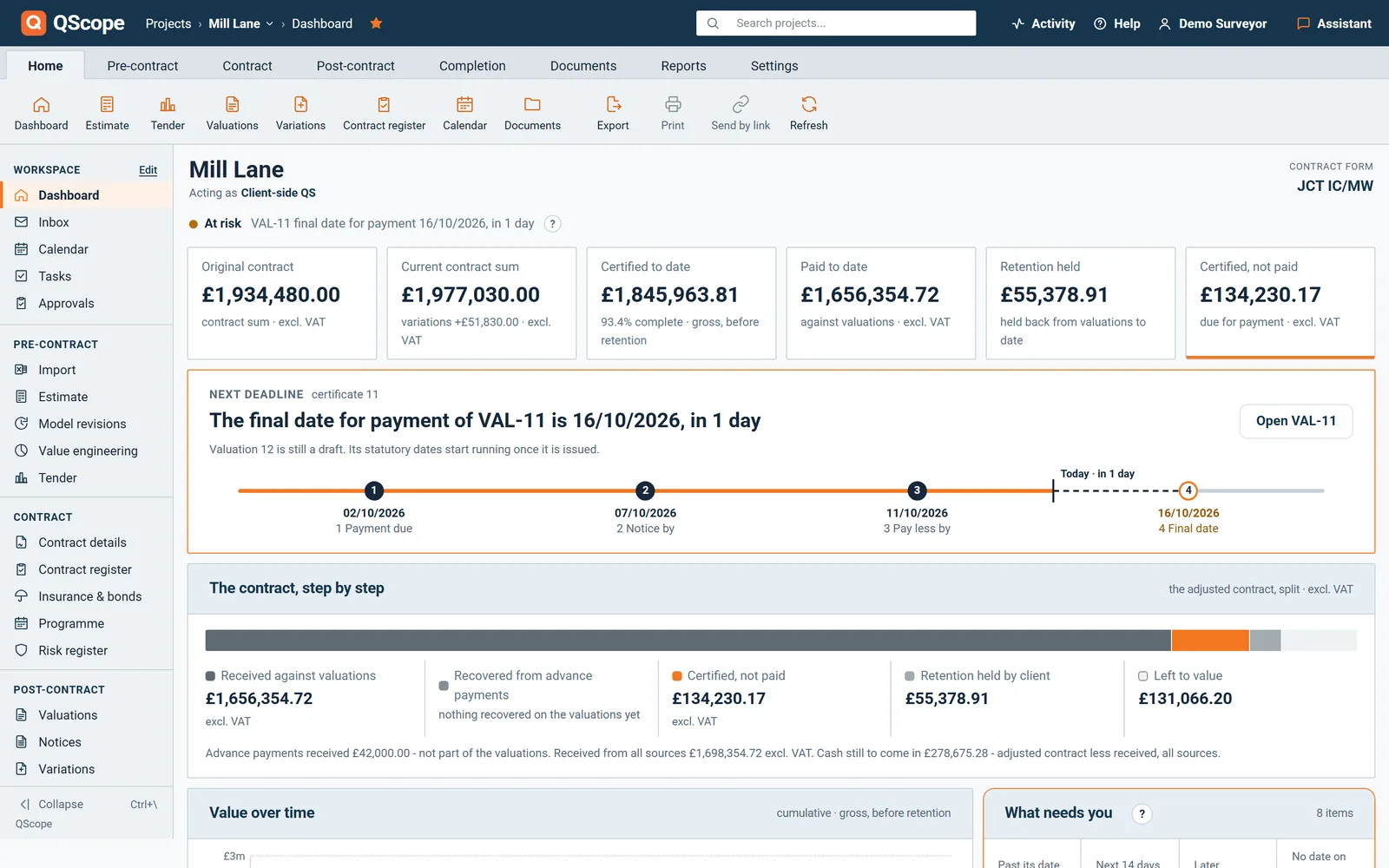
Dashboard next deadline: payment due, notice by, pay less by and final date for payment, counted from the contract periods

Enter the due date once. QScope returns the whole sequence and recalculates it if the due date moves.

Four dates, from one due date

The Housing Grants, Construction and Regeneration Act 1996 sets the payment timetable, and the contract form sets the day counts within it.

Get the form wrong and every date after it is wrong. Enter the due date once. QScope returns the whole sequence and recalculates it if the due date moves.

All projects

Every live project on one screen

A single job is easy to keep in your head.

  • Sorted by what is closest, not by project name
  • Overdue shown separately from approaching
  • Counts the days as of today, every time you open it
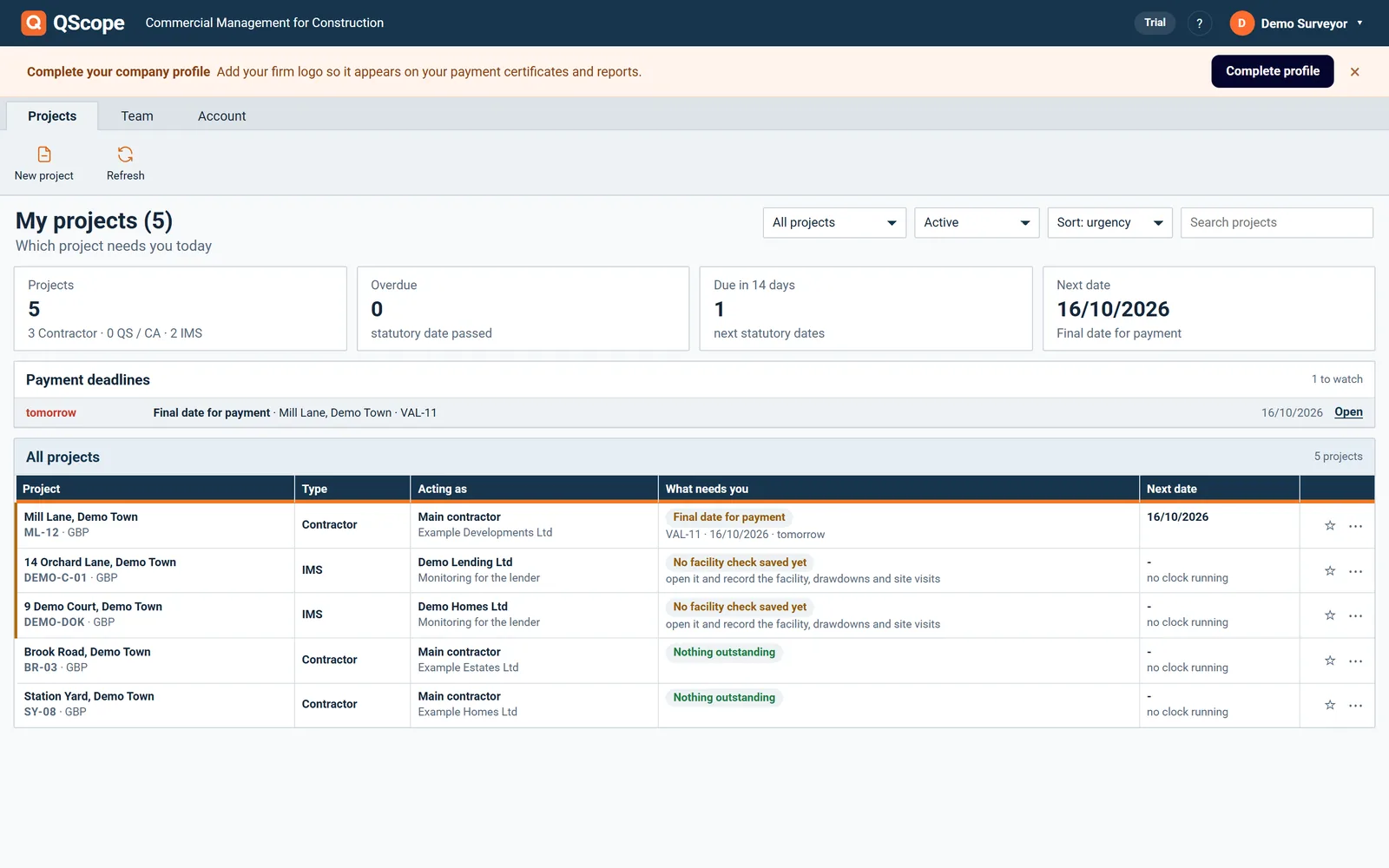
My projects: overdue statutory dates, dates due in 14 days and the next date for every live project

The project list carries a deadline panel that sorts by urgency, so the job in trouble reaches you rather than waiting to be found.

Client Valuations

The dates belong on the certificate that carries them

A payment notice under section 110A has to state the sum due and the basis for it.

  • Statutory statement printed on the certificate
  • Due date, final date for payment and pay-less deadline on the face
  • Your practice name and logo, never QScope branding
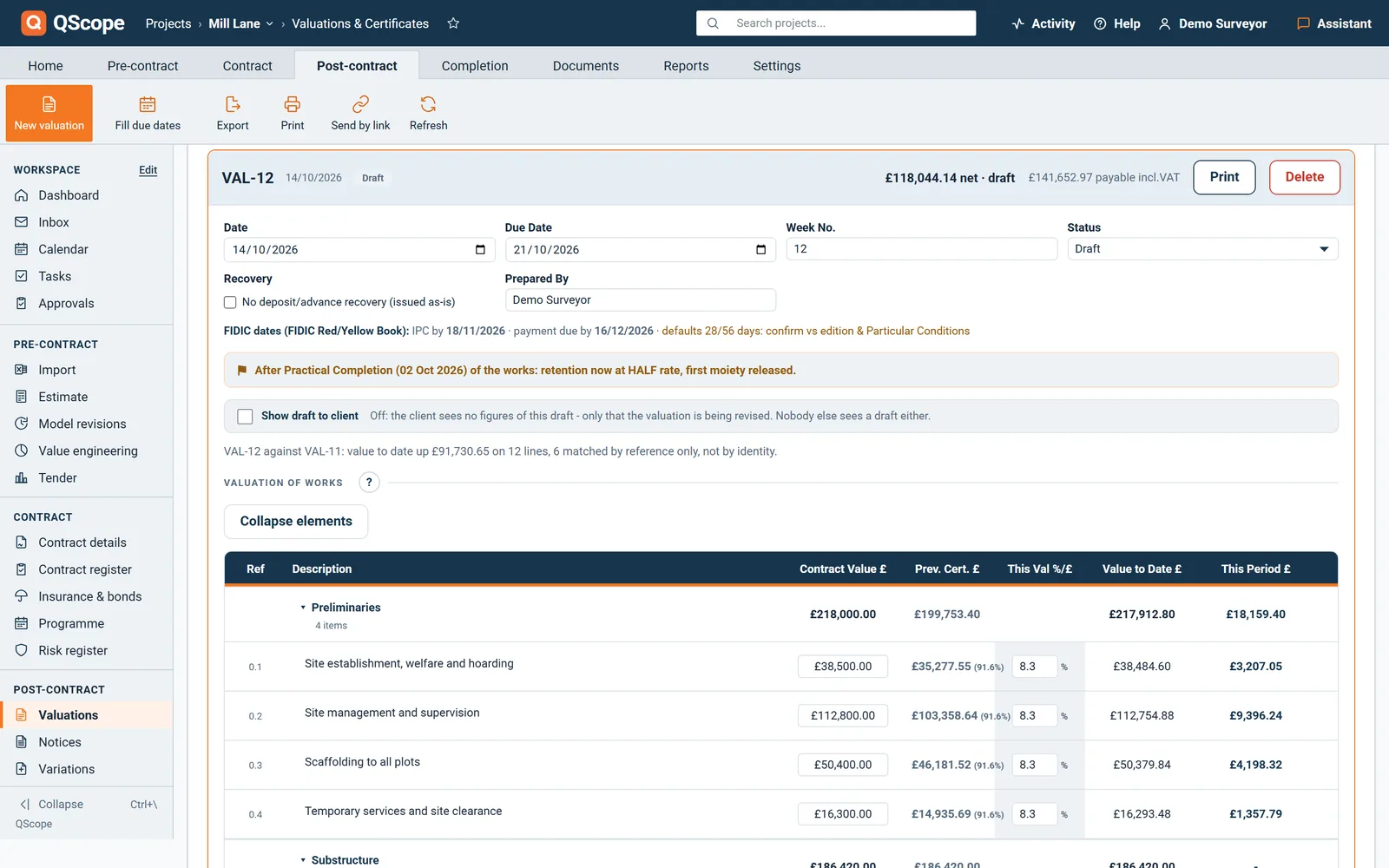
Statutory dates printed on the valuation: payment notice by, final date for payment and pay less notice by

The sum due and the statutory dates are printed on the valuation itself, so the certificate carries its own statement of the basis.

See it running before you sign up

Retention

The other date that costs money

The pay-less deadline is the date that costs money this month.

  • Half the retention released at practical completion
  • Balance released at the end of the rectification period
  • Release date warned on the project list, sorted by urgency
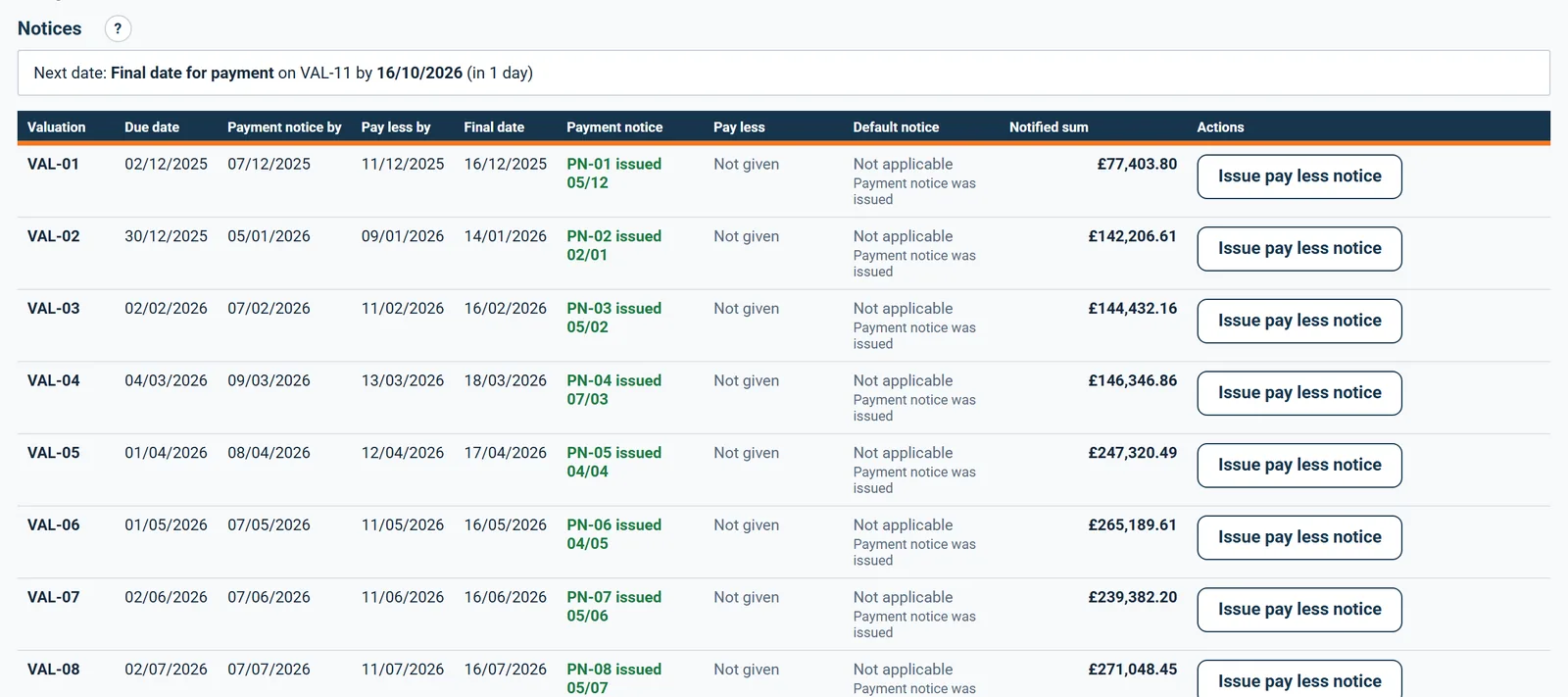
Notices screen: payment notice, pay less notice and final date for each valuation, with what was given and when

QScope counts the release from the practical completion date and the rectification period, and warns on the project list as it approaches, the same way it warns on payment deadlines.

Payment

FIDIC and international projects, counted the same way

Outside the UK the timetable comes from the contract, not a payments Act.

  • FIDIC Statement, IPC and payment dates in calendar days
  • Gulf projects on the FIDIC default of 28 and 56 days from the Statement
  • FIDIC counted in calendar days, straight through weekends and bank holidays
A FIDIC project: the payment statement counted on the contractual certification and payment periods

Calendar days, not working days. FIDIC has no pay-less notice; the 28 and 56 day periods are the 1999 Red Book defaults and are editable for the Particular Conditions.

Contract Register

Every deadline the contract sets, on one register

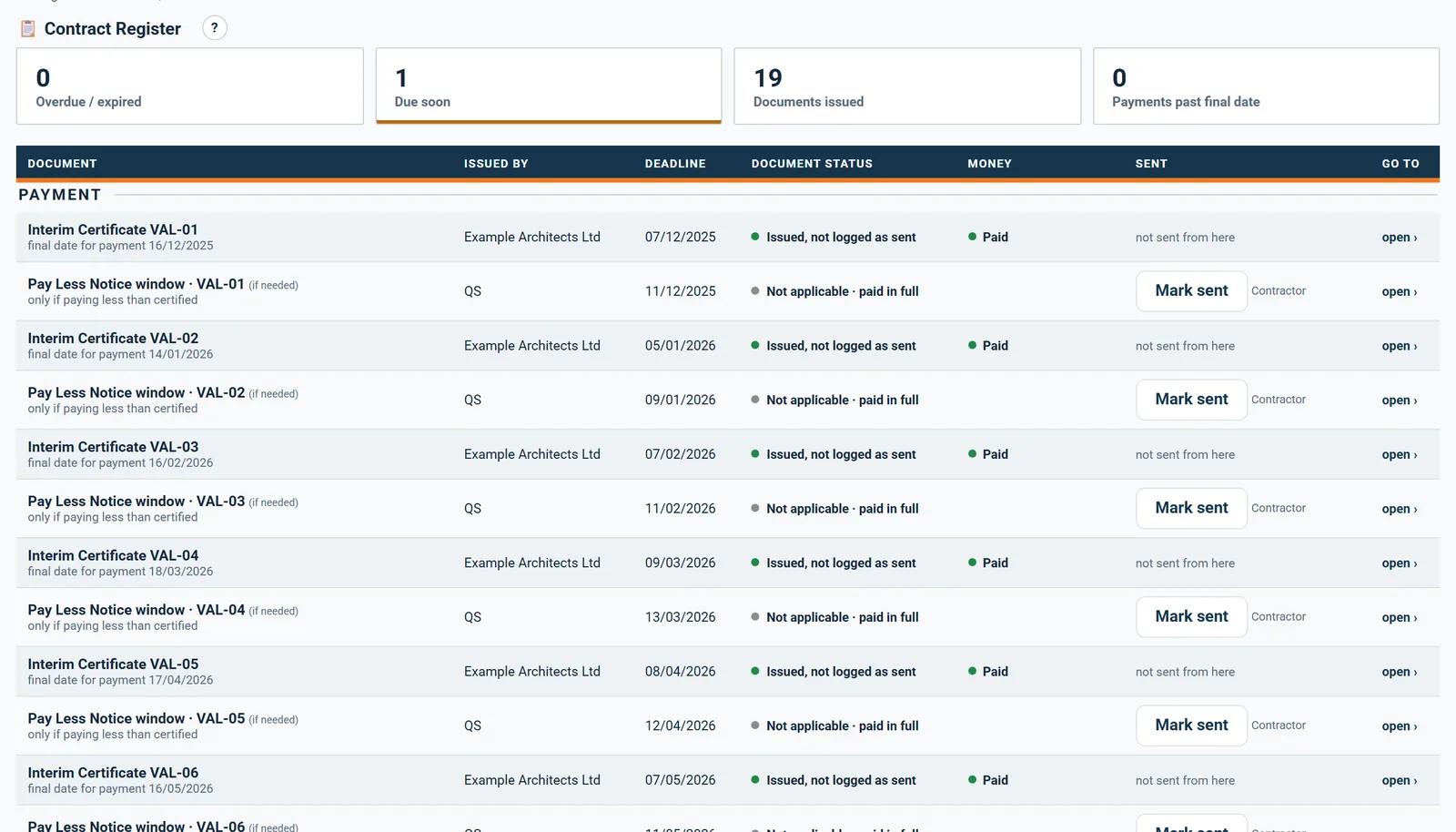
The Contract Register lists every certificate, notice and document the contract requires, with its deadline, who issues it and who it goes to.

  • Each valuation with its notice and its final date for payment, and the pay less notice window
  • The EOT decision, practical completion, making good, the schedule of defects and the final certificate
  • Securities by expiry, and the final account documents counted from practical completion
Contract Register: every certificate and notice with its deadline, who issues it and whether it was sent

Red only when the deadline has passed and the item is yours to do. Full amber inside the warning window for that kind of deadline, two days for payment and thirty for securities, and nobody else's item ever turns red.

Statutory payment dates

When the Construction Act does not apply

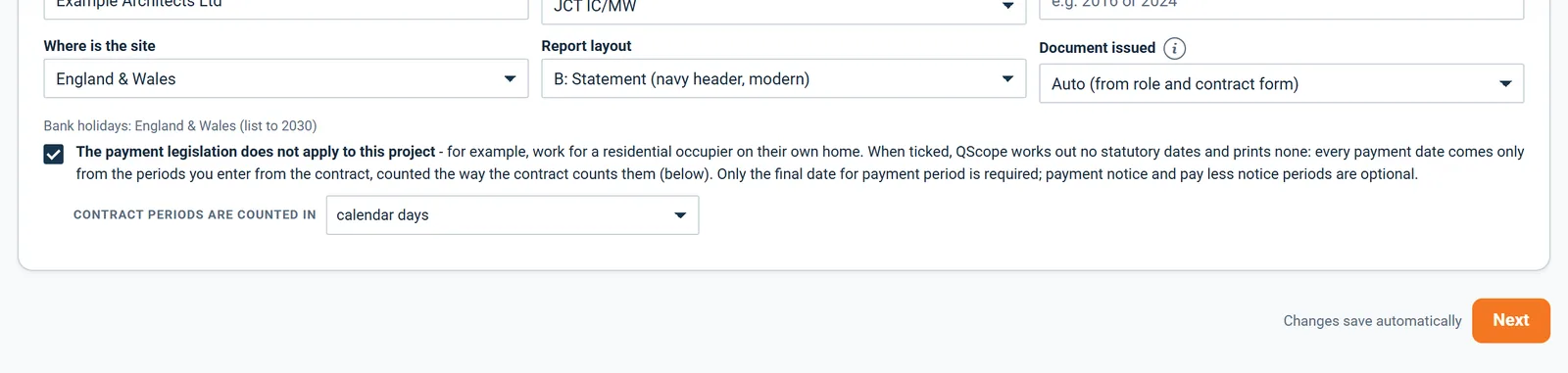
Tick The payment legislation does not apply to this project and every date comes only from the periods in your contract.

  • No statutory date is worked out or printed, only the dates your contract gives.
  • Only the due date and the final date for payment are required, and notice periods are optional.
  • Choose whether the contract counts calendar days or working days.
Settings: where the site is for bank holidays, and the option for a contract outside the Construction Act

When the payment legislation does not apply, say so in Settings and choose whether the contract periods are counted in calendar days or working days.

Statutory payment dates

The whole valuation cycle in one table

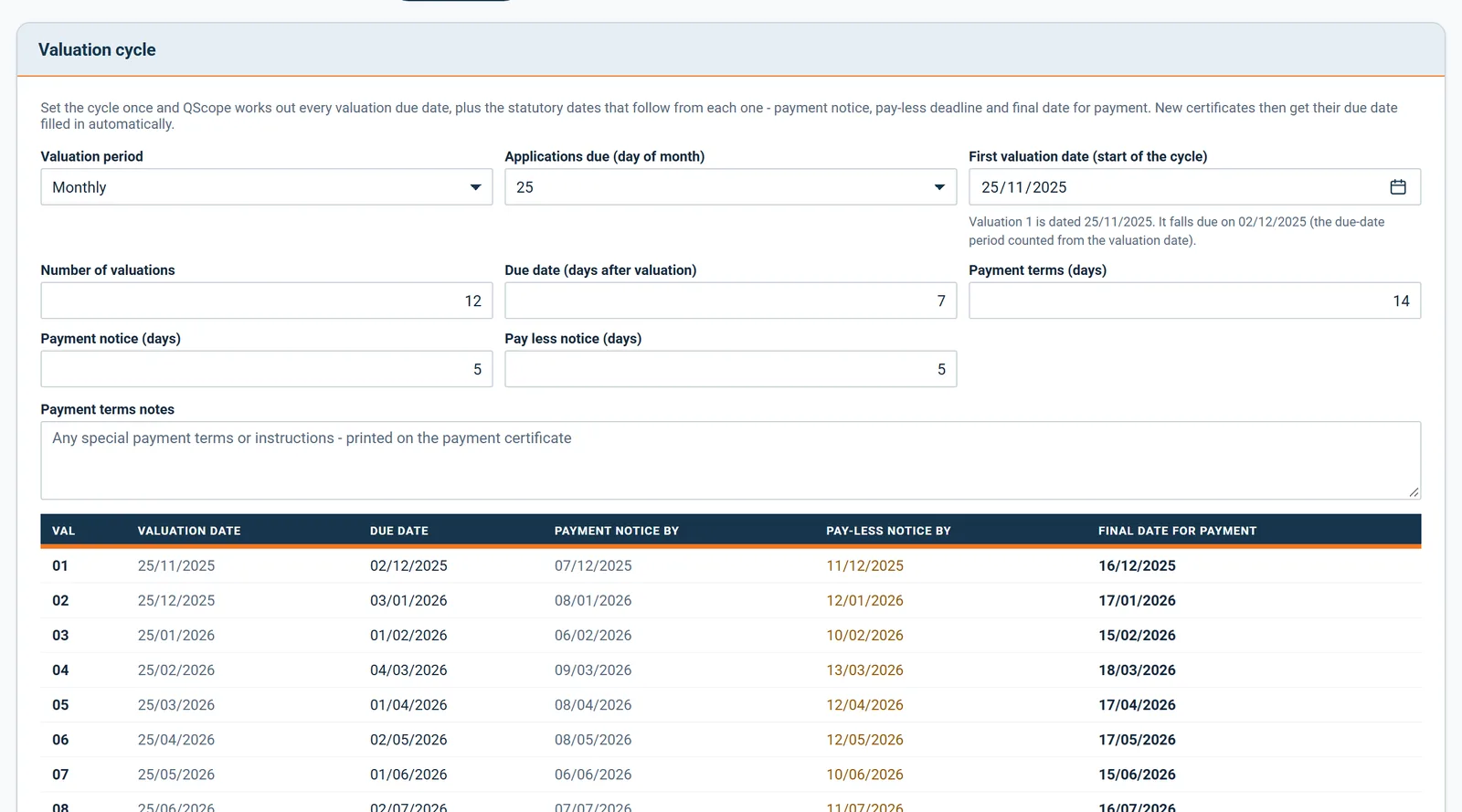
Set the valuation cycle once and QScope lists every valuation date and its payment dates.

  • Choose monthly, four weekly, fortnightly or weekly valuations.
  • Pin monthly valuations to a fixed day so the cycle never drifts at month ends.
  • Leave the number of valuations blank and it follows the programme dates.
Valuation cycle settings and the full schedule of valuation, due, notice and final dates

Set the valuation period, the day applications are due, the first valuation date and the number of valuations, and the whole schedule of dates follows.

Statutory payment dates

A Pay Less Notice from the same dates

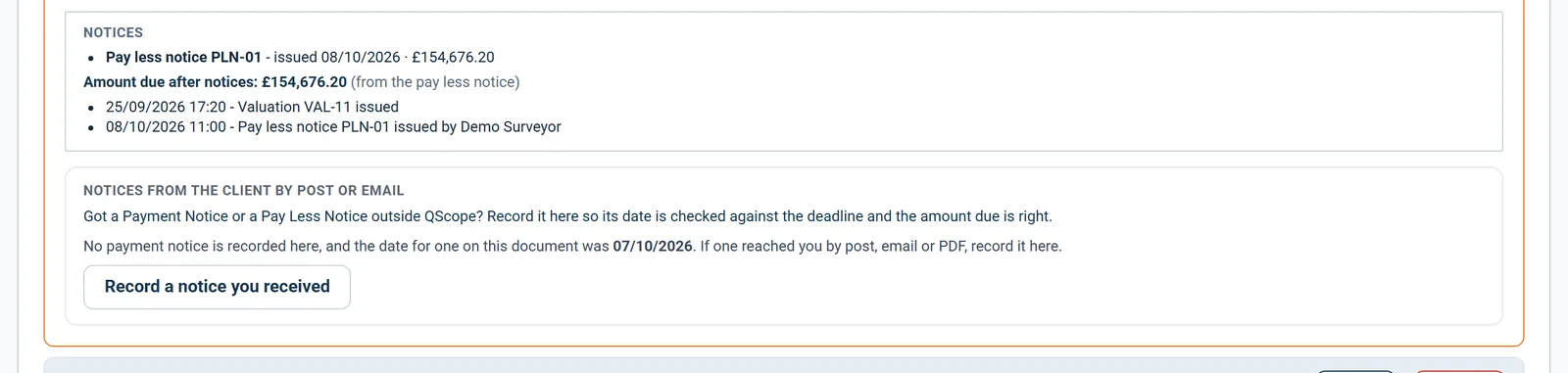
Print a Pay Less Notice against any valuation, with the sum due, the deadline and space for the basis.

  • The sum stated as due is the figure on the certificate.
  • The final date for payment and the last day for the notice come from that certificate.
  • Signature blocks for the payer and the payee are on the page.
Notices recorded on a certificate: the pay less notice with its date, amount and deadline

The pay less notice sits on the valuation it answers, with its date and amount, and the amount due after notices is worked out from it.

Statutory payment dates

Notices given through the link

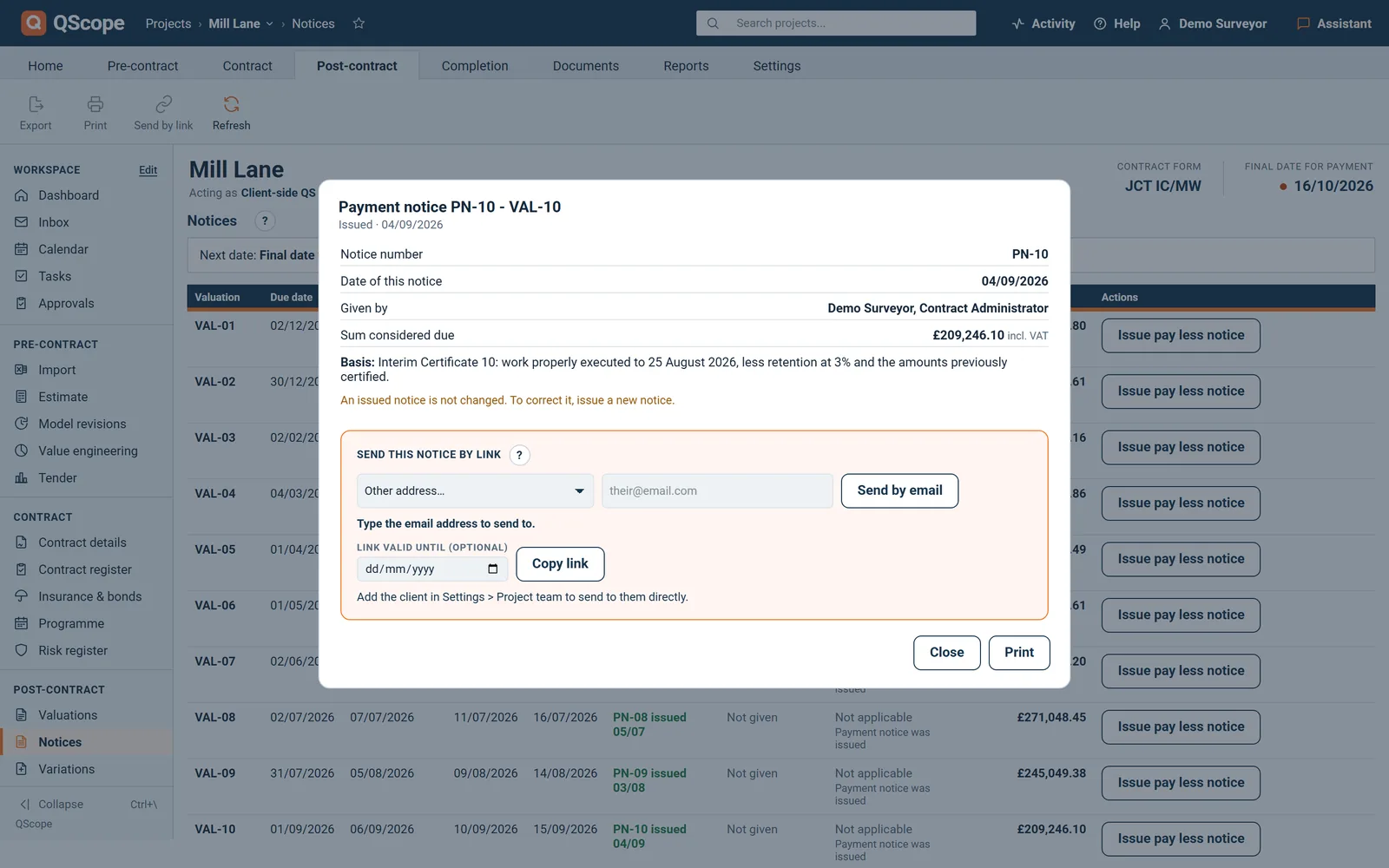
The client can give a payment notice or a pay less notice through the link, up to the date on the document.

  • Each answer carries an amount and the basis on which it was calculated.
  • Once the date has passed, that answer is no longer offered.
  • The server refuses a late notice even if the page is left open.
An issued notice with Send this notice by link: choose the person, set an expiry and copy the link

Send this notice by link: choose the person, set how long the link stays valid and copy it, so the notice reaches them with its date on record.

Every other function on the Statutory payment dates screen

23 functions the sections above do not cover, each as it works in the program.

Functions 1 to 12

01The schedule table shows each valuation date with its due date, notice dates and final date for payment.
02The project dashboard shows the next payment due, notice dates and final date for the nearest valuation.
03Mark a document as sent and record who it went to.
04Record a notice that arrived by post or email, and QScope marks it if it came after the date on the document.
05Record where the FIDIC payment clock starts and whether the Particular Conditions amend the periods.
06Payment terms notes print on every payment certificate.
07With no contract form chosen, QScope works out no payment date at all and says what is missing.
08The first time a project has a valuation and no confirmed periods, the window asks for them.
09Each period must be a whole number of days, and nothing is saved until all four are filled in.
10If your final date for payment differs from the usual figure for your contract form, Settings points it out.
11With periods set but no contract form chosen, Settings says that the dates are waiting for the form.
12Under the first valuation date, Settings tells you when valuation 1 falls due.

Functions 13 to 23

13Each new valuation takes its due date from the schedule, and one button fills any that are blank.
14An issued certificate keeps the dates it was issued with, even if the settings change later.
15If dates cannot be worked out, the certificate says Not stated and why, instead of printing a blank.
16A valuation cannot be issued until a contract form is chosen.
17If no dates can be shown, the deadlines panel says the payment periods are not confirmed.
18The dashboard flags a final date for payment that is close or passed, with the amount still missing.
19The dashboard asks you to choose the contract form or confirm the periods when either is missing.
20When the payment notice date passes with no notice recorded, the valuation says so.
21A FIDIC payment period that differs from 56 days is pointed out in Settings.
22The contract form cannot be changed while a client contract is pending or signed.
23Upload the contract and QScope reads the contract form from it.
Who it is for

The same four dates, four different desks

You are applying

You start the clock with the application

You send the application and the clock starts. If the payment notice is late or missing, the sum you applied for becomes the sum that falls due.

Applying for payment
the same measurement

You are certifying

Your notices are what the Act reads

You issue the notices, and the dates on them are the ones the Construction Act holds you to. A missed pay-less deadline is not an argument you can win.

Certifying payment

You are doing both

You count the dates with nobody checking

You send the application yourself and count the same four dates, with nobody to remind you which notice has to leave this week.

Doing both yourself

You are reporting

You lend against dates that must hold

You confirm the drawdown timetable against the contractual payment dates, so the facility releases against dates that will actually hold.

Recommending a drawdown

The client, the architect and the tenderer are not on this list. They are the people you let in on a link: they see the one document you sent them, answer it, and that answer is written into the record. No account, no licence, no charge, on every plan.

FAQs

The questions this page raises most often, answered without a sales pitch at the end.

JCT SBC and Design and Build, JCT Intermediate and Minor Works, NEC3 and NEC4 ECC, and the Scheme for Construction Contracts. Each carries its own day counts for the final date for payment and the pay-less notice.

Yes. England and Wales bank holidays are skipped, which is where hand counting usually goes wrong around Easter and the August bank holiday. Weekends are counted, because the periods you confirm are calendar days.

Enter it in the project settings and QScope uses your figure instead of the default for the contract form. The pay-less deadline is then counted back from your final date for payment.

Yes. Select the FIDIC contract form and QScope dates the Interim Payment Certificate at the Statement date plus 28 days and payment at the Statement date plus 56 days, counted in calendar days on the 1999 Red Book defaults. There is no payment notice or pay-less notice under FIDIC, and the periods are editable for the Particular Conditions.

From your own contract. QScope does not assert them: you confirm the four periods once, and every date is counted from those. The standard positions for JCT, NEC and the Scheme are shown beside the fields as information, never filled in for you. FIDIC is counted in calendar days, straight through weekends and bank holidays.

No. QScope calculates dates from the figures and contract form you enter. It does not check that the form you selected is the one that actually applies, and the notices you issue remain your professional responsibility.

From the blog

The part nobody teaches you, written down

Three pieces from the same corner of a contract as this page, answered at length and without a sales pitch at the end.

All 174 pieces

Keep reading

The three parts this page leans on

Every payment date counted from your contract, not ours

You confirm the four periods once, from your own contract, and QScope counts every notice and final date from them. It does not guess them, and it will not issue a certificate until you have. Miss a pay-less notice and the sum applied for becomes the sum due, so the deadline that costs most is the one nobody counted.

30 days free, no card.

Rather ask first? Write to help@qscope.co.uk and you will get a reply within one working day, Monday to Friday.