QScope

Cost estimate

Construction estimating connected to the whole project

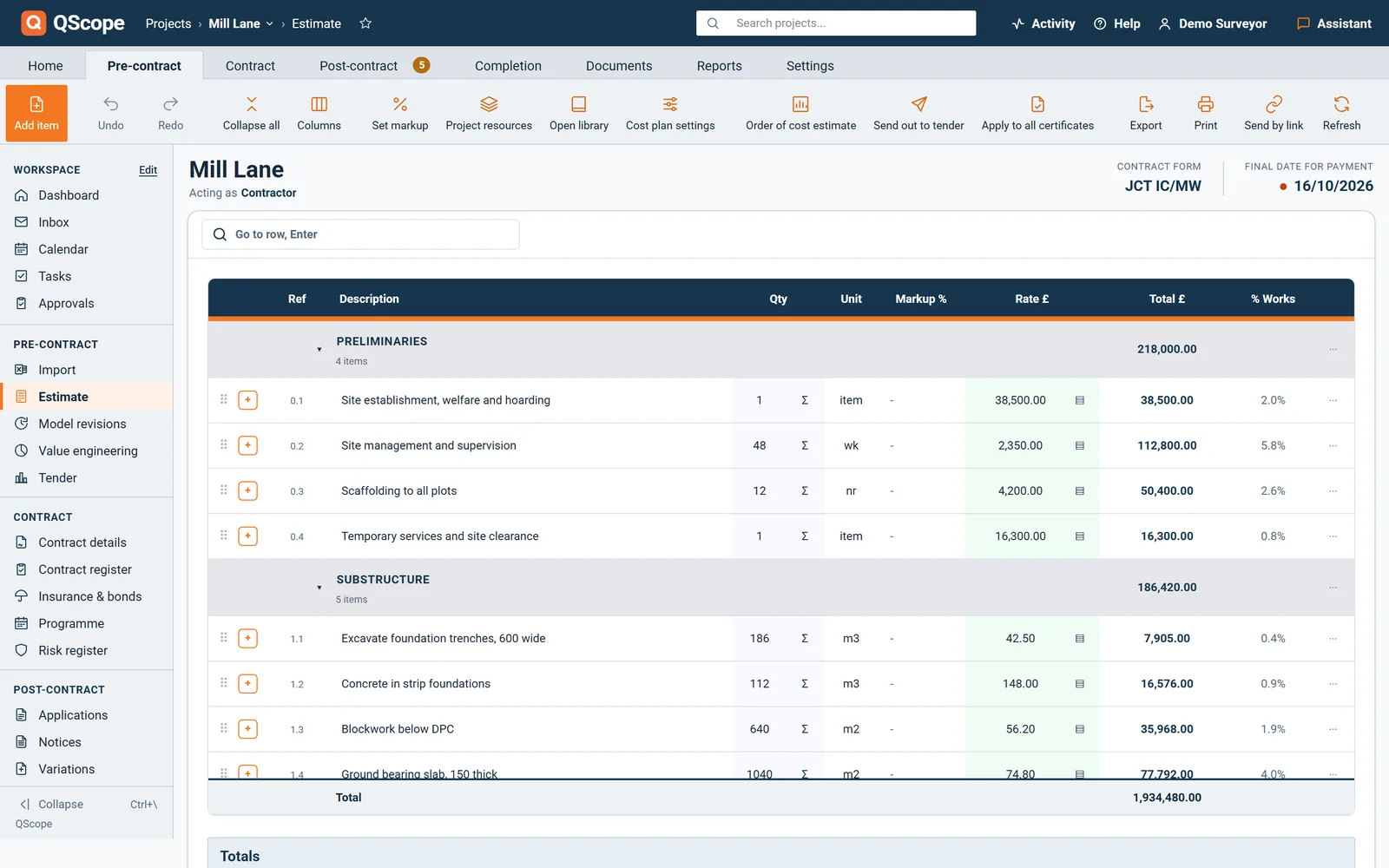
Descriptions and units come from the QScope library on the NRM1 tree. The quantities, the rates and the allowances are yours, and the estimate you price is the one the contract and the valuations are built from.

  • Markup set on the whole estimate or on one section, with the base rate kept underneath
  • Collapse all, or jump to a row by number, reference or words from the description
  • Undo and redo, thirty steps deep, with the usual keyboard shortcuts

30 days free, no card.

The bar under the estimate shows the cost per square metre, the number of items and how many still have no rate, so a gap is visible before the total is quoted.

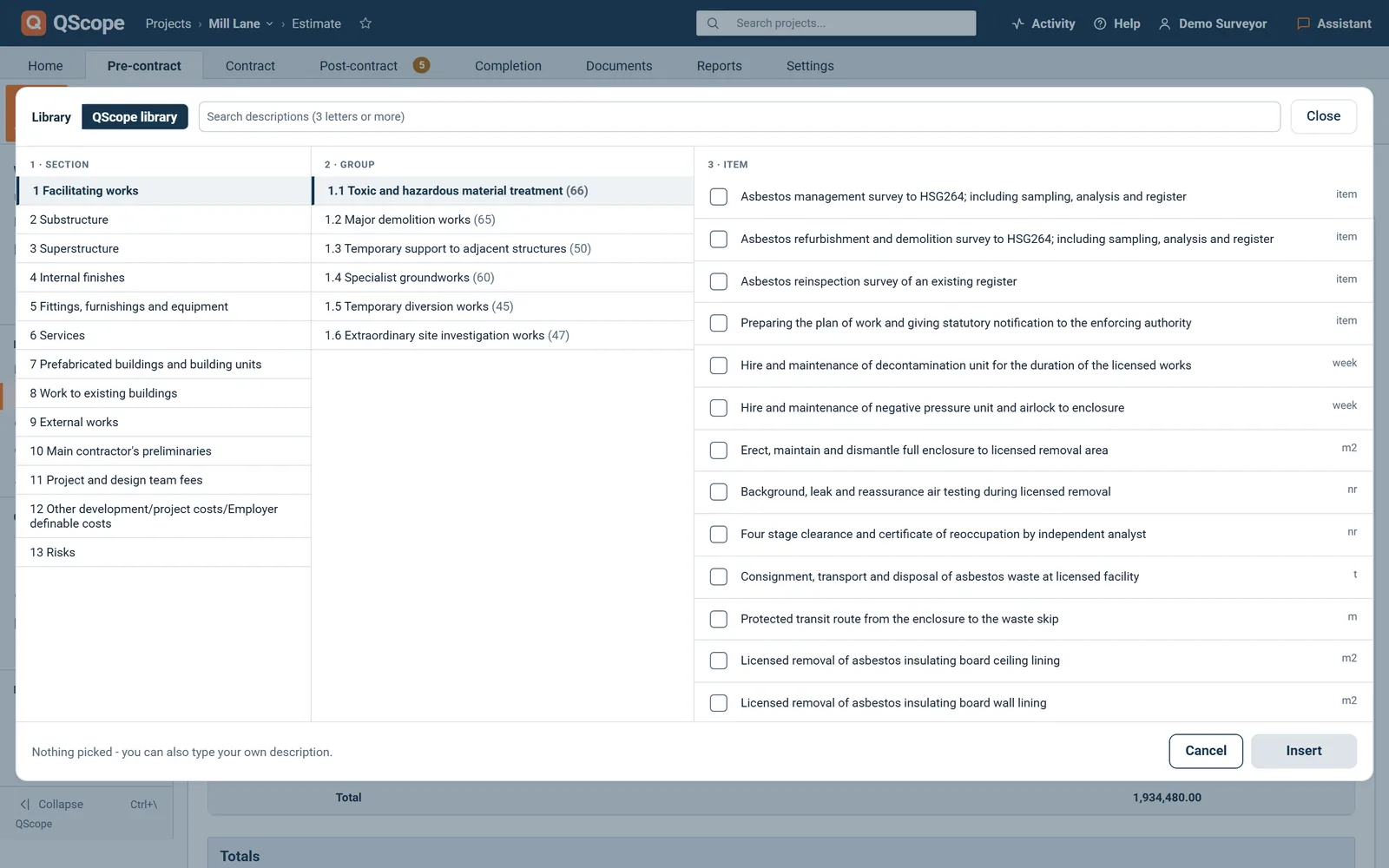
The QScope library

4,876 items you do not have to type

The QScope library holds 4,876 items on the NRM1 tree, in 13 sections, 58 groups and 358 families, written to NRM2 measurement.

  • Search by three letters or more, tick several items and insert them in order
  • Each item brings its element, reference, description and unit into the line
  • No rates in the library: the rate is always yours

Open it from any row with Ctrl and Space. The description and the unit are already right, so the bill reads the way a quantity surveyor expects.

Rate build-up

Build the rate from labour, materials, plant and subcontract

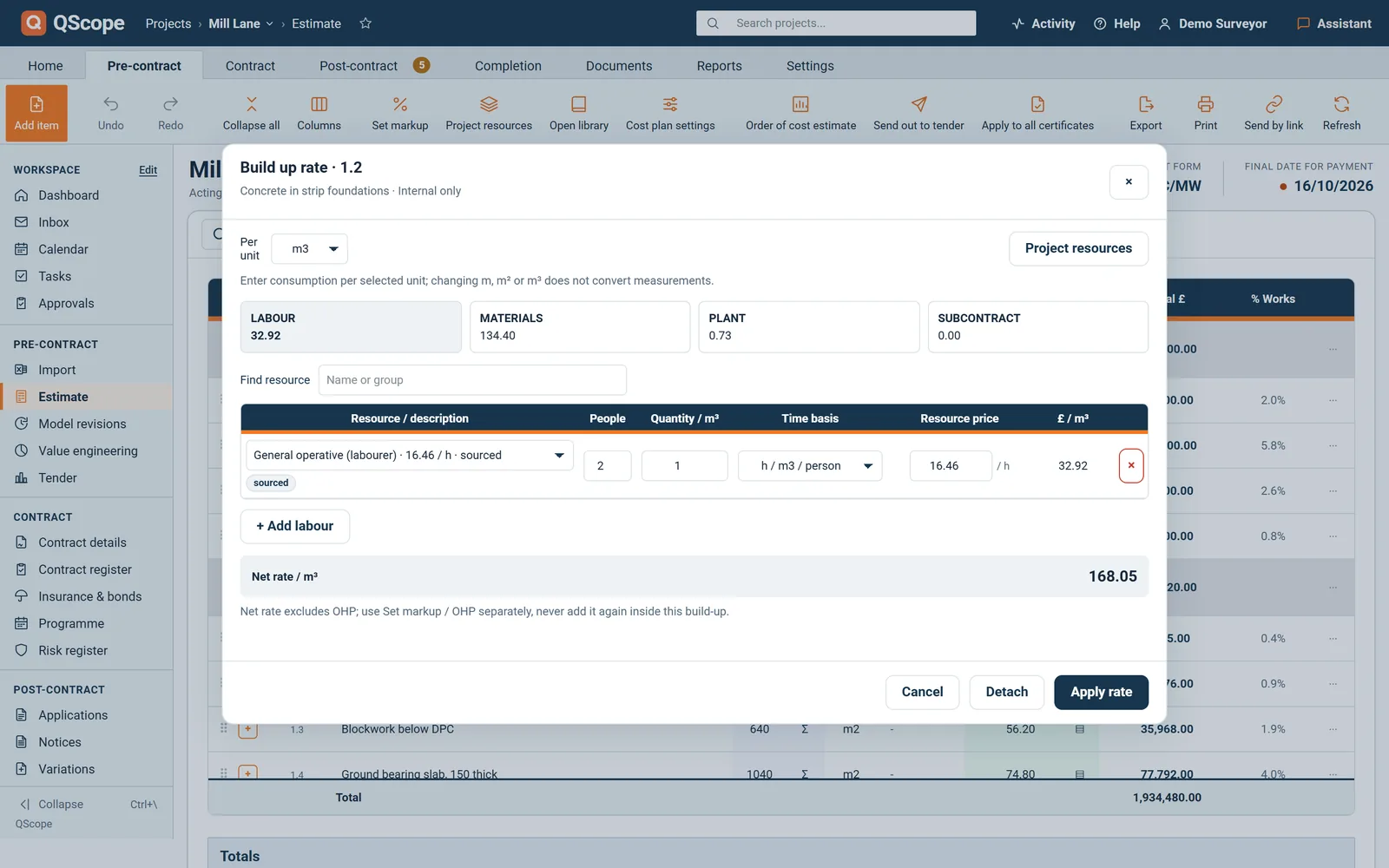
Any rate can be built up from four kinds of resource, and the net rate is applied back to the line.

  • Labour by people and time, materials with a waste percentage, plant by hours, subcontract by quote
  • Project resources hold one price each, so a change updates every build-up that uses it
  • A standard list of 286 UK resources, with your own prices always taking priority
Cost estimate
Build up rate · internal only
ResourcePer m2
Labour · bricklayer and labourer£31.20
Materials · blocks, 5% waste£18.90
Plant · mixer£1.40
Net rate / m2£51.50

The build-up is internal and never leaves your account. Once applied, the rate is locked on the line with a built up tag, and the net rate excludes overheads and profit.

Allowances

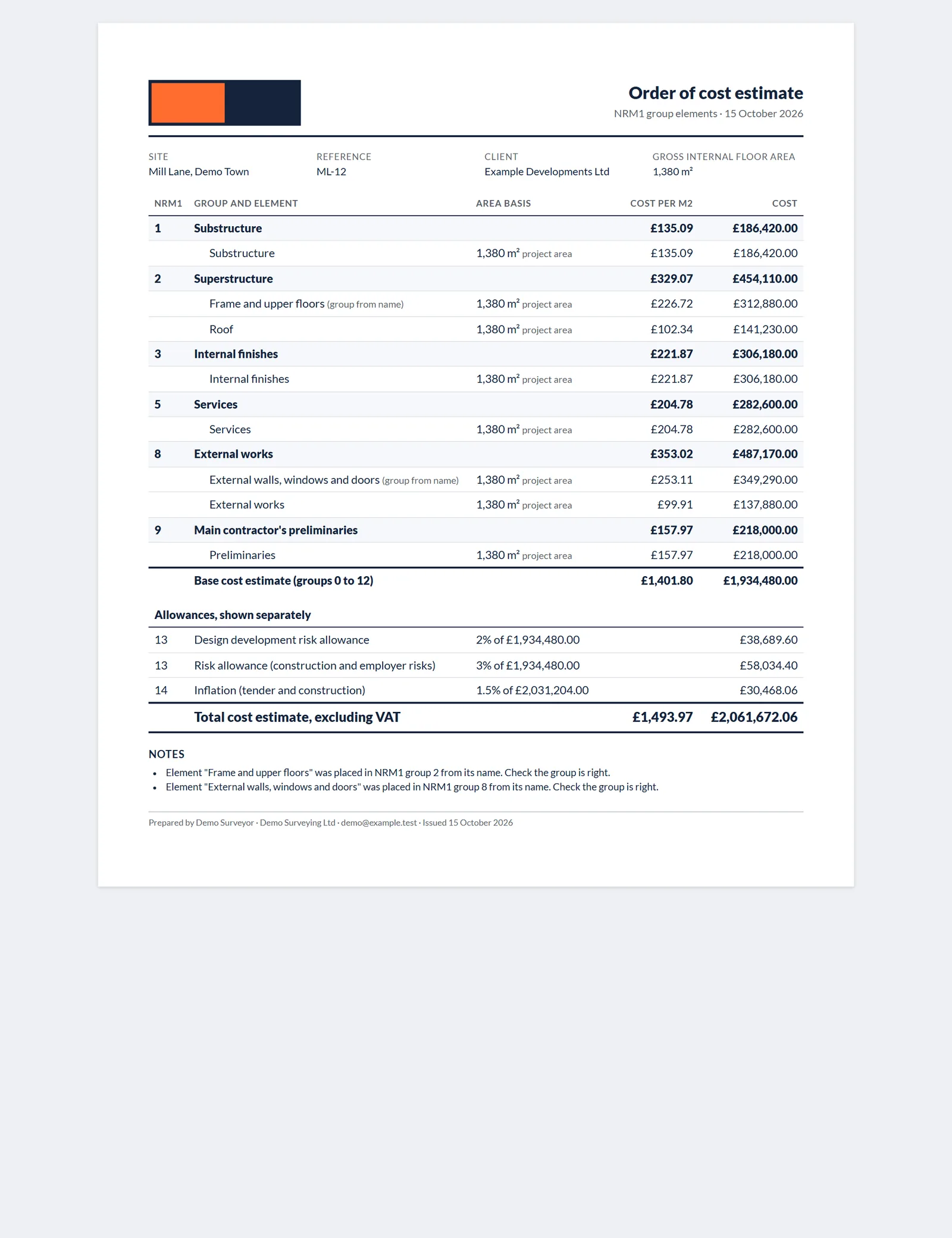
Allowances and an order of cost estimate on NRM1

Design development, risk and inflation are set as percentages and shown separately, never buried in the rates.

  • The estimate shows the cost plan including allowances next to the base cost
  • The order of cost estimate prints NRM1 group elements 0 to 12 with the cost per m2
  • The floor area comes from the gross internal floor area in the project settings
Cost estimate
Order of cost estimate · NRM1 group elements
Base cost estimate, groups 0 to 12£774,500
Design development and risk£46,470
Inflation£24,620
Total cost estimate, excl. VAT£845,590

No allowance is filled in for you. A percentage left blank says not set, so a cost plan with no risk allowance says so on the page.

Cost plan by link

The cost plan by link, cut to what each person may see

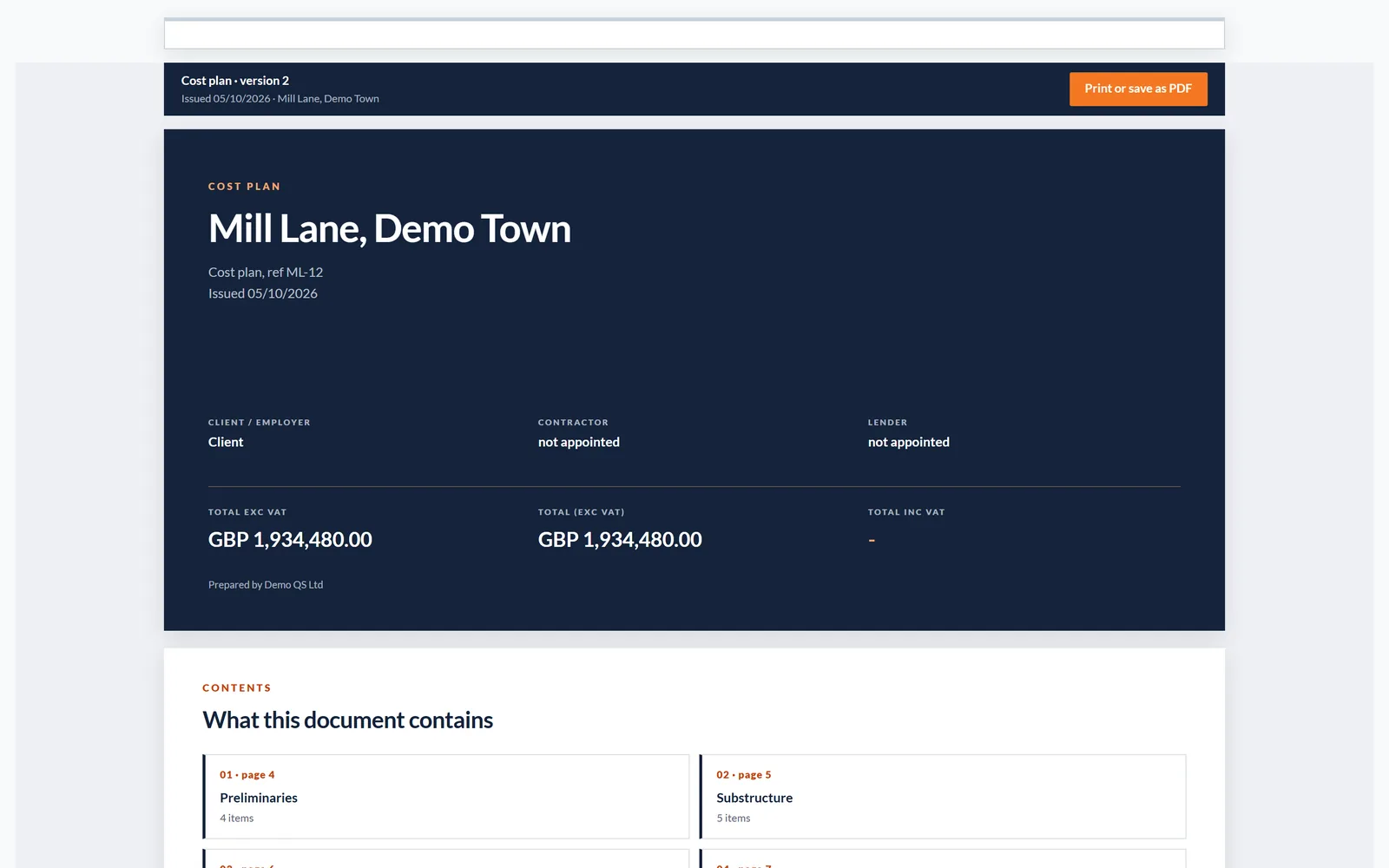
Save a version and send it by link: the link always shows a saved version, never the live estimate.

  • Full cost plan, a package at its own rates, scope and quantities, or stage amounts
  • The level follows the person's role and is cut on the server, so hidden rates never reach them
  • Up to fifty saved versions, and any link can be withdrawn
Cost estimate
Send the cost plan by link
PersonWhat the link shows
Clientfull cost plan
Groundworks subcontractortheir package only
Planning consultantscope and quantities
Saved versionv3

Cost, markup and rate build-ups never leave your account for anyone. A withdrawn link says it has been withdrawn by the sender.

Into the contract

The estimate becomes the job the valuations run on

An estimate in a different file from the valuations is two versions of the truth, so here it is the same record.

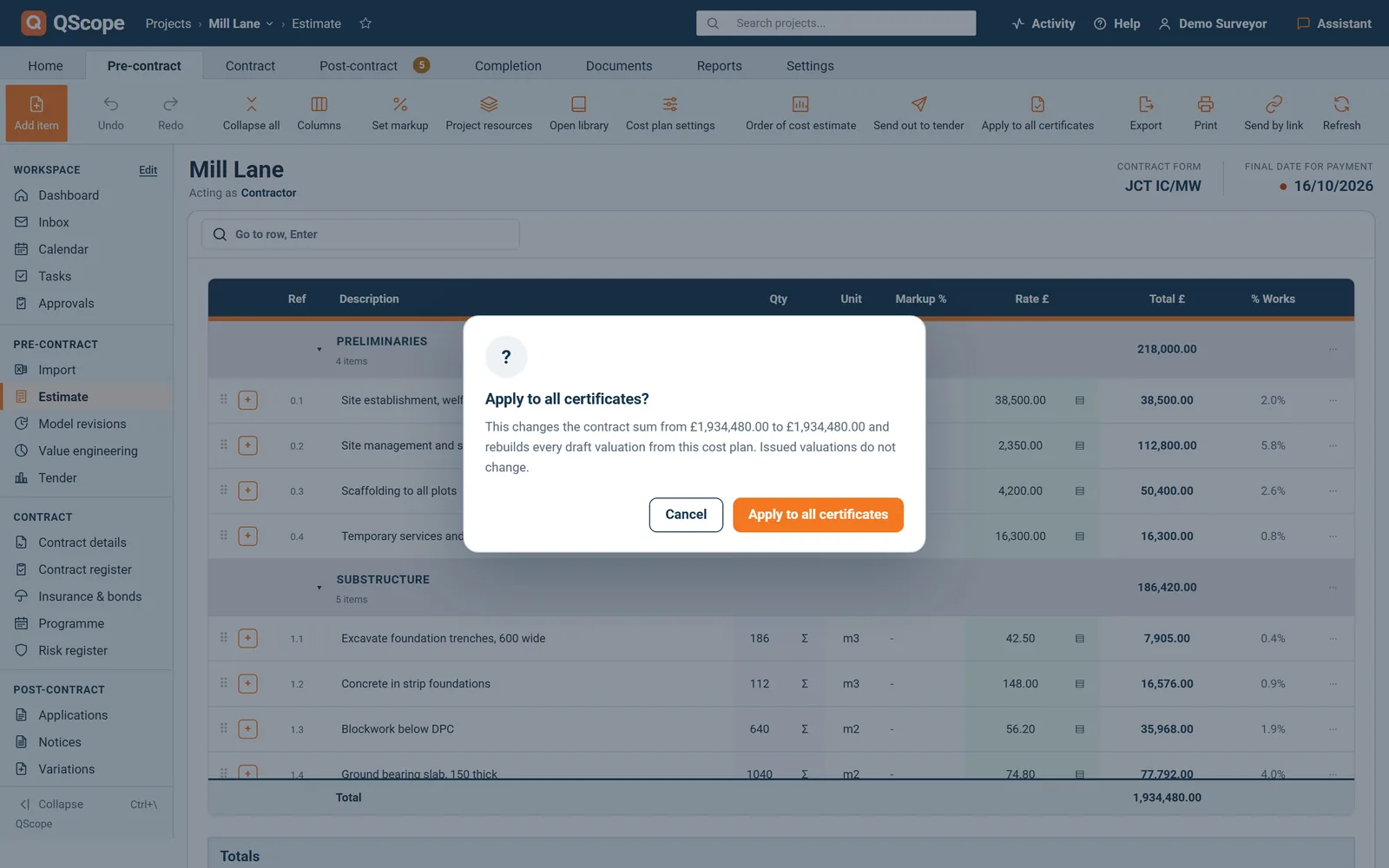
  • Apply to All Certificates sets the contract sum from the estimate total
  • Draft valuations are rebuilt from it, and issued ones are never rewritten
  • Send out to tender builds the enquiry from the same lines
Cost estimate
From estimate to certificate
Estimate total£774,500.00
Contract sumset from the estimate
Draft valuationsrebuilt
Issued valuationsunchanged
Next valuationbuilt from the cost plan

A new valuation is built from the cost plan and carries each line's percentage on from the last one, so nothing is retyped between the estimate and the certificate.

Cost estimate

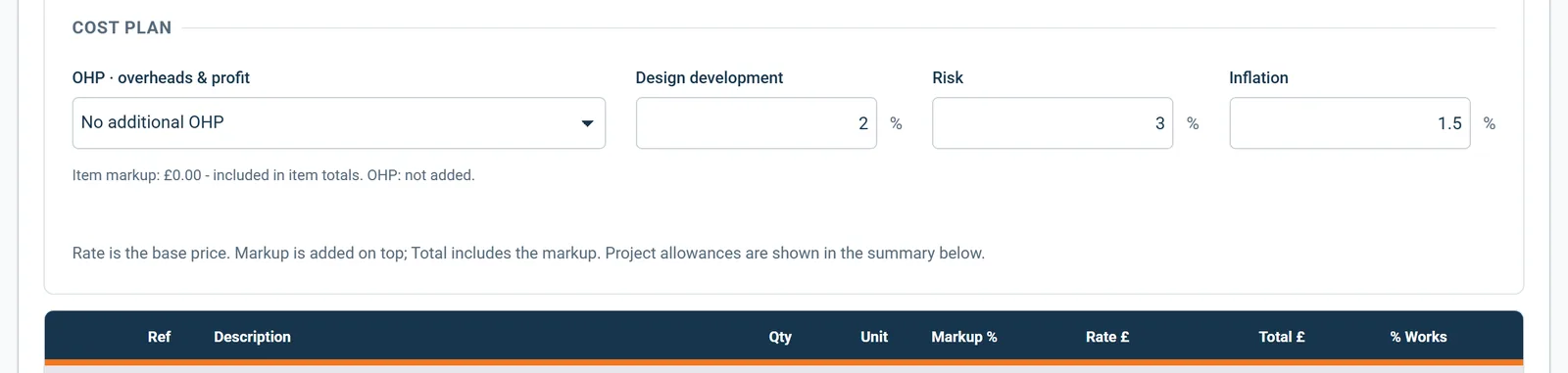
Overheads and profit on the subtotal

Overheads and profit can be added as one percentage of the subtotal and shown on every total.

  • Choose No additional OHP or Add OHP · % of subtotal in Cost plan settings.
  • The percentage is worked out from the base rates, before item markup.
  • The OHP line appears under the estimate, in the section summary, on the print and on the order of cost estimate.
Cost estimate
Overheads and profit on the subtotal
In the program
Cost plan settingsfield
OHP · overheads & profitfield
No additional OHPfield
Add OHP · % of subtotalfield
Overheads & profitfield

On screen: “Cost plan settings”, “OHP · overheads & profit”, “No additional OHP”, “Add OHP · % of subtotal”.

Cost estimate

Measure the quantity line by line

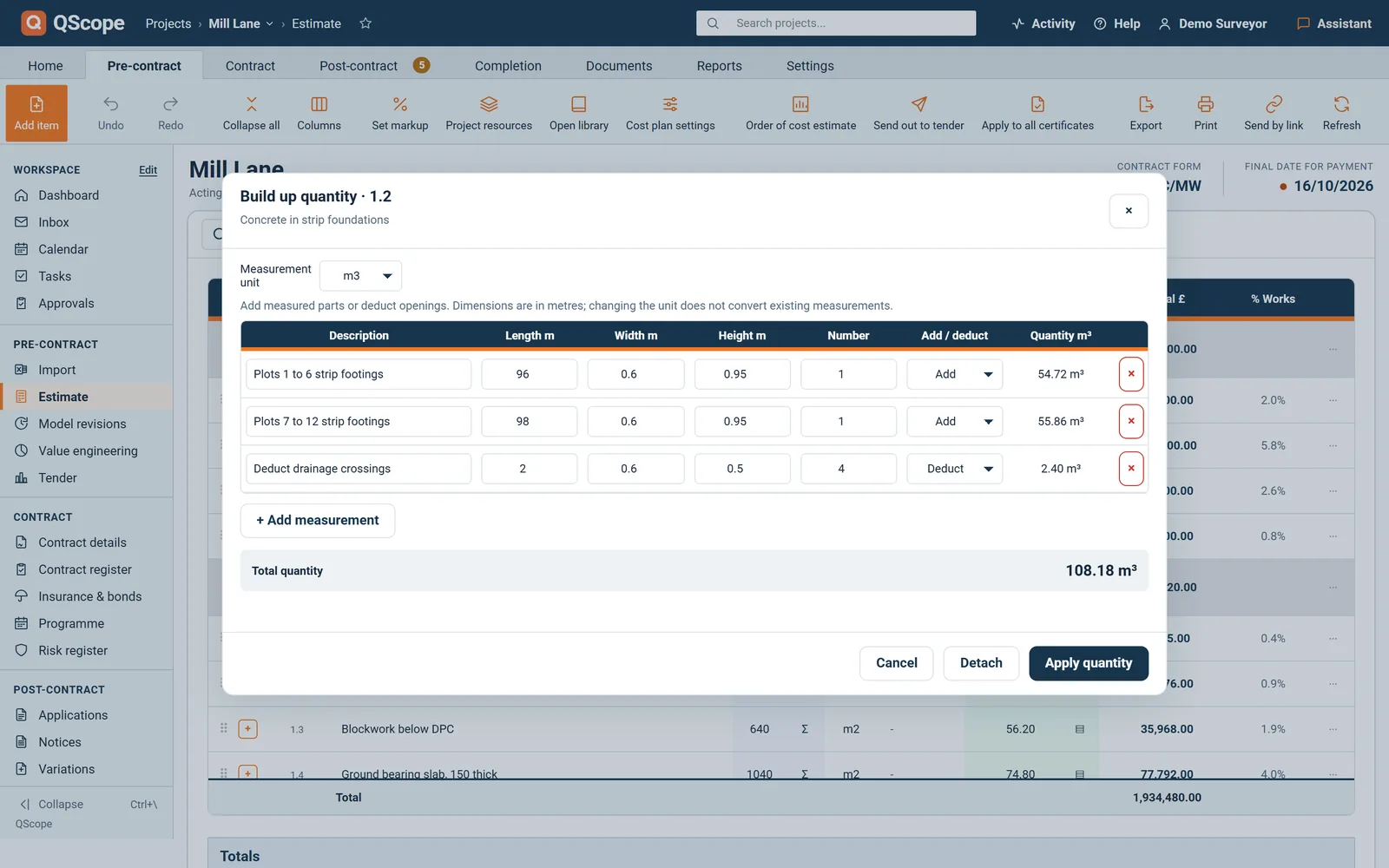
Build up quantity, the Σ beside Qty, measures a line from lengths, widths, heights and numbers, with deductions.

  • Each measurement has a description, Length, Width, Height and Number, depending on the unit.
  • Set a measurement to Deduct to take out openings.
  • Apply quantity writes the total to the line and locks Qty until you press Detach.
Cost estimate
Measure the quantity line by line
In the program
Build up quantitywindow
Measurement unitwindow
Length mwindow
Width mwindow
Height mwindow

On screen: “Build up quantity”, “Measurement unit”, “Length m”, “Width m”.

Cost estimate

A printed cost plan in sections

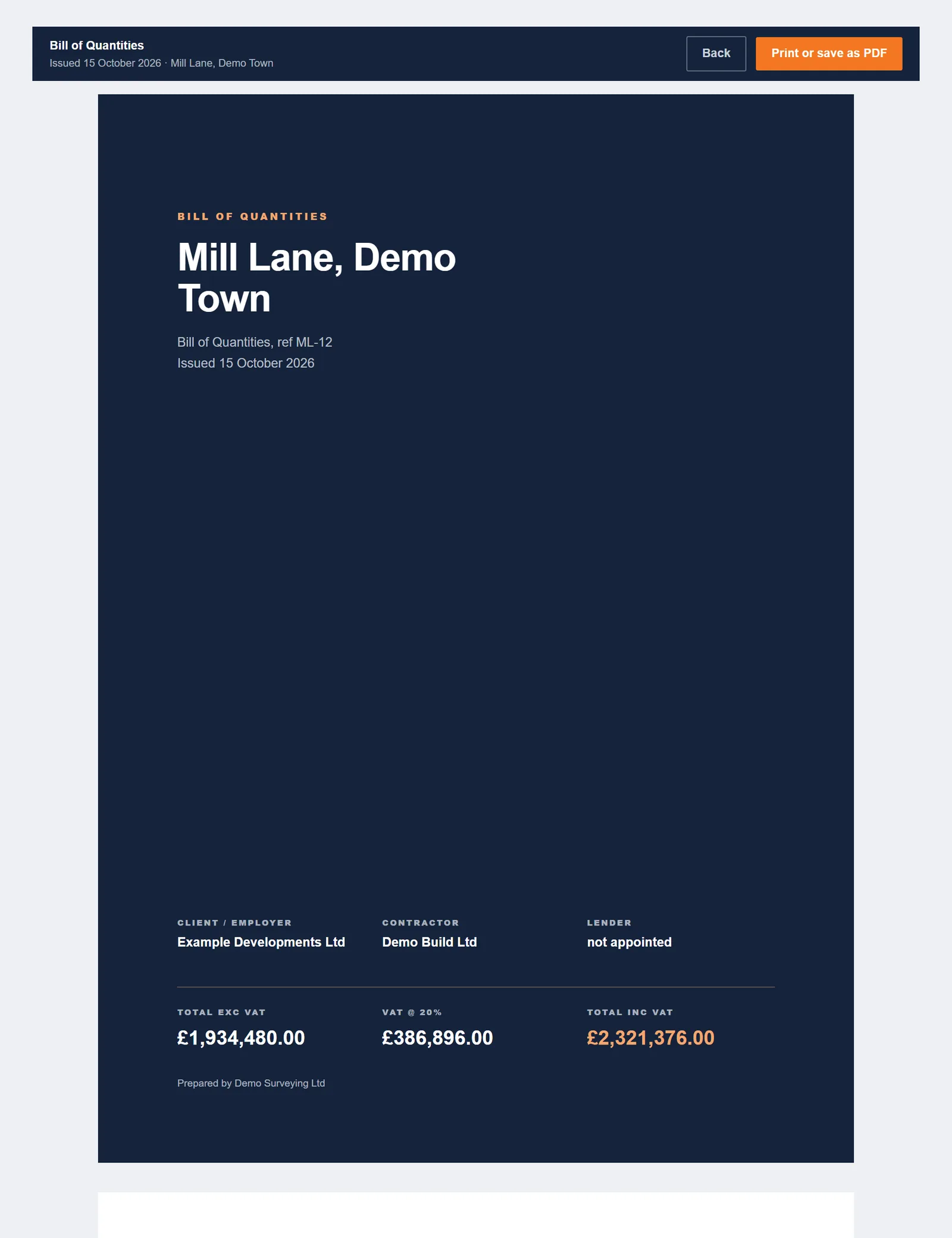
Print builds the cost plan document, called Bill of Quantities on contractor projects.

  • Each section starts on a new page with its subtotal and its share of the total.
  • A summary by section leads down to Total payable including VAT.
  • The last page says how the cost plan was produced and carries your signature and a receipt box for the client.
Cost estimate
A printed cost plan in sections
In the program
Printdocument
Cost plandocument
Bill of Quantitiesdocument
Section subtotal · x% of the cost plandocument
Summarydocument

On screen: “Print”, “Cost plan”, “Bill of Quantities”, “Section subtotal · x% of the cost plan”.

See it running before you sign up

Every other function on the Cost estimate screen

27 functions the sections above do not cover, each as it works in the program.

Functions 1 to 14

01+ Add item puts a new item at the end of the estimate, scrolls to it and puts the cursor in the description.
02The + beside a row adds a priced item directly below that row, ready to type into.
03Press Enter in the last field of a row and the next item opens underneath it.
04Drag a row or a section heading by its handle to move it, and draft valuations take the new order.
05An empty estimate offers two ways in: add the first line, or load a file in the Import tab.
06The More menu on each row adds a row below, inserts a section, opens the library at that row, omits or restores the line, or deletes it.
07The menu on a section heading renames it, inserts another section, sets markup for that section or deletes the heading while the lines under it stay.
08Lines above the first heading sit under Unsectioned until you press Name this section.
09Unit offers the usual units and also takes your own, which then appears on the list for that project.
10The % Works column shows each line's share of the estimate total.
11After inserting from the library, the cursor selects the first * in the description so you can type the dimension, and Tab moves to the next one.
12The items without a rate button above the table takes you to the first line still waiting for a rate.
13Columns lets you tick which columns to show, Description and Total always stay, and your choice is kept for you on that project.
14Send to (email) sends a saved version to someone outside the project team at the level you choose, scope and quantities by default.

Functions 15 to 27

15Restore an earlier version lists saved copies with their row counts and lets you restore the cost plan only or the whole project.
16A line under the table shows the item markup already inside the totals, apart from any additional OHP.
17A measurement that deducts more than it adds is refused, so the quantity never goes below zero.
18A resource used in a build-up cannot be deleted or change its type, so no build-up loses a price without you knowing.
19On a narrow window Columns hides % Works, Markup %, Ref and the drag handle first, so the description keeps its width.
20Undo refuses a step that would change a line an issued valuation stands on, and says which valuation.
21Cost and margin details show Sub Cost Plan, Projected Margin and Margin %, with a dash until every line has a cost.
22The order of cost estimate places each element in its NRM1 group by name and lists anything it cannot place as Not classified.
23Notes on the order of cost estimate warn when risk or inflation may be counted twice, or when no floor area is set.
24Subcontractors and guests without the client side never see the allowances or the order of cost estimate.
25The email arrives with the subject Cost plan for your review followed by the site address.
26When a link cannot go, the panel says why, for example no role that receives the cost plan or no email address in Project team.
27If the screen shows an empty estimate while the saved one has rows, the save is refused and you are offered an earlier version.
Who it is for

Four chairs, one valuation on the table

You are applying

You value it, and the certificate cuts it

You value the work line by line and submit the application. When the certificate lands short, the difference is argued line by line too, and your valuation is the evidence.

Applying for payment
the same measurement

You are certifying

You cut it, and you sign your name

You value the same lines from the other chair and issue the certificate. Every percentage you cut has to survive the question of why, a month or a year later.

Certifying payment

You are doing both

You value your own work, alone

You price it, you value it and you apply for it yourself, between site visits. The certificate still has to add up as if a surveyor had built it.

Doing both yourself

You are reporting

You certify value the lender pays on

You certify value in place so the lender can release the next tranche. The valuation is the same arithmetic; the reader was never on site.

Recommending a drawdown

The client, the architect and the tenderer are not on this list. They are the people you let in on a link: they see the one document you sent them, answer it, and that answer is written into the record. No account, no licence, no charge, on every plan.

FAQs

The questions this page raises most often, answered without a sales pitch at the end.

No, and that is deliberate. The library carries descriptions and units on the NRM1 tree. The rate is yours, typed in or built up from labour, materials, plant and subcontract.

The 286 standard UK resources carry indicative prices from public UK sources. They are a starting point, not our rates, and your own project prices always take priority.

Their own package, priced at their own rates. No other rates, no margin and no build-ups.

Yes. Apply to All Certificates rebuilds the draft valuations from it. An issued valuation is never rewritten.

From the blog

The part nobody teaches you, written down

Three pieces from the same corner of a contract as this page, answered at length and without a sales pitch at the end.

All 174 pieces

Keep reading

The three parts this page leans on

Price one live job from the library

Build the estimate, set the allowances, print the order of cost estimate and send the client their cost plan by link.

30 days free, no card.

Rather ask first? Write to help@qscope.co.uk and you will get a reply within one working day, Monday to Friday.