QScope

Valuations and certificates

Construction valuations without disconnected spreadsheets

Value line by line, by percentage or by a fixed sum. Retention, previously certified and this period calculate as you type, and no line can be certified past 100 per cent.

  • Value line by line, by percentage or by a fixed sum, on the same screen
  • Both routes are capped, so the total to date cannot exceed the line
  • Your practice name and your logo on the document, never QScope branding

30 days free, no card.

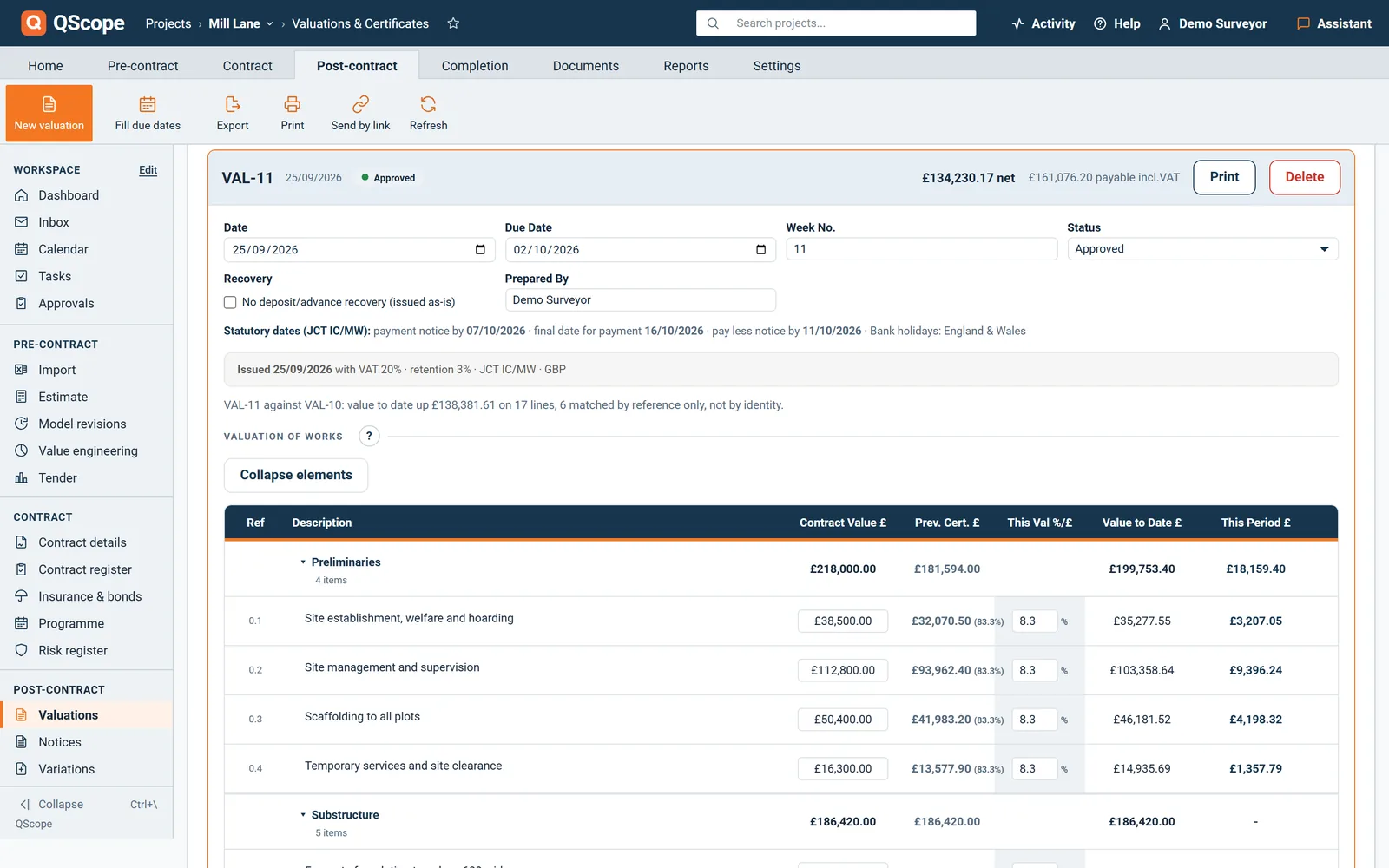
QScope Valuations and Certificates screen with valuation 11 open: dates, status and the certified amount

Thirty three lines across eight sections, with the approved variations added as lines, valued on one certificate. The net is the gross less the retention movement, and it is calculated, not typed in.

Everything through one percentage, and a fudge column at the bottom

The valuation is the easy part.

Some lines are a percentage of measured work. Some are a lump sum, a provisional sum drawn down in tranches, or dayworks off a sheet. A certificate is only a payment notice if it carries the dates the Construction Act attaches to it, and the pay-less deadline is the one that turns a valuation into a liability.

Two ways to value

Two ways to value, on the same certificate

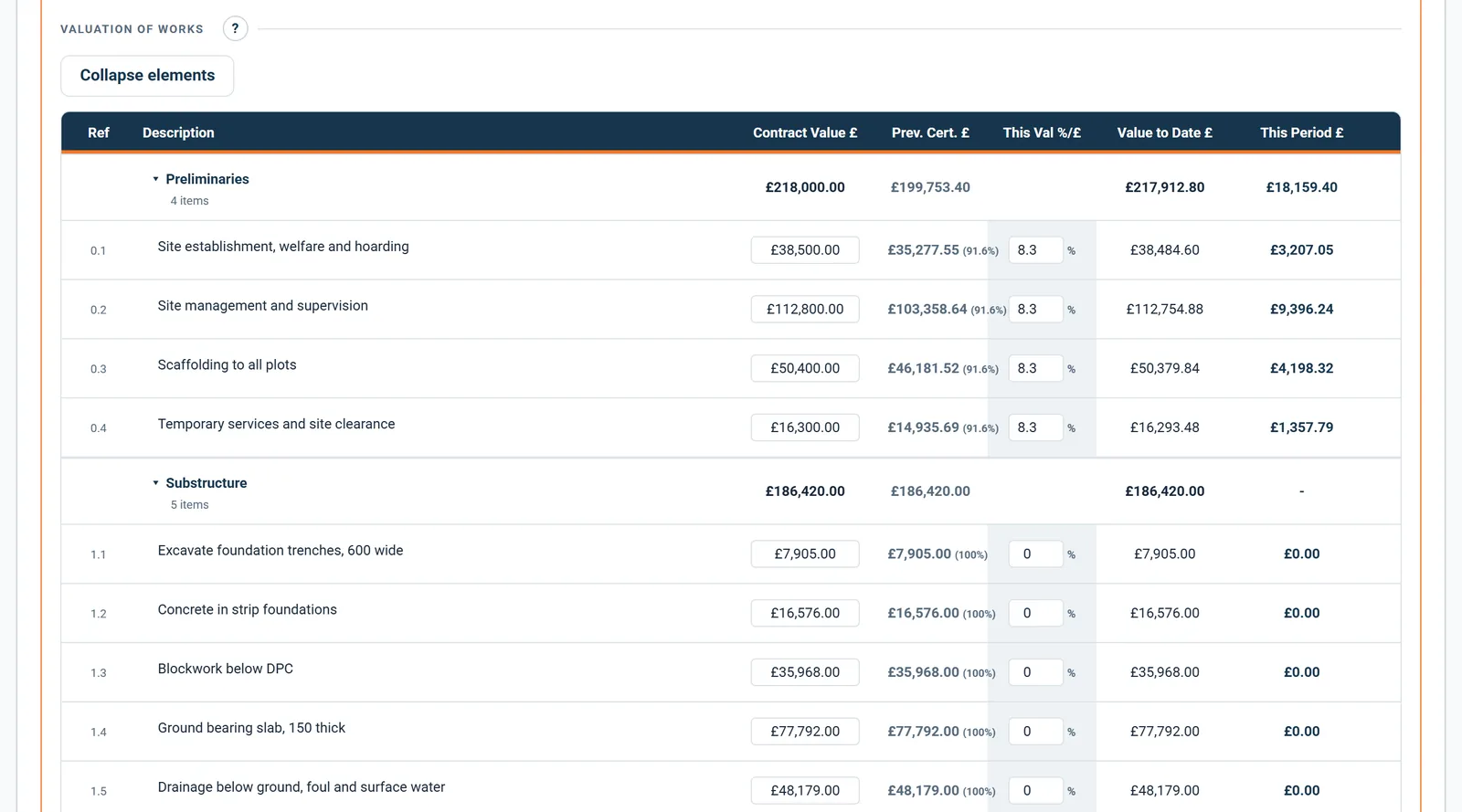
Some lines are a percentage of measured work, some are a lump sum, a provisional sum drawn down in tranches, or dayworks off a sheet, and forcing everything through a percentage is how spreadsheets end up with a fudge column.

  • A fixed sum stays fixed when you correct the contract value of the line
  • Both routes are capped so the total to date cannot exceed the line
  • The printed certificate always shows a percentage, so the client sees a normal valuation
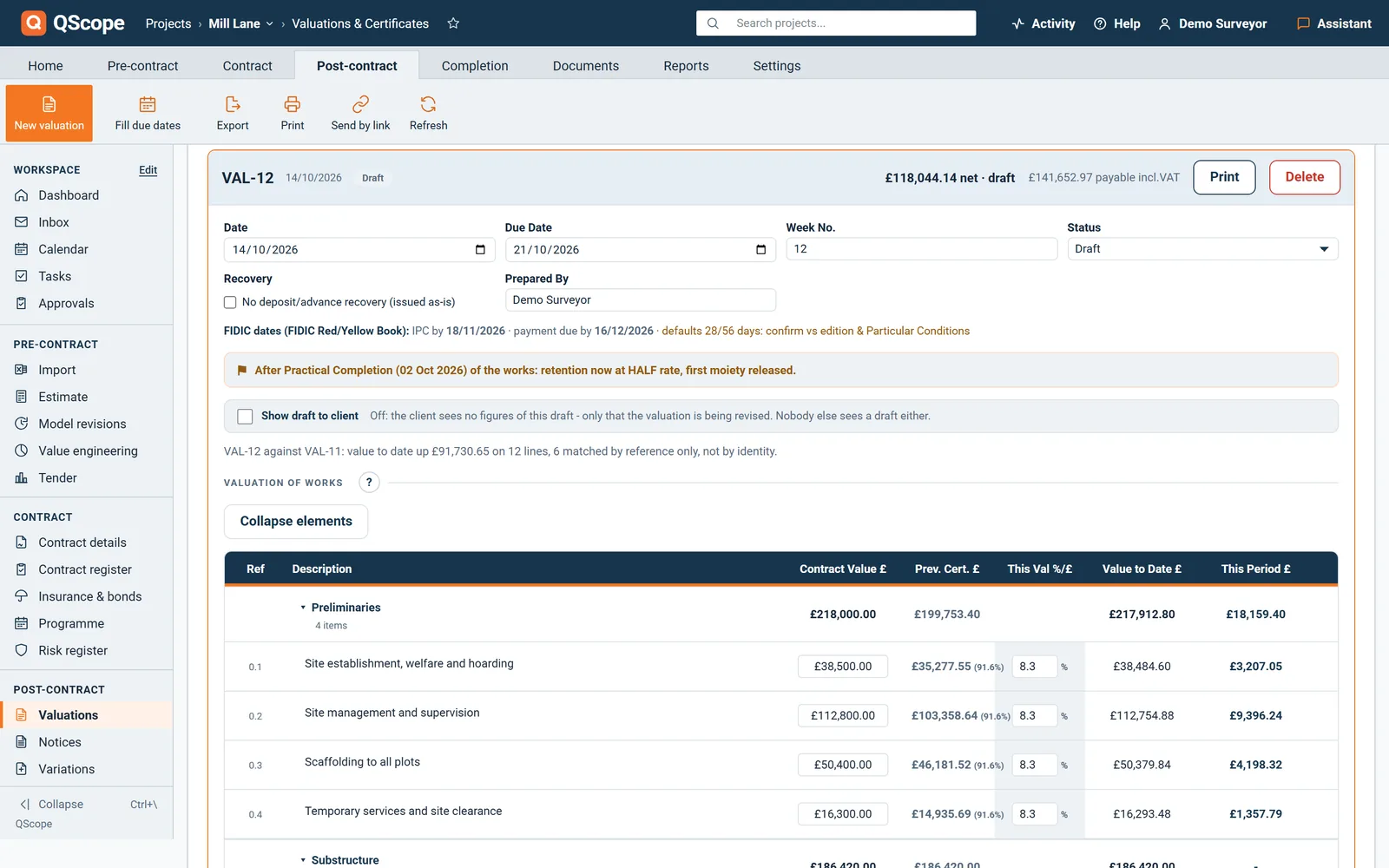
Valuation grid: contract value, previously certified, this valuation as a percentage or a sum, value to date and this period for each line

Click the per cent on any line to switch it to a fixed sum. The rest of the certificate does not change, because underneath both routes produce the same figure.

The document

The certificate carries the statutory statement

Section 110A of the Construction Act requires a payment notice to state the sum considered due and the basis on which it is calculated.

  • Your firm logo and practice name, never QScope branding
  • Signature blocks that follow your role in the contract
  • Document named correctly for JCT, NEC or the Scheme
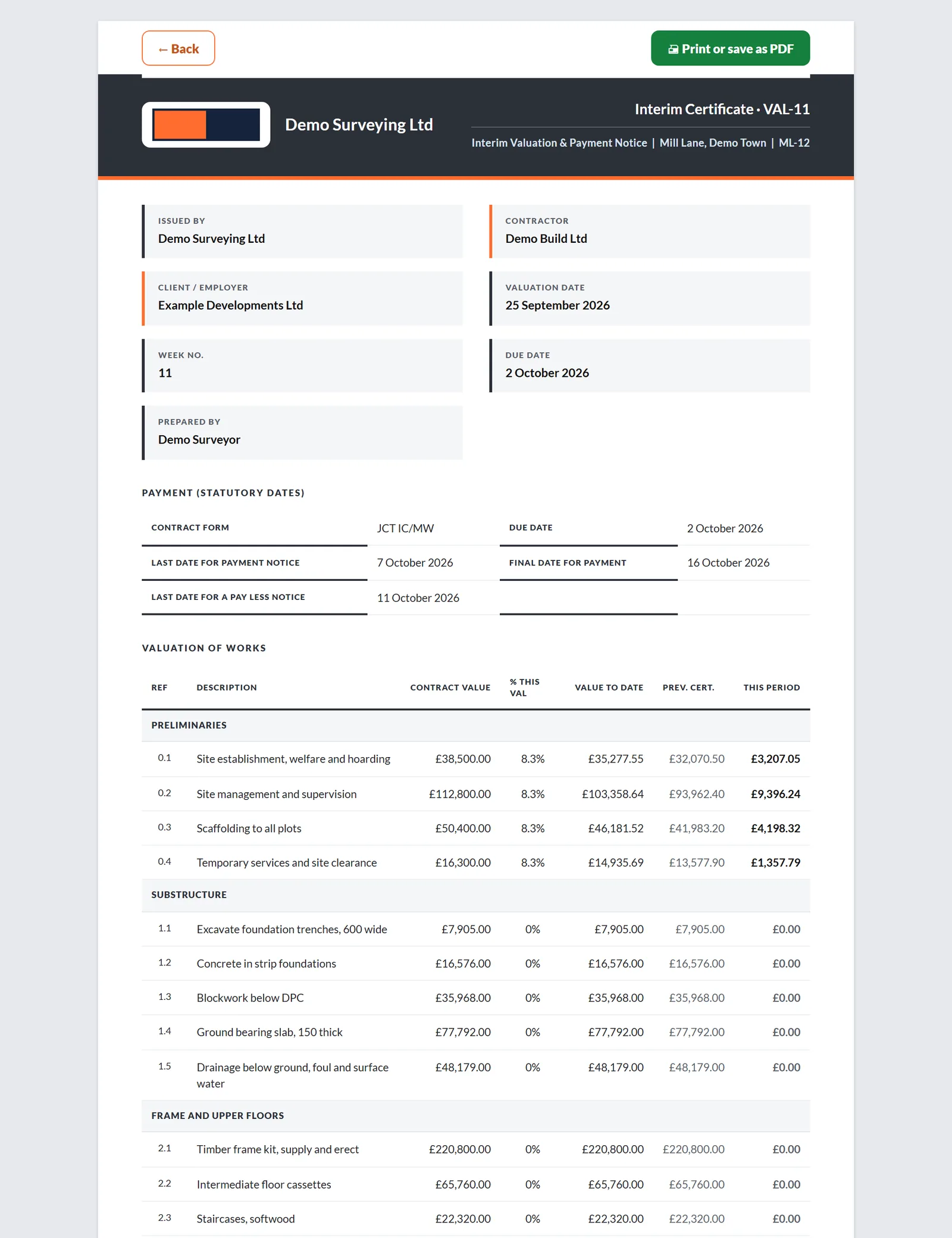
Printed interim certificate: payee, payer, gross valuation, retention, previous certificates, the sum due and the statutory dates

The valuation schedule is the basis on which that sum is calculated, and the document says so on its face rather than leaving the client to work it out.

Counted on the certificate, not afterwards

The routes, the dates and the contract forms are what the program actually carries, and each one is read out of the code that runs the valuation rather than rounded up for a page like this.

2

ways to value a line, on the same certificate

4

statutory dates printed on the face of every certificate

7

contract forms carrying their own statutory periods

The two routes are a percentage of the line or a fixed sum for the period. The four dates are the date payment falls due, the last day for a payment notice, the last day for a pay-less notice and the final date for payment. FIDIC is one of the forms, and it counts its own sequence in calendar days.

Statutory dates

The dates that turn a valuation into a notice

A certificate is only a payment notice if it carries the dates the Construction Act attaches to it.

  • Due date, payment notice deadline, pay-less deadline and final date for payment
  • England and Wales bank holidays skipped automatically, weekends counted
  • Printed on the face of the certificate, not just shown on screen
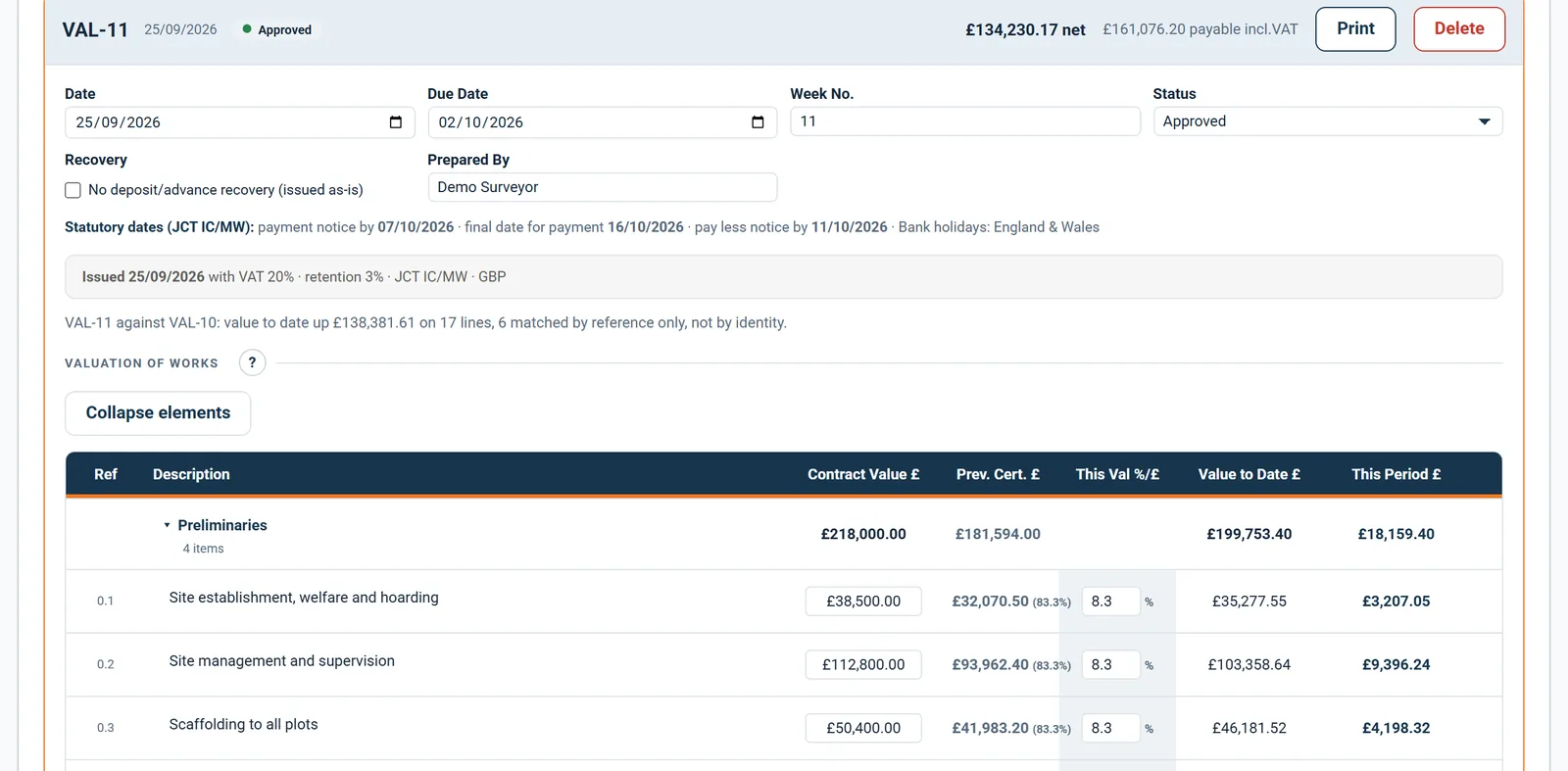
Valuation header with date, due date, status and the statutory dates under the contract form

The payment notice, pay less and final dates are counted from the due date under the contract form. The pay less deadline is the one that turns a valuation into a liability.

Once it is issued

An issued certificate stays the one the client received

A valuation cannot be issued until the four payment periods have been confirmed from your contract, and once it is issued the server refuses any save that would change it.

  • Put it back to Draft to change it, and that step is recorded in the audit trail
  • A revised valuation carries a banner saying what changed since issue, and the reissue says which version it supersedes
  • Show the draft to the client before issue, marked as not issued, with no way to agree it or serve a notice
An approved certificate: its lines and figures locked, with payment received recorded against it

Without confirmed periods the button says it cannot issue and opens Confirm your payment periods: QScope will not supply a number of its own for a date that has legal effect.

See it running before you sign up

Retention

Retention comes off the certificate, once

The £1,209 deducted for retention on this certificate is not a setting buried in a menu.

  • Full rate during the works, half rate after practical completion
  • Deducted from the certificate, not applied on a separate note
  • Release date calculated from the rectification period
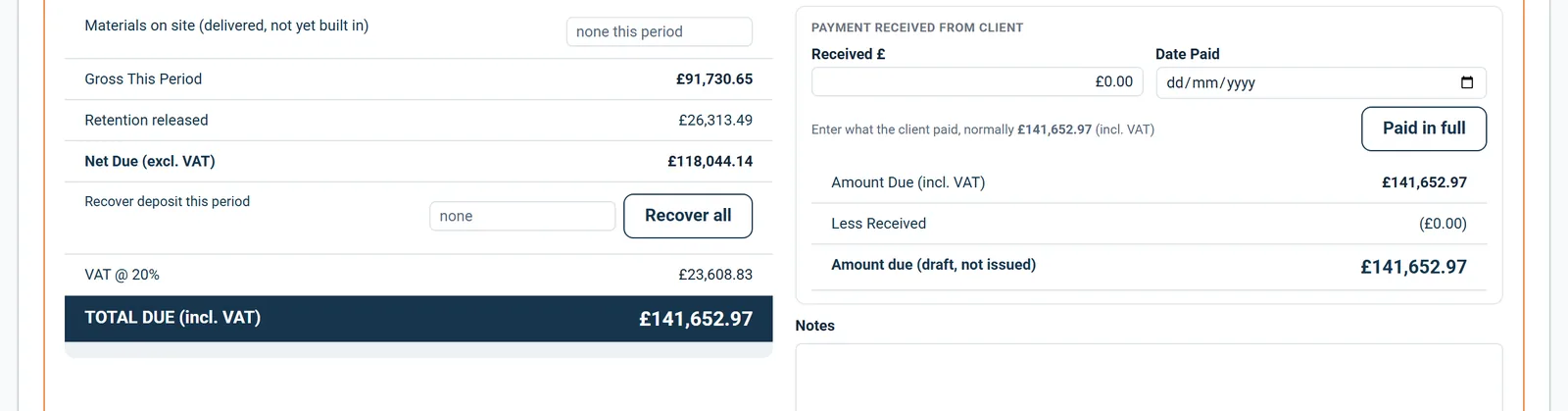
The money ladder on a valuation: gross this period, retention released, net due, VAT and total due

It is a deduction from the sum due, and it has to be the same figure the client sees on the retention notice, so the number here is the number on the notice.

Variations

Approved variations arrive as valuation lines

Under JCT they are valued in the certificate, so retention runs down one track and nothing is paid twice.

  • Approved variations pull in as normal valuation lines
  • Retention deducted once, in the certificate, as JCT expects
  • A certified variation cannot also be marked paid, so nothing counts twice
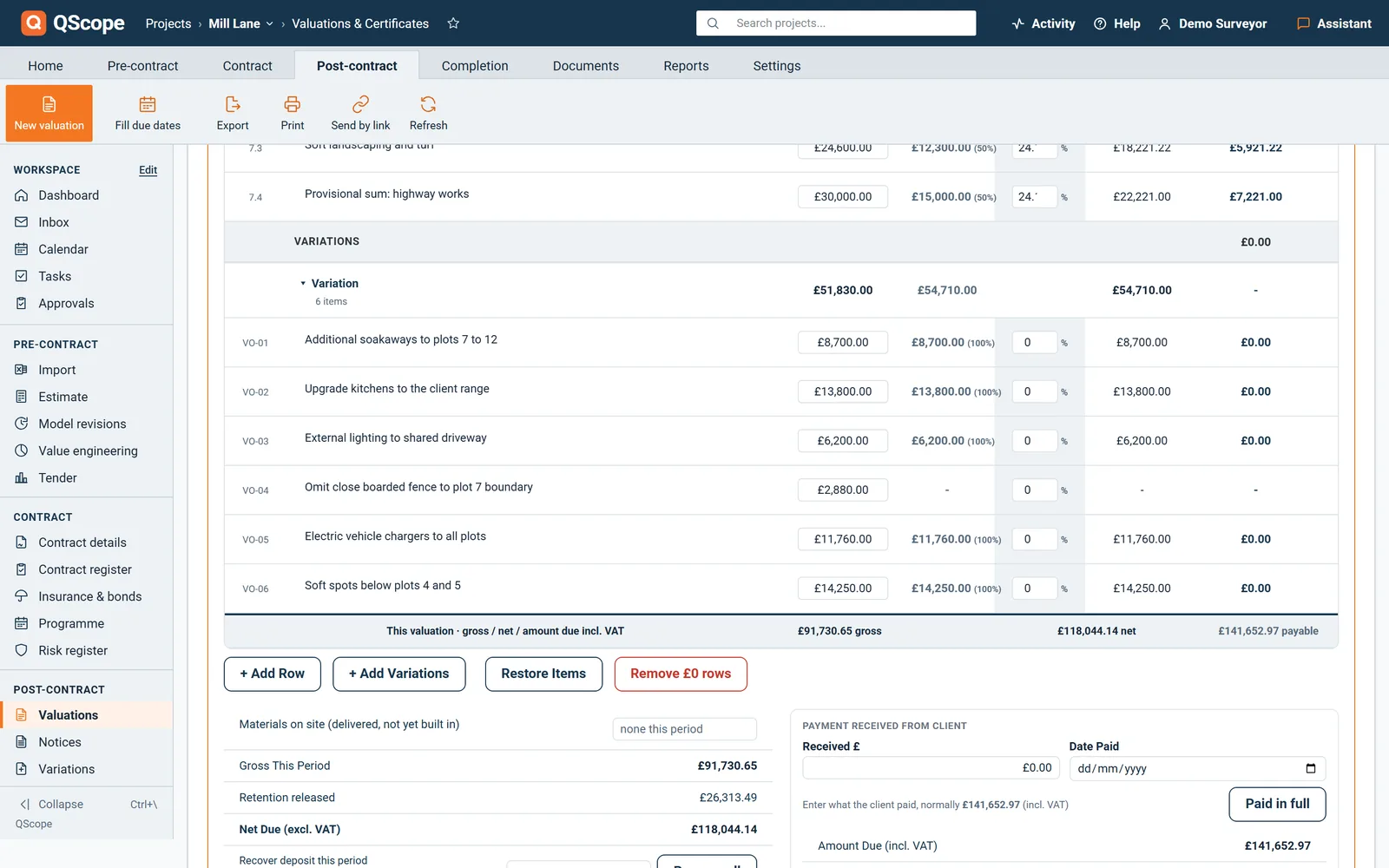
Approved variations carried into the valuation as their own lines

The approved variations are not paid on a separate note. The certified percentage is written back to each variation record, so the two never drift apart.

FIDIC

On FIDIC the Statement becomes a certificate

On a FIDIC contract the Contractor submits a monthly Statement, the Engineer values it and issues an Interim Payment Certificate, and the Employer pays.

  • Measured work valued under Clause 12, the same line by line valuation
  • Interim Payment Certificate within 28 days of the Statement, payment within 56, on the 1999 Red Book defaults
  • Retention released against Taking-Over and the Defects Notification Period, not practical completion
A FIDIC project: the statement and payment certificate on the contractual periods

There is no payment notice and no pay-less notice. The days are counted in calendar days and stay editable for the Particular Conditions of your contract; the published defaults are a starting point to verify, not legal advice.

Every other function on the valuations screen

51 functions the sections above do not cover, each as it works in the program.

Functions 1 to 26

01Fill blank due dates on certificates fills only the empty due dates from the schedule and overwrites nothing.
02Each valuation carries its own Date, Due Date, Week No. and Prepared By.
03Lines are grouped by element with subtotals, and Collapse elements folds a long bill down to its headings.
04You can edit the description and contract value of a line or remove it while the valuation is a draft.
05+ Add Row adds a line that is not in the bill.
06Restore Items puts back any bill lines you removed, with their previous certified value.
07Remove £0 rows clears the lines with nothing claimed this period.
08Enter materials delivered but not yet built in, and they are added to the gross for this period.
09Recover a deposit on any valuation by typing the amount or pressing Recover all.
10Tick No deposit/advance recovery (issued as-is) for a certificate already issued without recovery.
11Record what the client paid and when, or press Paid in full, and the card shows what is still due.
12Notes on the valuation print on the certificate.
13A draft can be deleted, an issued valuation cannot.
14Choose a modern or a classic monochrome layout for every printed certificate.
15Payment terms notes from Settings print on every certificate.
16If an issued valuation goes back to Draft, the client sees only that it is being revised, with no figures.
17Record a payment notice or pay less notice that arrived by post or email, with its date, amount and basis.
18The client disputes individual lines in their own column, each with a reason, and the total must agree to the penny.
19The client page shows the notice dates, and once a date has passed that answer is no longer offered.
20On a draft the client can only ask a question.
21After an answer you can issue on your figures or on theirs with one button.
22A deadline link opens the right valuation and highlights it.
23Set Acting as and the tab renames itself to Valuations & Certificates on the client side or Payment Applications for a subcontractor.
24Valuations are numbered from the highest number used, so deleting a draft never repeats a number.
25A new valuation takes its due date from the valuation schedule in Settings.
26When a fixed sum differs from the old percentage, the card and the printed certificate say by how much.

Functions 27 to 51

27The foot of the table shows gross, net and the amount due including VAT for this valuation.
28A line with nothing certified shows a dash rather than a row of zeros.
29When retention goes down, the card shows Retention released as a positive figure.
30Advance recovery appears as its own line, naming the advance and the amount recovered.
31A negative valuation is labelled DUE FROM CONTRACTOR rather than shown as a minus figure.
32Where a deposit or advance is recovered, the certificate says whether VAT came off before or after.
33If the due date belongs to a different valuation in the schedule, the draft tells you to check the dates.
34Each valuation states in one sentence how much the value to date moved since the previous one.
35A line with an advance against it shows how much of the advance is included in the certified figure.
36A valuation cannot be issued until a contract form is chosen in Settings.
37Where a deposit or advance is recovered, the valuation cannot be issued until you say whether that payment was invoiced with VAT.
38An unset or out of range rate stops the issue with CANNOT ISSUE CLEANLY and asks you to confirm.
39An issued card shows the date it was issued and the rates it was issued on.
40If a rate is missing, the program warns before printing and marks the certificate INCOMPLETE.
41A printed draft states that its dates are worked out from today's settings and fixed at issue.
42The certificate opens with Print or save as PDF at the top.
43The email to the client is titled Valuation VAL-04 for your review with the site name.
44When the client answers, you get an email naming the valuation and the answer.
45The client's answer sits on the card with their figure, yours and the difference line by line.
46A status set by the client through the link is marked via link.
47If a valuation went out without payment dates, the card says so and explains what the client cannot do.
48When the payment notice date passes with no notice recorded, the card says so with the date.
49Valuations Summary prints every issued valuation with gross, retention, net and the running total.
50Detailed Valuation Report sets the bill against the percentage certified in each valuation you choose.
51The dashboard flags a valuation still in draft after its period has ended.
Who it is for

Four chairs, one valuation on the table

You are applying

You value it, and the certificate cuts it

You value the work line by line and submit the application. When the certificate lands short, the difference is argued line by line too, and your valuation is the evidence.

Applying for payment
the same measurement

You are certifying

You cut it, and you sign your name

You value the same lines from the other chair and issue the certificate. Every percentage you cut has to survive the question of why, a month or a year later.

Certifying payment

You are doing both

You value your own work, alone

You price it, you value it and you apply for it yourself, between site visits. The certificate still has to add up as if a surveyor had built it.

Doing both yourself

You are reporting

You certify value the lender pays on

You certify value in place so the lender can release the next tranche. The valuation is the same arithmetic; the reader was never on site.

Recommending a drawdown

The client, the architect and the tenderer are not on this list. They are the people you let in on a link: they see the one document you sent them, answer it, and that answer is written into the record. No account, no licence, no charge, on every plan.

FAQs

The five that come up most often about certificates that have to stand up as payment notices.

Yes. You can enter the bill directly or bring it in, then every certificate values against those lines. Section subtotals and omissions carry through, so the certificate structure matches the bill the client already has.

You cannot. QScope caps each line at the contract value less what has already been certified, and tells you how much is left on that line rather than silently trimming the figure.

No. Documents carry your practice name and your logo. QScope does not appear on anything you send a client.

Yes, and each has their own login so the audit trail records who prepared each certificate. If two people open the same project, QScope warns the second one rather than letting one overwrite the other.

Yes. Set the contract form to FIDIC and the certificate becomes an Interim Payment Certificate valued from the Contractor’s Statement, with the 28 and 56 day sequence counted in calendar days on the 1999 Red Book defaults. The dates are published starting points to verify against your Particular Conditions and jurisdiction.

From the blog

The part nobody teaches you, written down

Three of the questions this page raises, answered at length and without a sales pitch at the end.

All 174 pieces

Keep reading

The three parts this page leans on

Put one valuation in and see the certificate come out

Your own lines, your own retention rate and your own contract form. The percentages, the fixed sums, the statutory dates and the statement come out of the same screen, and nothing is retyped between the valuation and the document you send.

30 days free, no card.

Rather ask first? Write to help@qscope.co.uk and you will get a reply within one working day, Monday to Friday.