QScope replaces the quantity surveyor where there isn’t one, and helps the one you have.
Cost estimates, tendering, variations, valuations and retention, through to the final account.
Works to
- JCT
- NEC3/4
- RIBA
- NRM
- FIDIC
Cost estimates, tendering, variations, valuations and retention, through to the final account.
Works to
30 days
No card to start, and nothing to cancel if you decide to walk away.
1,653
Distinct priced item descriptions, ready to pull before you write a line.
4 dates
Counted from your own contract, so you are not the one remembering them.
One record, three people who need different things from it.
Pick the one that sounds like your week. What sits underneath is the same project record, but what you are trying to get out of it is not, and each page behind these buttons is written for one reader.
Applications go out on the day they fall due, every variation carries the instruction that raised it, and the money still owed to you is a figure you read off one screen rather than one you rebuild by hand on a Sunday evening with three spreadsheets open in front of you and no way to check it.

Certify only what has actually been built, question a sum long before it hardens into the sum that falls due, and read the whole commercial position on one screen instead of hunting for it across three inboxes, a spreadsheet and a folder of attachments nobody has opened since the early spring.

Measurement, certificates, statutory dates and the record that stands behind them all live in one place, so a figure queried a year after issue is answered from the document itself rather than from memory, and the paper you send out carries your own practice name and letterhead, never our own.

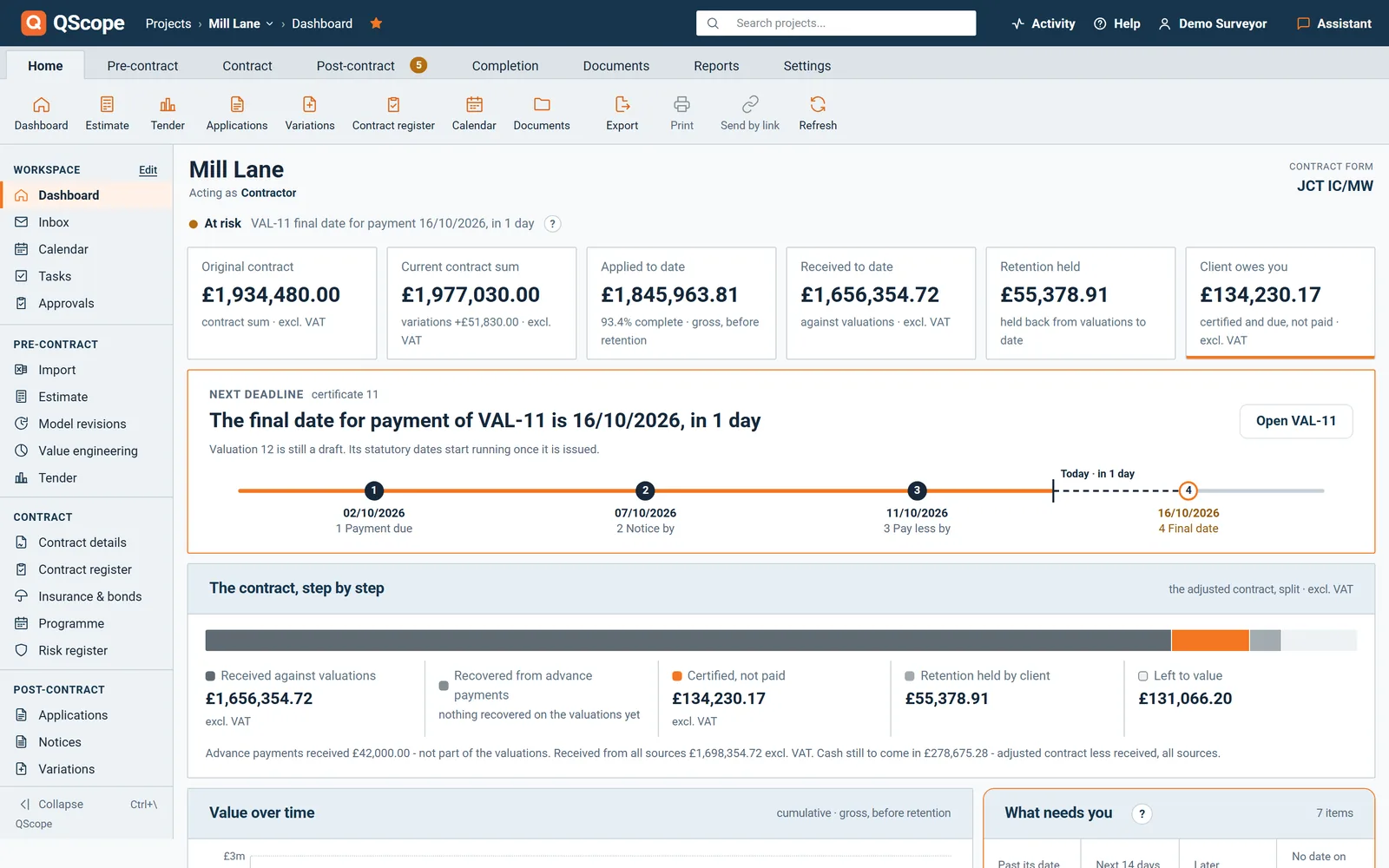
None of these is a story about software. They are what happens on a construction contract when the paperwork is late, missing, or impossible to rebuild. The figures are from the job in the panel at the top of this page.
£12,964.10
One missed date
The contractor applied for £68,400.00 and the certificate says £55,435.90. If neither a payment notice nor a pay-less notice is served by the deadline, the sum applied for becomes the notified sum and falls due in full.
QScope counts that deadline from the periods you confirm from your own contract, prints it on the face of the certificate and repeats it on the notice you send to the client.
£7,585.97
Sitting with somebody else
That is the retention held on this job today. Half comes back at practical completion and half at the end of the defects period, twelve months on. Neither half comes back on its own, and nobody is counting the days.
The rate drops to half automatically once practical completion is certified, the release date is counted from it, and the notice you send shows the same figure as your dashboard.
12 months
Later, in a negotiation
A year after issue, somebody asks how a figure was arrived at. From a spreadsheet you rebuild it from memory and hope it matches the paper you sent. Whoever cannot show their working concedes the point, right or wrong.
A QScope certificate freezes at the moment of issue, and every change made since then sits in a trail that nobody can edit, that carries a name and a date against it, and that exports to CSV.
You confirm the payment periods once, from your own contract. Everything below is counted from them and printed on the certificate and on the notice. These are the dates from the job in the panel at the top of this page.
Miss the payment notice on 7 September and the pay-less notice on 11 September, and the sum applied for becomes the notified sum. You pay £68,400 instead of the £55,436 you certified: £12,964 you never agreed to, on one job, for one missed date.
The five-day period for a payment notice is the limit set by s.110A(1) of the Housing Grants, Construction and Regeneration Act 1996. The fourteen days to the final date and the five days for a pay-less notice on this job come from the contract, not from statute, which is why QScope asks you to confirm them rather than assume them. Try it on your own contract.
QScope is quantity surveying and commercial management software for UK construction. The same record carries the job from the day you price it to the day the account is agreed. What you estimated is what the valuations measure against, what the valuations certified is what the final account adds up.
Nothing is retyped between one stage and the next, so a figure you entered in the first week is still the figure being argued from in the last one.
Ten stages, one record
On the left, what a commercial team does by hand most months and stops doing. On the right, what one job set up this afternoon can already put in an envelope. Same change, seen from both ends.
Six things you stop doing
Six things you can already send
Not a video and not a tour. Move three percentages, press issue, and read the certificate that comes out. The arithmetic and the dates are the ones the program uses, on the same job as the panel at the top of this page.
Drag a percentage. Every figure below recalculates as you move it, and no line can go back below what was already certified.
Retention is held on the cumulative certified value, so the certificate shows the movement for this period, not three per cent of this valuation. That is how the program calculates it.
The four dates are not typed in. They are counted from the contract form by the same engine the program uses, with UK bank holidays excluded.
This is the layout QScope prints, with your practice name on it and never ours.
That was about thirty seconds on a demo. On your own job it takes an afternoon, and then it takes twenty minutes a month.
Every tool here follows the money, from the first estimate to the final account. Most construction software was built for drawings and snagging, then had a money tab added later. QScope starts where the money starts: the bill, the valuation and the certificate.
Free, and no account needed
Put in your contract form and the date of the application, and get the four dates back: payment due, payment notice, pay-less deadline and the final date for payment. Nothing is saved and nothing is asked of you.
No logos we were not given and no quotes nobody said. Three interviews written up in full, including the parts where QScope was not the answer.
 Main contractor
JB Building London
Extensions and refurbishments across London, certifying down to their own subcontractors.
Main contractor
JB Building London
Extensions and refurbishments across London, certifying down to their own subcontractors.
 Main contractor
Tora Build
Eleven questions on how the commercial side of their jobs actually runs, answered in full.
Main contractor
Tora Build
Eleven questions on how the commercial side of their jobs actually runs, answered in full.
 Developer and client
MD & Audrey Properties
Paying a contractor on their own schemes, and what they wanted to see before releasing money.
Developer and client
MD & Audrey Properties
Paying a contractor on their own schemes, and what they wanted to see before releasing money.
Every assumption below is yours to set, including how much time you think QScope would save you. We have not put a single figure of our own into this calculation.
Your own figure, a year
£0
Eight hours at forty-five pounds, halved, is the starting point on the sliders, not a claim. Change all three and the figure changes with them.
On your own
£199/month
Most popular
Small team
£449/month
Whole business
£849/month
Every screen above is on every plan. There is no tier that takes retention away, and no tier that charges you again for the certificate at the end of a job you already paid for. What changes between plans is how many projects you run at once.
No. Documents carry your practice name and your logo. QScope does not appear on anything you send a client.
Yes. Set the contract form to FIDIC and the certificate becomes an Interim Payment Certificate valued from the Contractor’s Statement, with the 28 and 56 day sequence counted in calendar days on the 1999 Red Book defaults. The dates are published starting points to verify against your Particular Conditions and jurisdiction.
Yes. If your bill is in an awkward format, send it to support and we will tell you the quickest route rather than leaving you to fight it. Either way the sections and subtotals you priced are preserved.
No. The cost side is entered by hand and stays that way. The program has no access to your accounts, and pretending it did would be the worst possible choice in a report about margin.
QScope detects it and warns the second person rather than letting one silently overwrite the other. Losing an afternoon of valuation because a colleague had the job open is not an acceptable failure mode.
Yes, to CSV, per project. It opens in Excel with a byte order mark so names with accents are not mangled, which matters when the file goes into a bundle.
From the blog
174 pieces on the commercial side of a contract. No sign-up, and no piece that ends in a sales pitch.

A certificate for less is not money lost, it is money deferred, unless you let it disappear. Why the certified figure usually rules the month, how cumulative valuations carry the difference forward, and when the fight is worth having now.
Read now
The due date starts the clock. The final date for payment is when money must arrive. Between them sits a counting rule that keeps weekends in and takes bank holidays out, on the England and Wales calendar.
Read now
The end of the rectification period is silent. No invoice, no application, no meeting, and that is exactly why the money sits there.
Read nowNot a sample and not a tour. Your own job, your own contract dates, and the certificate that comes out of the other end. Thirty days, no card, and nothing to cancel if you walk away.
Rather ask first? Write to help@qscope.co.uk and you will get a reply within one working day, Monday to Friday.