QScope

Reports

The reports you actually send

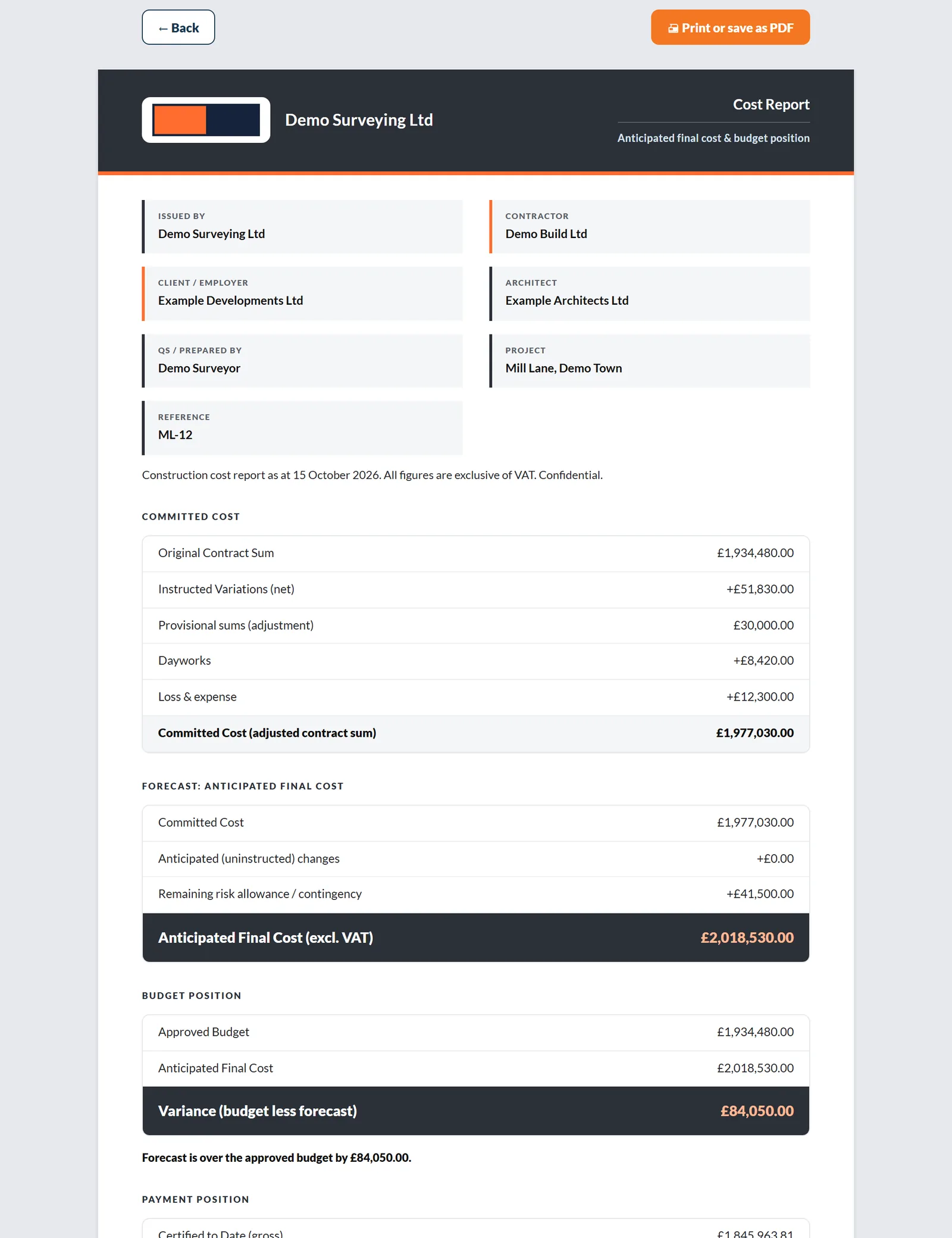
Not a report builder with forty options. Four documents a QS produces every month, each already laid out the way a client expects to receive it.

  • Your practice name and logo, never QScope branding
  • Client purchase order printed so their accounts team can match it
  • Layout A Classic prints in black and white with totals closed by a double rule

30 days free, no card.

Reports
What prints
Cost report, anticipated final costClient
Retention noticeClient
Client Financial SummaryClient
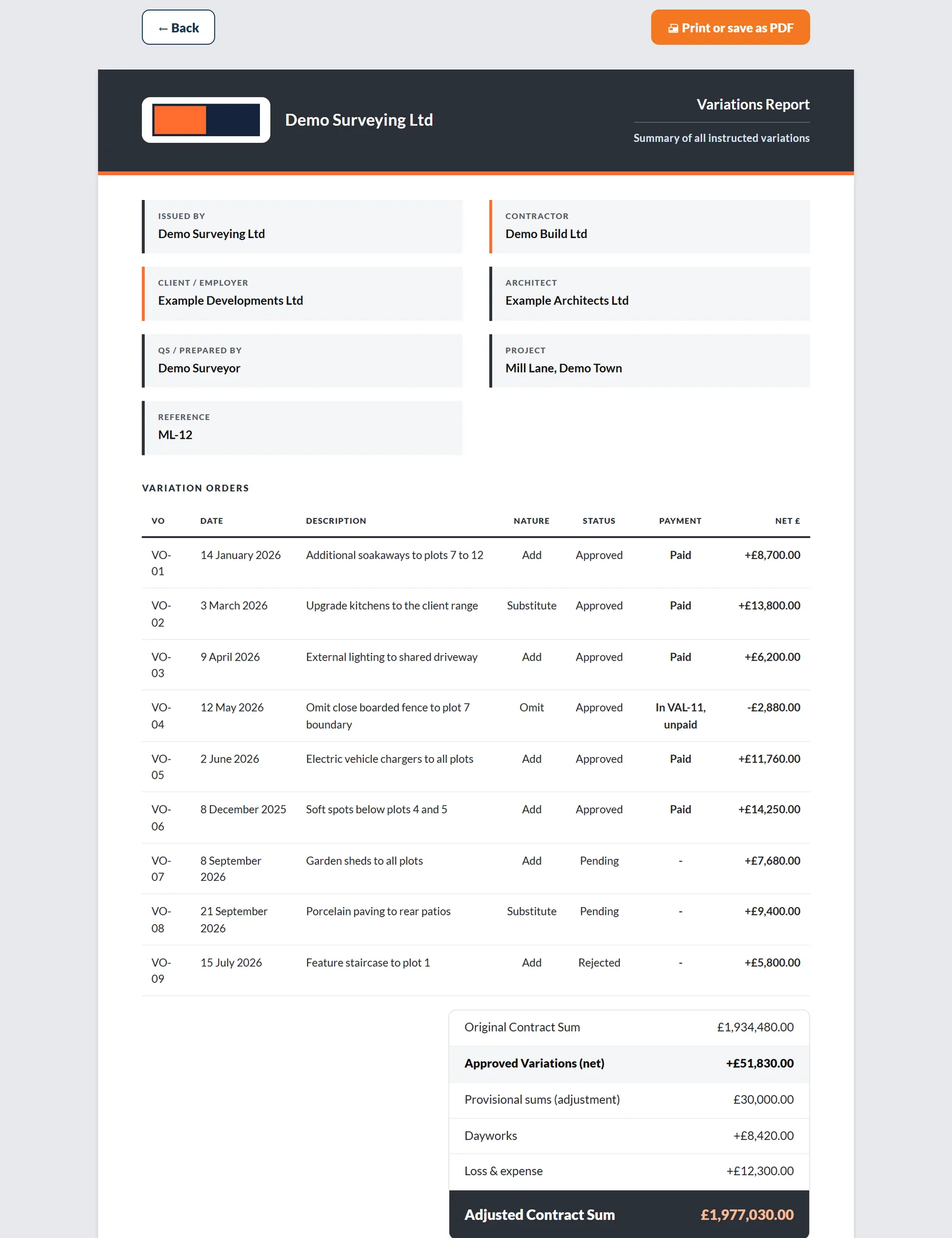
Variations ReportClient
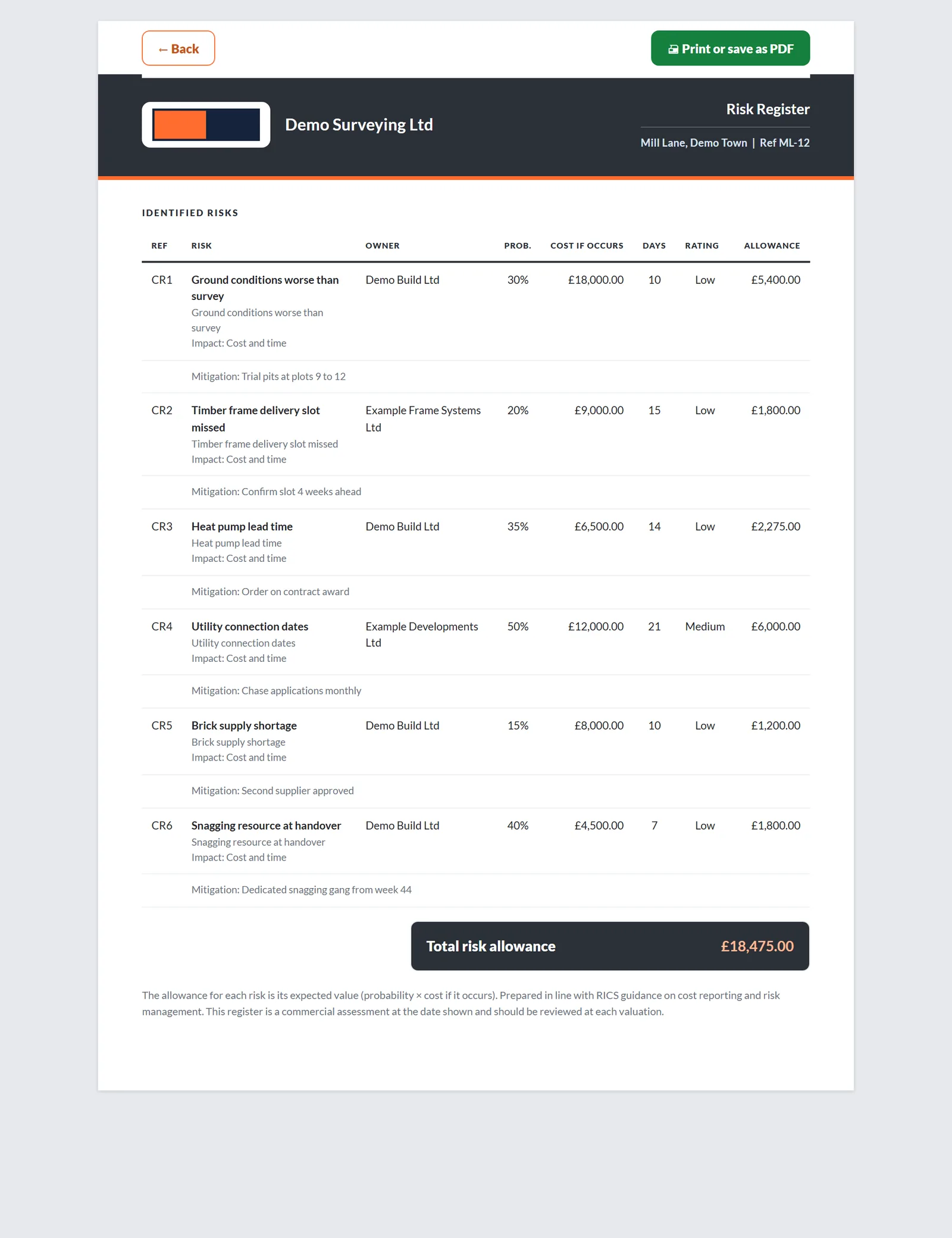
Risk registerInternal

Every document QScope prints is black and white, with negative amounts in brackets and figures set in tabular numerals so columns line up.

Printed to survive a bundle

Reports get photocopied, scanned and attached to adjudication papers.

Anything that relies on colour stops being readable at that point, and a report that cannot be read is a report that cannot be relied on. Every document QScope prints is black and white, with negative amounts in brackets and figures set in tabular numerals so columns line up.

Reports

Cost report: tell them early

A cost report exists so the client hears about an overrun while something can still be done about it.

  • Anticipated final cost against approved budget, variance stated as a figure
  • Remaining to certify shown against the anticipated final cost
  • Contingency carried from the risk register, so it can be defended
Reports
Cost report to client
Approved budget
£230,000
Anticipated
£224,800
Variance
+£5,200
Certified to date£84,115.00
Remaining to certify£18,400.00
Risk allowance carried£5,200.00
Anticipated final cost£224,800.00

Anticipated final cost sits against the approved budget from the first valuation onwards, with the contingency drawn from your risk register rather than guessed.

Reports

Retention notice and the client financial summary

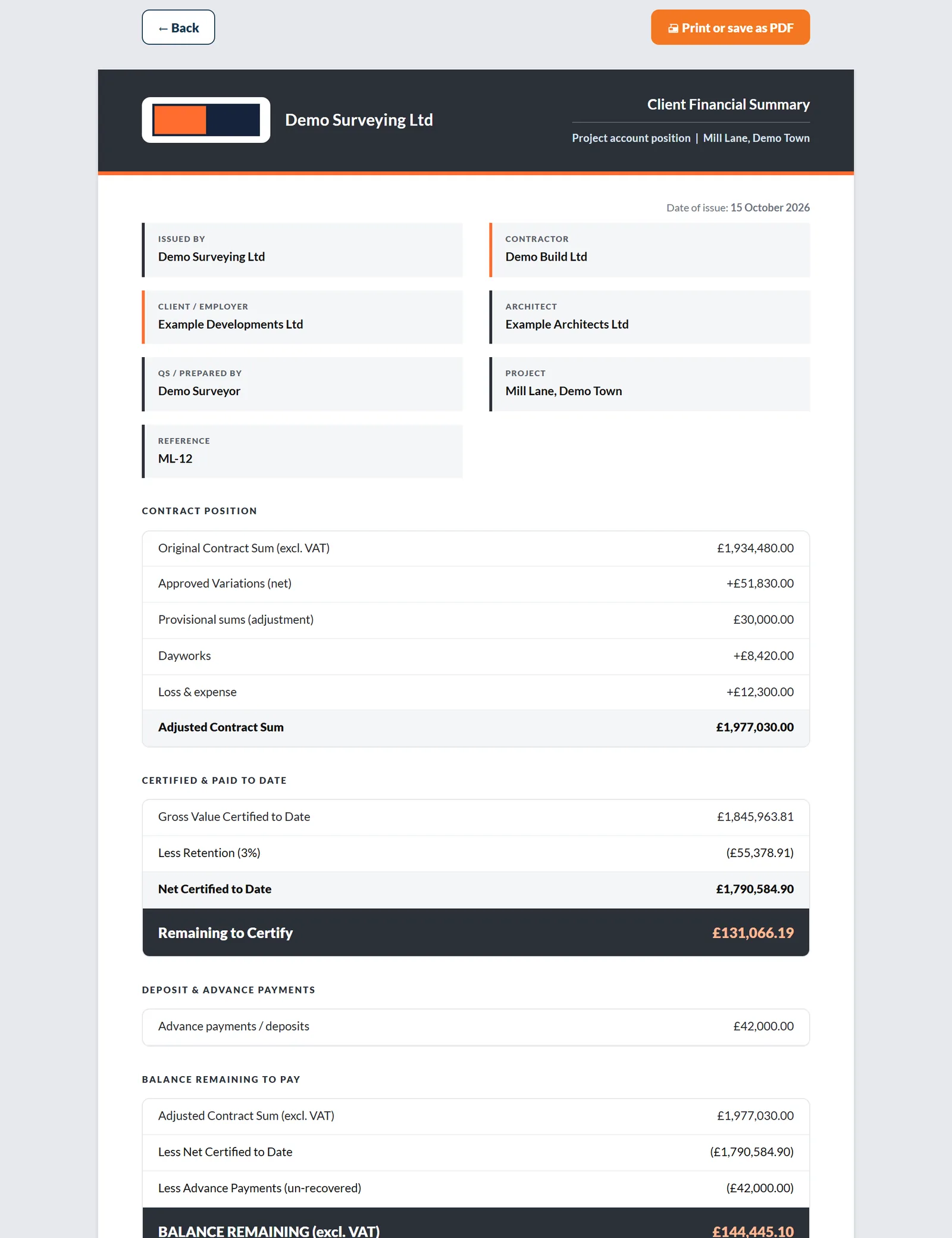
Two documents that exist to stop an argument before it starts.

  • Retention held, with the first half released at practical completion and the balance at the end of the defects period
  • Client Financial Summary listing every certificate with net due, received and outstanding
  • Variations Report listing each change, its basis and its status
Reports
Client Financial Summary
CertificateDueReceived
PC-01, 15 May 2026£3,482£3,482
PC-02, 15 Jun 2026£428£428
PC-03, 15 Jul 2026£9,140Outstanding
Outstanding to date£9,140.00

Two documents that exist to stop an argument before it starts. The retention notice tells the client exactly what is held and when it comes back. The payment schedule shows every certificate, what was due and what was received.

See it running before you sign up

Cash flow

The cash forecast a funder actually asks for

A cost report tells the client where the final number is heading.

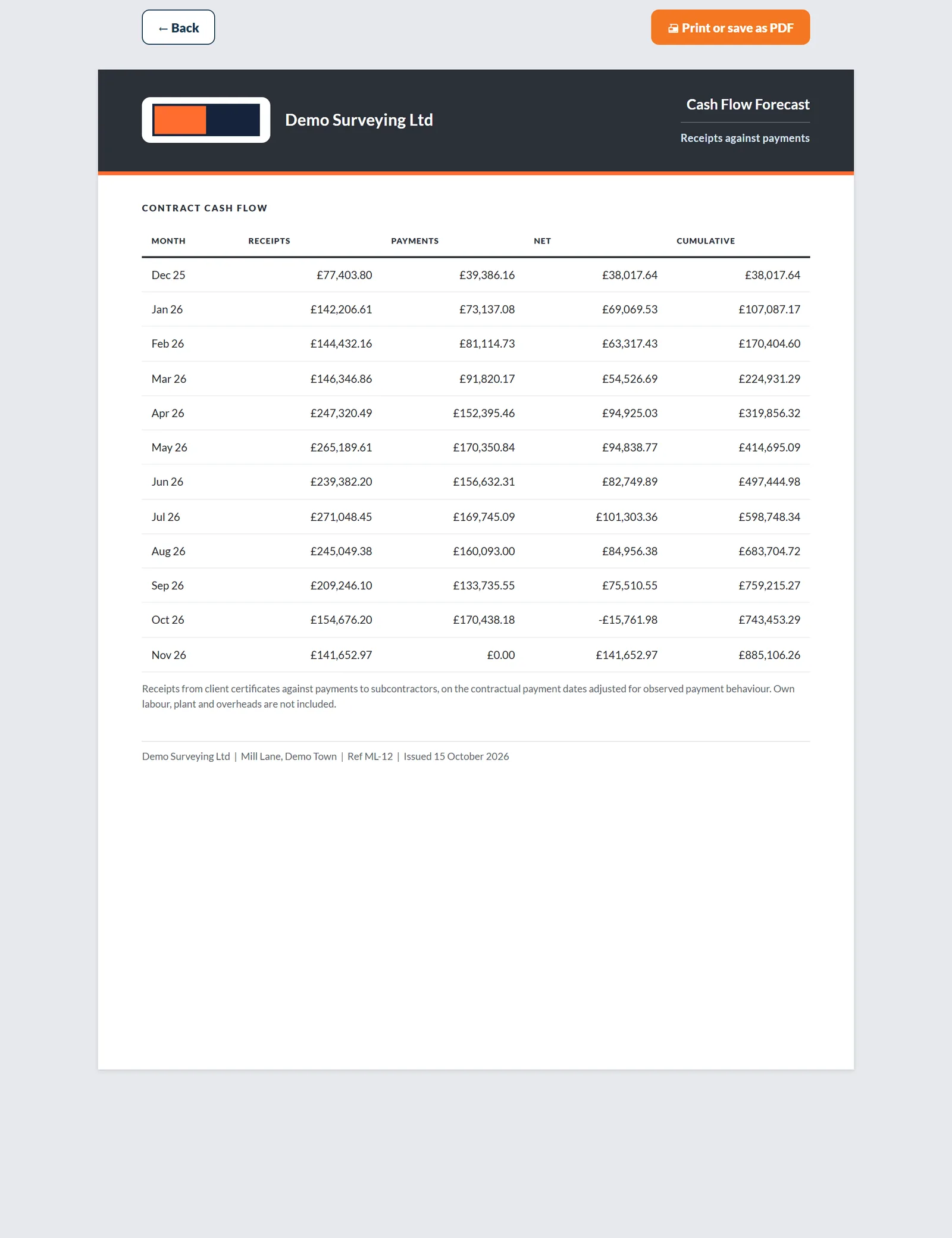
  • Receipts from certificates against payments to subcontractors
  • Cumulative position printed month by month
  • Says plainly what it does not include
Cash flow
Forecast for the funder
Peak funding
£186,400
Occurs
Nov 26
Sep 26 · actual(£142,900)
Oct 26 · actual(£171,300)
Nov 26 · forecast(£186,400)
Dec 26 · forecast(£164,100)

The forecast is built from the certificates already issued and the valuation schedule ahead, so the peak funding requirement is a document you can hand over rather than a figure defended from memory.

Cost and value

The report you keep, behind the one you send

The cost report faces the client and never mentions margin.

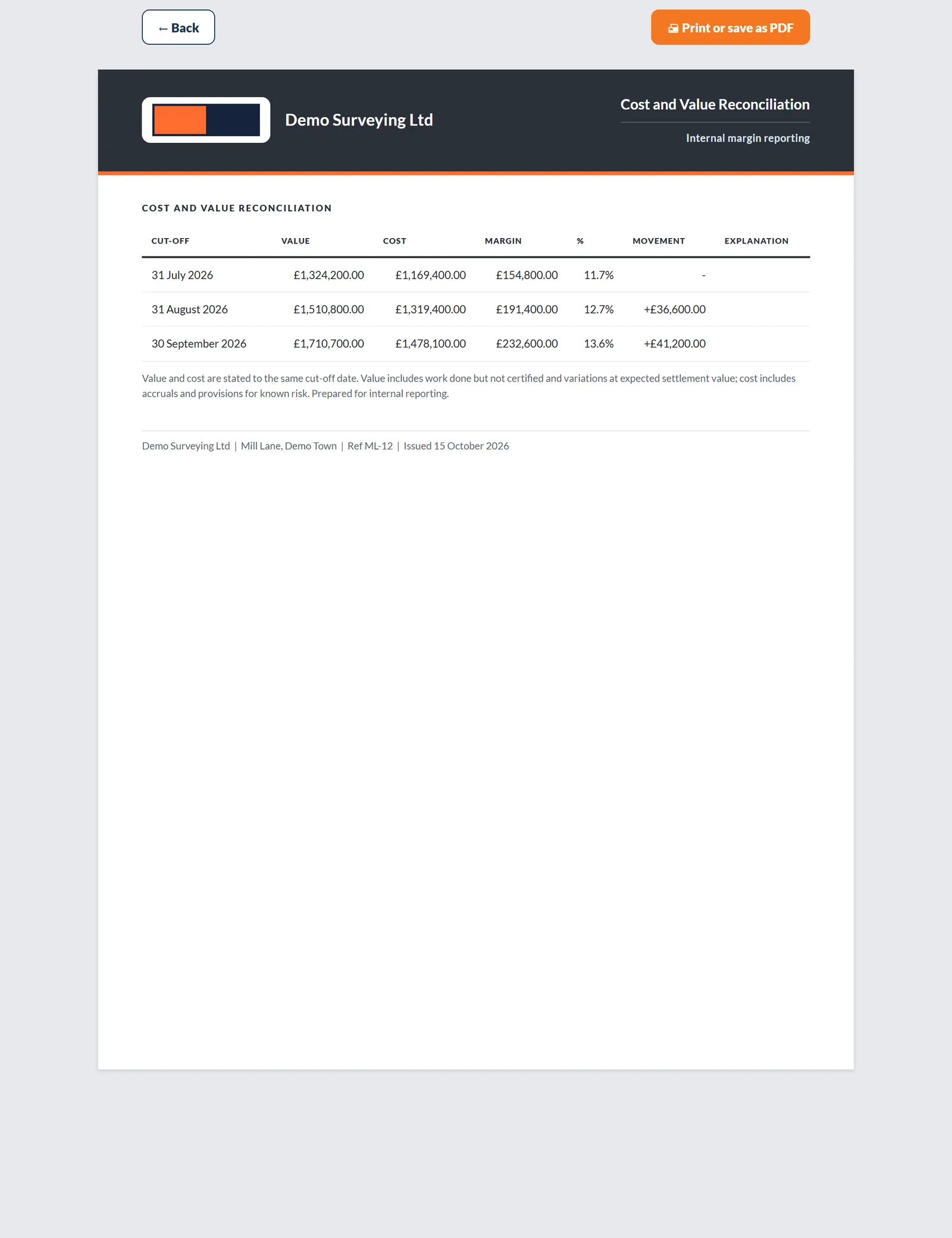
  • Value earned against cost incurred to one cut-off date
  • Margin and margin percentage, period by period
  • Kept internal, hidden from client guest links
Cost and value
Period to 30 Nov 26
Value
£93,300
Cost
£86,100
Margin
7.7%
Certified value£84,115
Done, not certified£6,400
Variations at settlement value£2,785
Value to the cut-off£93,300

Both work from one cut-off date, so the anticipated final cost you show the client and the margin you keep to yourself are two views of the same period, not two different projects.

Dashboard

Every report is the live position, printed

The reports are not a separate set of numbers you keep in step by hand.

  • Figures recalculated as you value, across every project
  • Contract sum, certified, retention and due this period first
  • The closest statutory deadline shown underneath
Dashboard
Ref 001, 11 Essex Road
Contract sum
£220,250
Certified to date
£84,115
Retention held
£4,205
Due this period
£14,031
Payment positionDateStatus
Last date for payment notice20 AugIssued
Last date for a pay-less notice24 Aug4 days
Final date for payment29 AugDue

Contract sum, certified to date, retention held and due this period stay current as you value, so the cost report you send and the figure you quote on the phone are the same figure.

Reports and documents

Certificates, notices and payment

The documents that move money, issued from the valuation they belong to.

  • Every document opens ready to print or save as a PDF
  • Your practice name and logo at the top, never QScope branding
  • Figures come from the live record, not retyped into a template
Reports and documents
Certificates, notices and payment
DocumentWhat it covers
Interim Payment Certificateper valuation
Subcontractor Certificateper subcontract valuation
Pay Less Noticeper valuation
Advance Payment Noticeper advance
Retention Noticeretention held and release stages
Retention Release Certificateper release
Certificate Registerevery certificate issued
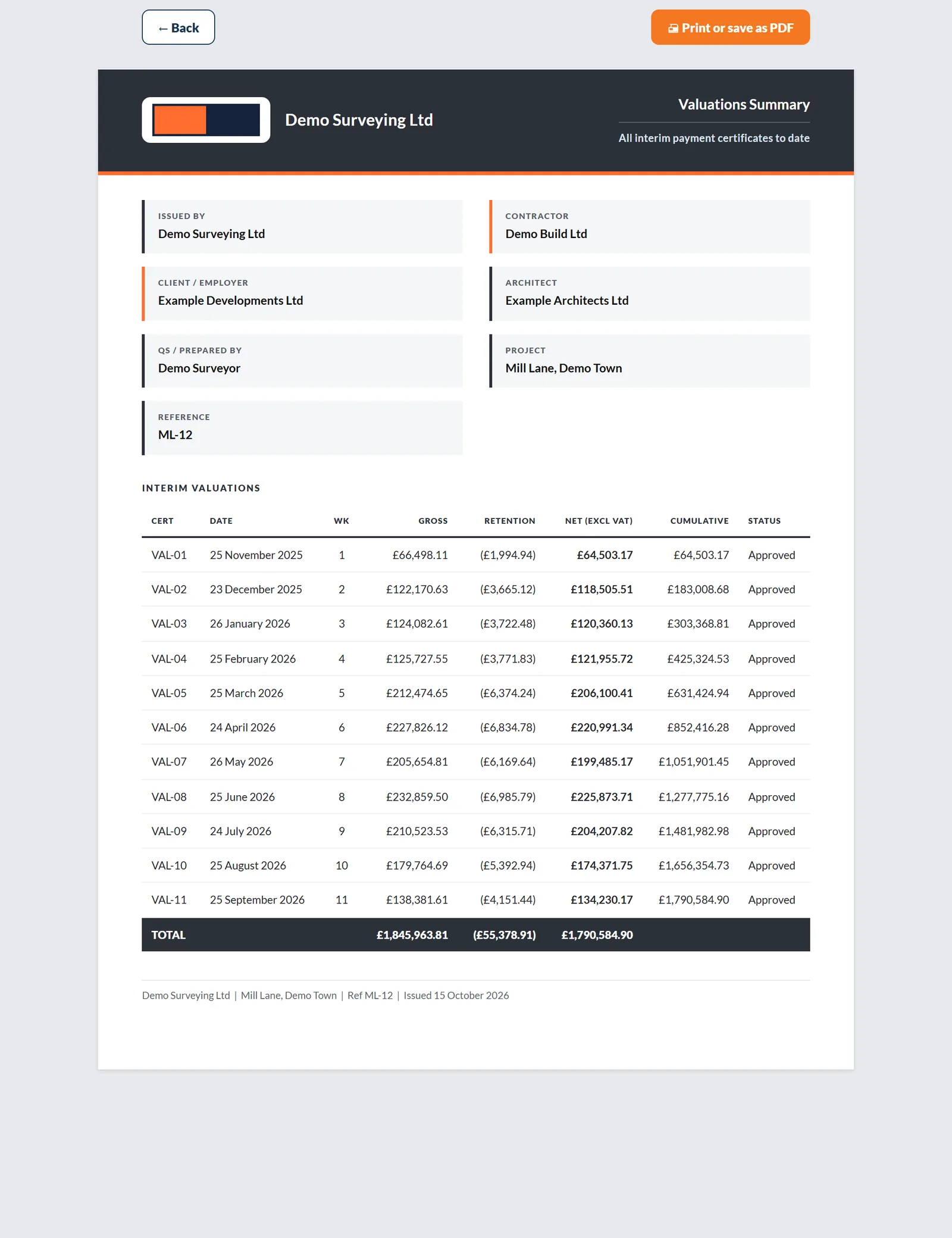
Valuations Summaryall valuations to date
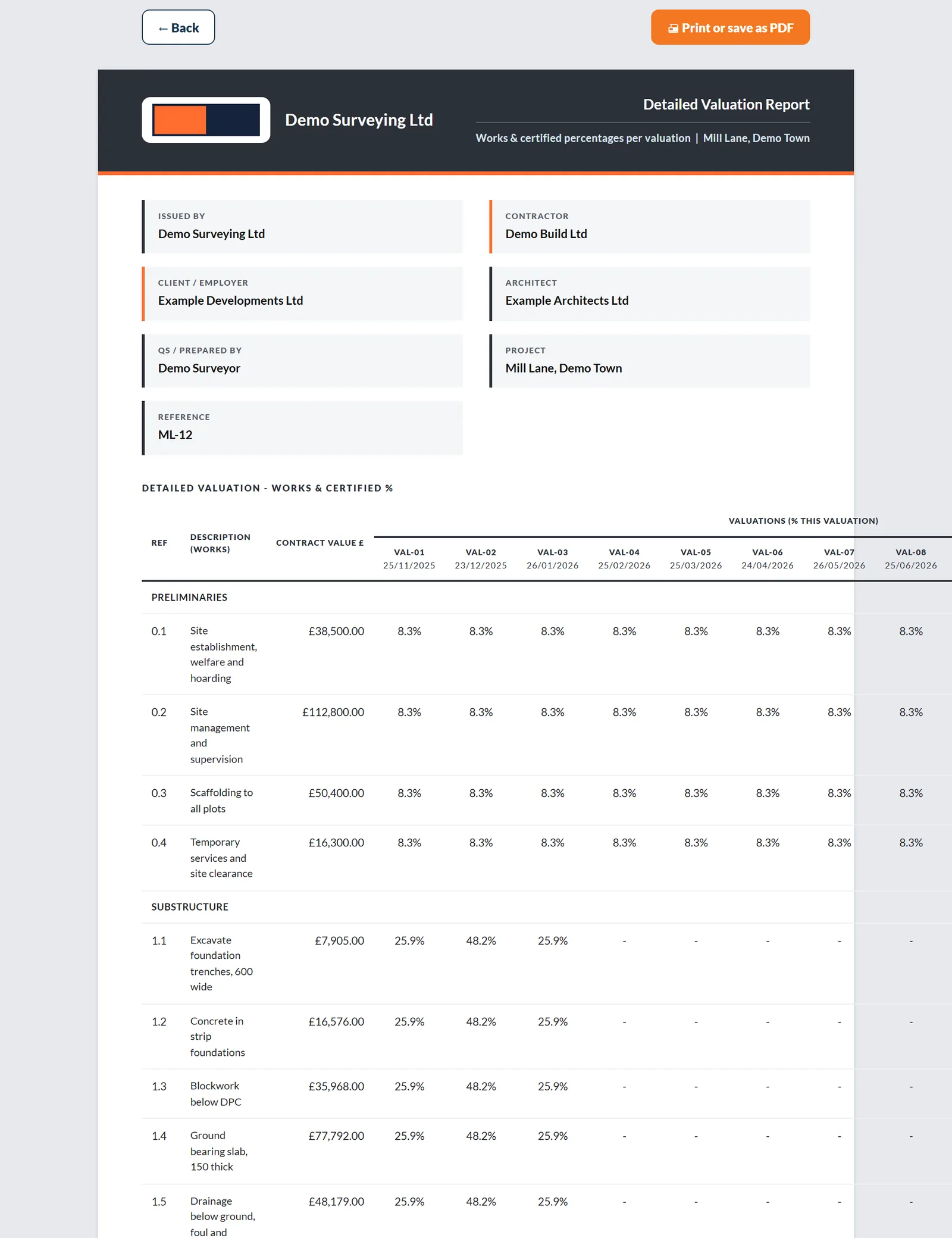
Detailed Valuation Reportline by line
Client Financial Summaryfor the client
Documents in this group10

The certificate takes the name your contract uses: Interim Certificate, Interim Payment Certificate, Payment Certificate, Interim Payment Notice or Interim Application for Payment.

Reports and documents

Change, time and instructions

The record of what changed, who instructed it and what it did to the date.

  • Every document opens ready to print or save as a PDF
  • Your practice name and logo at the top, never QScope branding
  • Figures come from the live record, not retyped into a template
Reports and documents
Change, time and instructions
DocumentWhat it covers
Variation Orderper variation
Variation Approvalper variation
Variations Reportthe register, valued
Instruction Registerin order of issue
Daywork Sheetsagreed sheets
Extension of Time Registerclaimed against awarded
Loss and Expensehead by head; Claims under FIDIC
Construction Programmethe Gantt, as a PDF
RFIper question, with its answer
Documents in this group9

Under FIDIC the loss and expense document prints as Claims, the word the contract uses.

Reports and documents

Completion and close-out

The certificates that end the job and release the last of the money.

  • Every document opens ready to print or save as a PDF
  • Your practice name and logo at the top, never QScope branding
  • Figures come from the live record, not retyped into a template
Reports and documents
Completion and close-out
DocumentWhat it covers
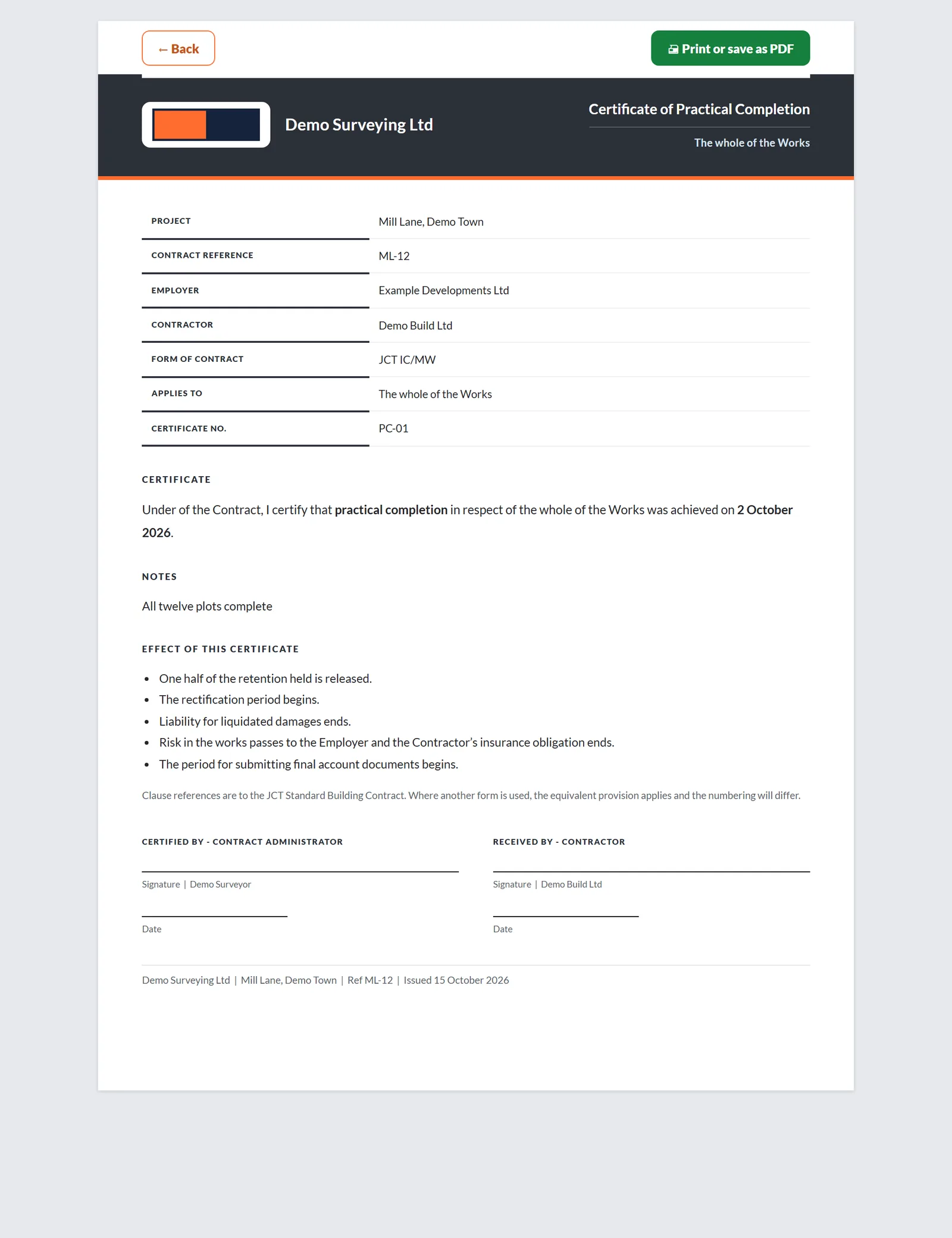
Certificate of Practical Completioncompletion
Certificate of Partial Possessionper section
Certificate of Non-Completionwhen the date is missed
Certificate of Making Goodend of defects
Schedule of Defectsat the end of rectification
Final Certificatethe last certificate
Final Accountcontract sum to balance
Final Account Agreementfor both signatures
Documents in this group8

Each certificate is issued from the completion record it belongs to, so the dates on it are the dates on the job.

Reports and documents

Cost, risk and the estimate

The reports you send upward and the ones you keep for yourself.

  • Every document opens ready to print or save as a PDF
  • Your practice name and logo at the top, never QScope branding
  • Figures come from the live record, not retyped into a template
Reports and documents
Cost, risk and the estimate
DocumentWhat it covers
Cost Reportanticipated final cost
ICMS Cost ReportICMS structure
Cost and Value Reconciliationto one cut-off
Cash Flow Forecastreceipts against payments
Risk Registerwith the allowance
Bonds, Policies and Warrantiesby expiry
Bill of Quantities or Cost planthe estimate
Order of cost estimateNRM1 group elements
Documents in this group8

The CVR stays yours and is hidden from every guest; the Cost Report is the document meant for the client.

Reports and documents

Contracts and lender monitoring

The contract documents and the reports a monitoring surveyor sends a lender.

  • Every document opens ready to print or save as a PDF
  • Your practice name and logo at the top, never QScope branding
  • Figures come from the live record, not retyped into a template
Reports and documents
Contracts and lender monitoring
DocumentWhat it covers
Contract for Workswith the client
Subcontract for Worksdown the chain
Initial appraisal reportfor the lender
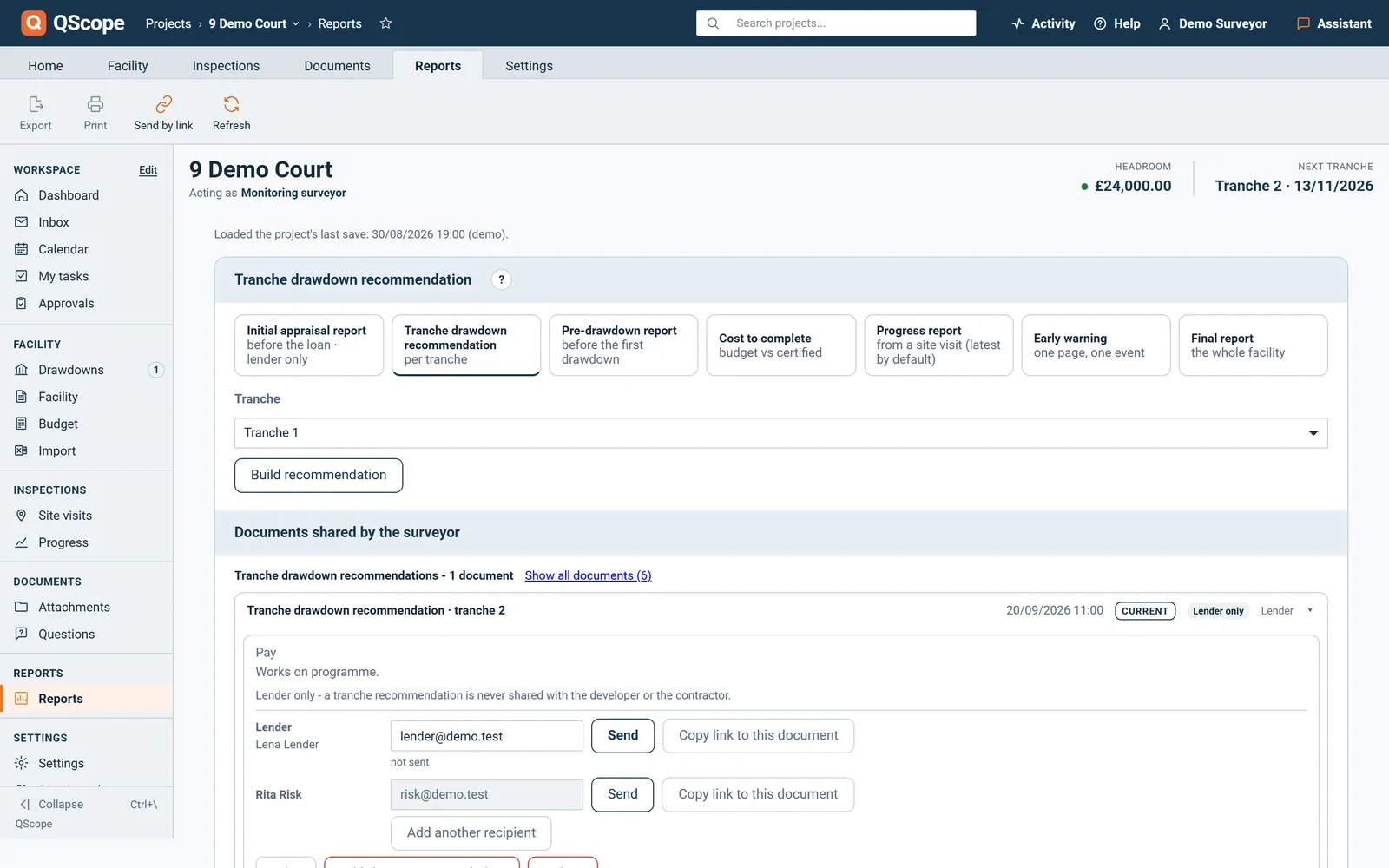
Tranche drawdown recommendationper tranche
Pre-drawdown reportbefore a drawdown
Cost to completefrom the record
Progress reporton schedule, behind or at risk
Early warningwhen it is needed
Final reportat completion
Documents in this group9

Contracts print with their acceptance record; monitoring reports print from the facility monitor with the evidence filed against each tranche.

Every other function on the Reports screen

20 functions the sections above do not cover, each as it works in the program.

Functions 1 to 10

01Choose the Report layout in Settings: A: Classic (monochrome, photocopy-safe) or B: Statement with a navy header.
02A client guest sees only the client reports: Client Summary, Valuations Summary, Cost Report, Detailed Valuation Report and Variations Report.
03Set Period from and Period to and the Client Financial Summary prints the period it covers.
04Tick the valuations to include and the Detailed Valuation Report prints one column for each.
05Save document to project freezes a monitoring report, so a document you sent never recalculates.
06If your browser blocks the print window, QScope tells you to allow pop-ups and nothing is lost.
07When the practice name is empty in both the project and your account, the Reports tab warns you before anything goes out.
08If your logo file is missing on the server, the Reports tab says so and documents print your practice name instead.
09Every document names the parties at the top: issued by, contractor, client, architect, QS, project and reference.
10The footer of every document carries your firm, the site, the reference and the date of issue.

Functions 11 to 20

11Signature and date boxes are printed for both parties, and an issued certificate carries your signature image.
12Documents for the client count issued valuations only, so a draft never reaches a printed total.
13An overpayment line appears on the Client Financial Summary only when there is an overpayment.
14Cost to complete prints only when a contract sum is set, so a missing figure is never shown as zero.
15The Pay Less Notice cites the HGCRA 1996, or the contract alone when the Act does not apply.
16If the employer has paid more than the agreed final account, the agreement states the overpayment the contractor repays.
17An issued certificate always reprints with the parties, tax name and document name it was issued with.
18A certificate with an unset rate asks before printing and carries an INCOMPLETE note on the page.
19A draft you share with the client prints marked DRAFT - NOT ISSUED.
20A variation order will not print without Instructed by and Basis of valuation.
Who it is for

One record, four reports that must agree

You are applying

You report cost against money secured

You report cost against the sum you have actually secured, and the difference between the two is the conversation with your own board.

Applying for payment
the same measurement

You are certifying

You report on figures you certified

You report to the client on a job you certify, and the report has to reconcile with the certificates you signed.

Certifying payment

You are doing both

Your record is the only report there is

You are the report: what you have applied for, what has been certified and what is still to fund, pulled from your own record.

Doing both yourself

You are reporting

You turn the record into a drawdown

You turn the project record into a drawdown recommendation, and the figures have to reconcile before the lender releases a pound.

Recommending a drawdown

The client, the architect and the tenderer are not on this list. They are the people you let in on a link: they see the one document you sent them, answer it, and that answer is written into the record. No account, no licence, no charge, on every plan.

FAQs

The questions this page raises most often, answered without a sales pitch at the end.

You choose the layout in Settings: A Classic, in black and white with totals closed by a double rule, or B Statement, with a navy header. What each document contains is fixed, because a consistent format is worth more in a client file or an adjudication bundle than a configurable one.

Layout A Classic is black and white because certificates and reports get photocopied and scanned, and a figure that is only red stops being a warning once it is grey. Deductions appear in brackets.

A client guest sees the risks and their status, but not your probability, cost or days: those are removed on the server before the page is sent.

Yes. The audit trail exports to CSV, and project data can be exported at any time, including during a trial and for 60 days after a cancellation.

From the blog

The part nobody teaches you, written down

Three pieces from the same corner of a contract as this page, answered at length and without a sales pitch at the end.

All 174 pieces

Keep reading

The three parts this page leans on

The reports you actually send

Not a report builder with forty options. Four documents a QS produces every month, each already laid out the way a client expects to receive it.

30 days free, no card.

Rather ask first? Write to help@qscope.co.uk and you will get a reply within one working day, Monday to Friday.